Module 14 Skill Assessment: Velociraptor Triage
For this assessment I exported the Velociraptor artifact results and worked through the JSON with jq. My preferred starting point was always the same: inspect one complete record, understand the available fields, and only then narrow the dataset.
I used an LLM to help shape some filters, but I deliberately avoided asking it for the answers. Direct answers would have defeated the point of the exercise. The useful part was translating my pivot logic into jq, checking the output, and tightening the filter myself.
Main notes: Module 14: Introduction to Digital Forensics Full investigation: Module 14: Practical Digital Forensics Case Study
Assessment Navigation
Workflow and questions
Velociraptor Collection Workflow
Before working through the five answers, I used Velociraptor to collect a small set of Windows artifacts from the live E-CORP client. I called them plugins in my rough notes, but Velociraptor calls them artifacts. Each one was chosen for a specific assessment question, so this was not a random bulk collection.
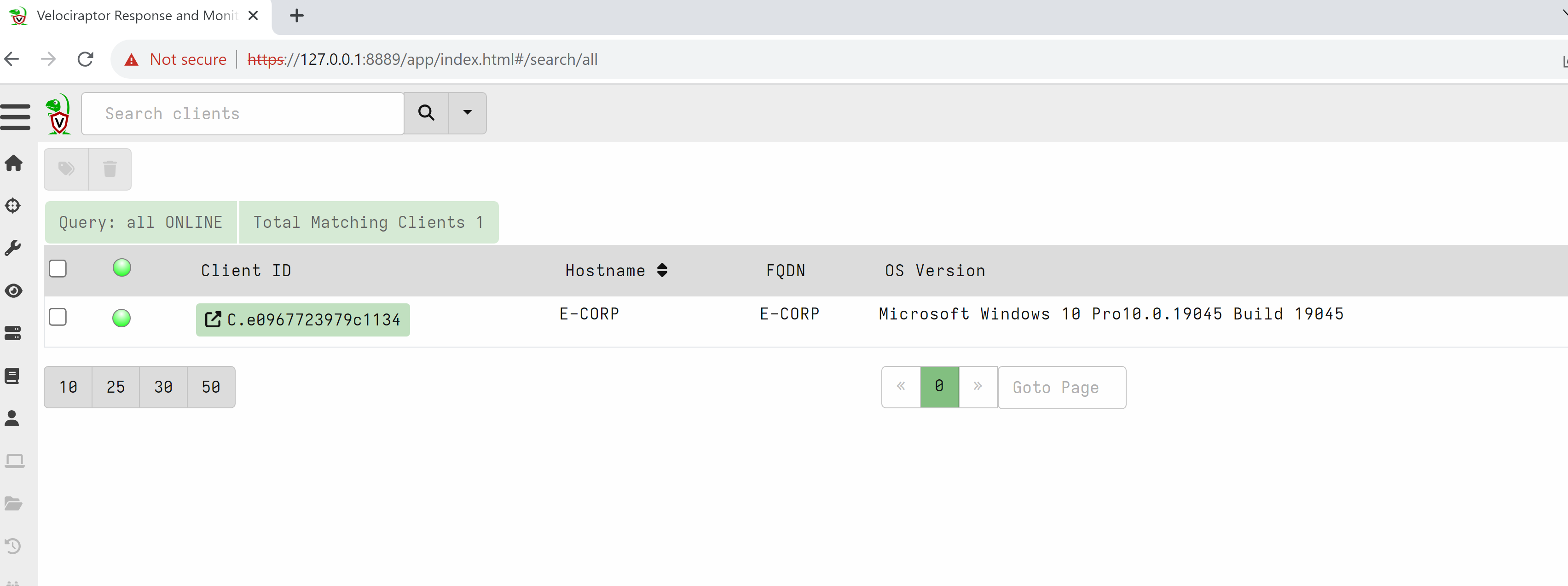
Step 1: Select the Target Client
I opened the client search, confirmed that E-CORP was online, and selected its client ID. This kept the collection tied to the correct endpoint before I launched any artifact.
Step 2: Choose Artifacts for the Five Questions
I mapped each question to the artifact most likely to contain the answer:
| Assessment pivot | Velociraptor artifact | Why I collected it |
|---|---|---|
| Private RWX memory | Windows.System.VAD |
Inspect process memory regions, permissions, mapping type, and backing files |
| Remote connection | Windows.Network.Netstat, followed by Windows.Network.NetstatEnriched |
Associate remote IP addresses and ports with processes |
| Run-key persistence | Windows.Sys.StartupItems |
Review startup extensibility points and their Registry locations |
| Mimikatz directory | Windows.Search.FileFinder |
Search targeted filesystem paths for mimi* and mimikatz* |
| Recent DOCX | Windows.Registry.RecentDocs |
Recover recently accessed document names from the user Registry |
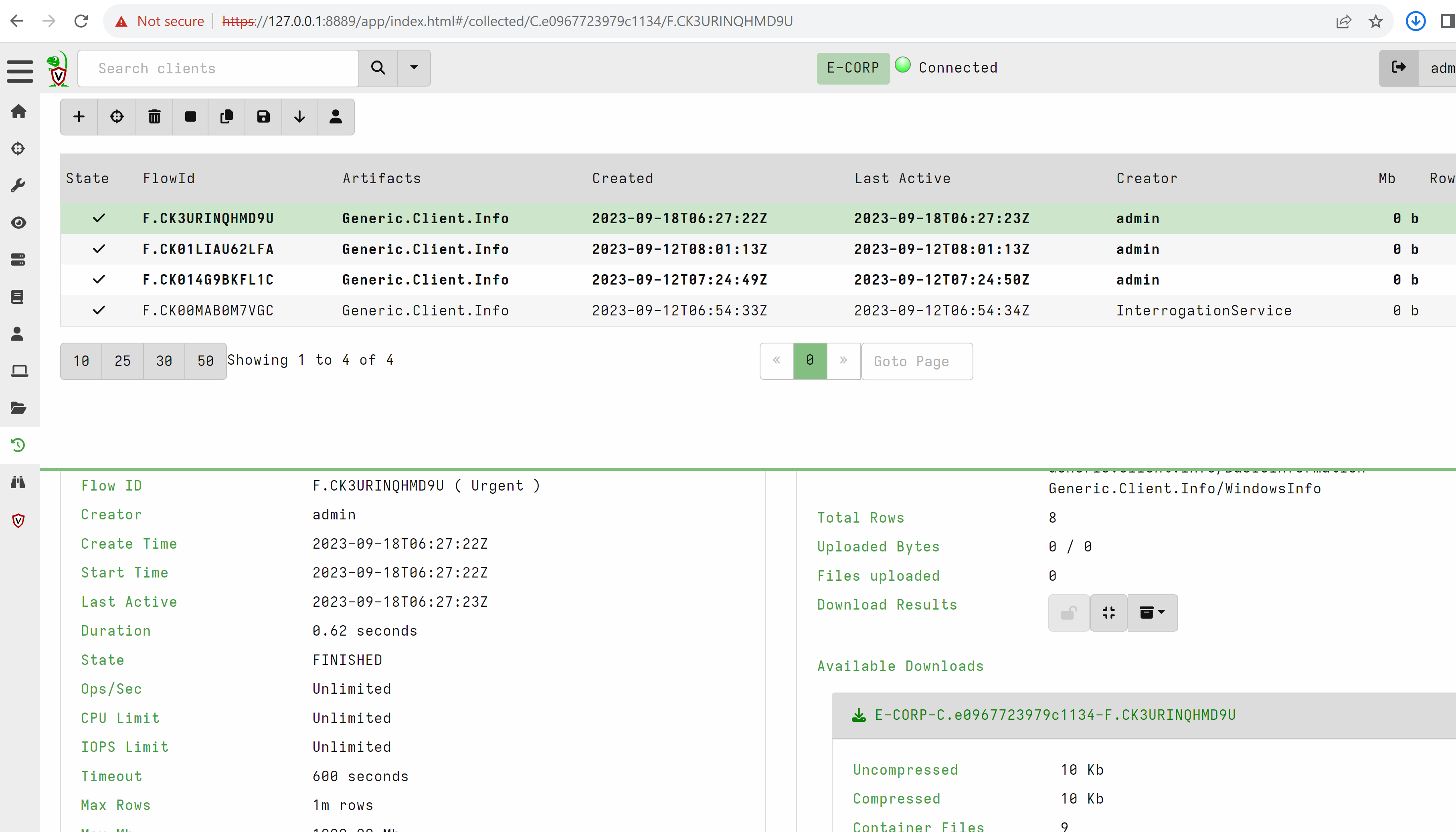
The collection history below shows the artifacts I ran. Windows.Network.Netstat was part of my first pass, but it did not expose the expected connection in this capture. I checked the Velociraptor documentation and reran that pivot with Windows.Network.NetstatEnriched, which produced the network evidence used later.

Step 3: Configure Targeted Parameters
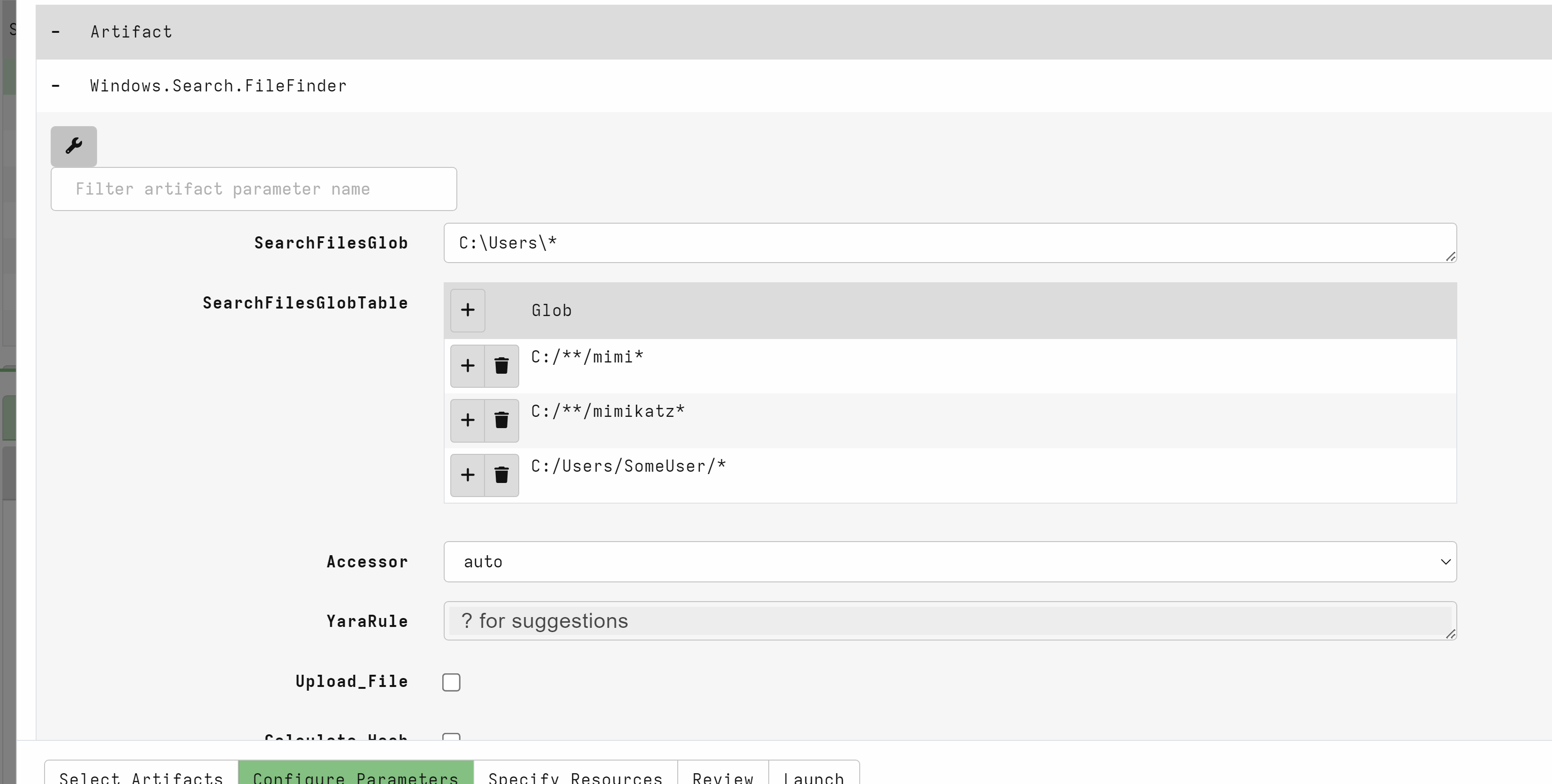
For Windows.Search.FileFinder, I searched under C:\Users\* and added focused globs for names beginning with mimi and mimikatz. I knew what family of path I was looking for, so a targeted search was faster and easier to review than exporting the entire filesystem.
Step 4: Run, Download, and Inspect the Results
After each collection finished, I opened its flow and downloaded the available result archive. I extracted the JSON files locally, inspected one complete record with jq, identified the useful fields, and only then wrote narrower filters. That order mattered because filtering before understanding the schema could easily hide the evidence I needed.
With the collection and export complete, I worked through each question as a separate evidence pivot.
Question 1: Private RWX Memory
VAD stands for Virtual Address Descriptor.
Windows uses VADs to track each process’s virtual memory regions, including:
- Start and end memory address
- Memory permissions such as
Read,Write,Execute - Whether the region is backed by a file or DLL
- Whether the region is private or mapped
I first inspected a complete VAD record so the later filters were based on fields I had actually seen.
┌──(analyst㉿kali)-[~/results]
└─# jq '.' Windows.System.VAD.json | head -n 100
{
  "ProcessCreateTime": "2026-07-24T14:04:37.007659Z",
  "Pid": 1012,
  "Name": "dwm.exe",
  "MappingName": "",
  "AddressRange": "7ffe0000-7ffe1000",
  "_Address": 2147352576,
  "State": "MEM_COMMIT",
  "Type": "MEM_PRIVATE",
  "ProtectionMsg": "PAGE_READONLY",
  "Protection": "-r-",
  "SectionSize": 4096,
  "_PathSpec": "{\"DelegateAccessor\":\"process\",\"DelegatePath\":\"1012\",\"Path\":\"2147352576\"}",
  "ProcessChain": [
    {
      "Pid": 592,
      "Ppid": 516,
      "Name": "winlogon.exe",
      "Threads": 3,
      "Username": "NT AUTHORITY\\SYSTEM",
      "OwnerSid": "S-1-5-18",
      "CommandLine": "winlogon.exe",
      "Exe": "C:\\Windows\\System32\\winlogon.exe",
      "TokenIsElevated": true,
      "CreateTime": "2026-07-24T14:04:35.3295279Z",
      "User": 0.09375,
      "System": 1.375,
      "IoCounters": {
        "ReadOperationCount": 4,
        "WriteOperationCount": 0,
        "OtherOperationCount": 842,
        "ReadTransferCount": 213928,
        "WriteTransferCount": 0,
        "OtherTransferCount": 199970
      },
      "Memory": {
        "PageFaultCount": 11206,
        "PeakWorkingSetSize": 26742784,
        "WorkingSetSize": 17883136,
        "QuotaPeakPagedPoolUsage": 208128,
        "QuotaPagedPoolUsage": 196968,
        "QuotaPeakNonPagedPoolUsage": 14640,
        "QuotaNonPagedPoolUsage": 12896,
        "PagefileUsage": 2830336,
        "PeakPagefileUsage": 3751936
      },
      "PebBaseAddress": 921827799040,
      "IsWow64": false
    },
    {
      "Pid": "1012",
      "Ppid": "592",
      "Name": "dwm.exe",
      "Threads": 14,
      "Username": "Window Manager\\DWM-1",
      "OwnerSid": "S-1-5-90-0-1",
      "CommandLine": "\"dwm.exe\"",
      "Exe": "C:\\Windows\\System32\\dwm.exe",
      "TokenIsElevated": false,
      "CreateTime": "2026-07-24T14:04:37.007659Z",
      "User": 0.546875,
      "System": 0.796875,
      "IoCounters": {
        "ReadOperationCount": 1,
        "WriteOperationCount": 0,
        "OtherOperationCount": 797,
        "ReadTransferCount": 108912,
        "WriteTransferCount": 0,
        "OtherTransferCount": 15216
      },
      "Memory": {
        "PageFaultCount": 18630,
        "PeakWorkingSetSize": 52256768,
        "WorkingSetSize": 48951296,
        "QuotaPeakPagedPoolUsage": 361288,
        "QuotaPagedPoolUsage": 352552,
        "QuotaPeakNonPagedPoolUsage": 37080,
        "QuotaNonPagedPoolUsage": 29560,
        "PagefileUsage": 22396928,
        "PeakPagefileUsage": 27049984
      },
      "PebBaseAddress": 212507525120,
      "IsWow64": false,
      "StartTime": "2026-07-24T14:04:37.007659Z",
      "EndTime": "0001-01-01T00:00:00Z"
    }
  ]
}
Step 2: Baseline Private RWX Regions
┌──(analyst㉿kali)-[~/results]
└─# jq -r 'select(.ProtectionMsg=="PAGE_EXECUTE_READWRITE" and .Type=="MEM_PRIVATE") | .Name' Windows.System.VAD.json |
sort | uniq -c | sort -nr
     17 internal.exe
     12 chrome.exe
     11 WinSW-x64.exe
      1 reverse.exe
Step 3: Investigate reverse.exe
reverse.exe combined a suspicious user-writable path, an untrusted executable, and private RWX memory. That combination justified a focused pivot.
┌──(analyst㉿kali)-[~/results]
└─# jq 'select(
  .Name=="reverse.exe" and
  .ProtectionMsg=="PAGE_EXECUTE_READWRITE" and
  .Type=="MEM_PRIVATE"
) | {
  Pid,
  Name,
  AddressRange,
  ProtectionMsg,
  Type,
  State,
  MappingName,
  ProcessCreateTime,
  Exe: .ProcessChain[-1].Exe,
  CommandLine: .ProcessChain[-1].CommandLine,
  Parent: .ProcessChain[-2].Name
}' Windows.System.VAD.json

{
  "Pid": 7832,
  "Name": "reverse.exe",
  "AddressRange": "a20000-a6e000",
  "ProtectionMsg": "PAGE_EXECUTE_READWRITE",
  "Type": "MEM_PRIVATE",
  "State": "MEM_COMMIT",
  "MappingName": "",
  "ProcessCreateTime": "2026-07-24T14:07:40.9835831Z",
  "Exe": "C:\\Users\\j0seph\\AppData\\Local\\reverse.exe",
  "CommandLine": "\"C:\\Users\\j0seph\\AppData\\Local\\reverse.exe\" ",
  "Parent": "explorer.exe"
}
Question 2: Remote Network Connection
I switched the collection to Windows.Network.NetstatEnriched. The workflow was the same, but this artifact captured the connection in my run.
┌──(analyst㉿kali)-[~/results]
└─# jq -r '
select((.DestPort // 0) != 0) |
select(
  (.DestIP // "") != "127.0.0.1" and
  (.DestIP // "") != "::1" and
  (.DestIP // "") != "0.0.0.0"
) |
[
  .Pid,
  .Name,
  .Status,
  .SrcIP,
  .SrcPort,
  .DestIP,
  .DestPort,
  .Path,
  .Username,
  (.Authenticode.Trusted // "unknown")
] | @tsv
' 'Windows.Network.NetstatEnriched%2FNetstat.json' | column -t -s $'\t'
444   svchost.exe  ESTAB  10.129.228.172  3389   10.10.15.108  51977  C:\\Windows\\System32\\svchost.exe              NT AUTHORITY\\NETWORK SERVICE  trusted
7832  reverse.exe  SENT   10.129.228.172  64104  3.19.219.4    80     C:\\Users\\j0seph\\AppData\\Local\\reverse.exe  E-CORP\\Administrator          untrusted
It:
- Removes entries with no destination port, such as listeners.
- Removes localhost traffic.
- Keeps remote network connections.
- Displays process, IP, port, executable path, user, and signature status.
- Formats the output as a clean table.
Question 3: Run-Key Persistence
┌──(analyst㉿kali)-[~/results]
└─# jq -r '
select((.OSPath // "") | test("^HKEY"; "i")) |
[.Name, .OSPath, (.Details // ""), (.Enabled // "")] |
@tsv
' Windows.Sys.StartupItems.json | column -t -s $'\t'
SecurityHealth       HKEY_LOCAL_MACHINE\\SOFTWARE\\Microsoft\\Windows\\CurrentVersion\\Run\\SecurityHealth       %windir%\\system32\\SecurityHealthSystray.exe                     disabled
VMware User Process  HKEY_LOCAL_MACHINE\\SOFTWARE\\Microsoft\\Windows\\CurrentVersion\\Run\\VMware User Process  "C:\\Program Files\\VMware\\VMware Tools\\vmtoolsd.exe" -n vmusr  disabled
reverse              HKEY_LOCAL_MACHINE\\SOFTWARE\\Microsoft\\Windows\\CurrentVersion\\Run\\reverse              C:\\Users\\j0seph\\AppData\\Local\\reverse.exe                    disabled
OneDriveSetup        HKEY_USERS\\S-1-5-19\\SOFTWARE\\Microsoft\\Windows\\CurrentVersion\\Run\\OneDriveSetup      C:\\Windows\\SysWOW64\\OneDriveSetup.exe /thfirstsetup            disabled
OneDriveSetup        HKEY_USERS\\S-1-5-20\\SOFTWARE\\Microsoft\\Windows\\CurrentVersion\\Run\\OneDriveSetup      C:\\Windows\\SysWOW64\\OneDriveSetup.exe /thfirstsetup            disabled
The suspicious entry is visible in the full list. I made the evidence easier to review by filtering for executables under user-writable paths:
┌──(analyst㉿kali)-[~/results]
└─# jq -r '
select((.OSPath // " ") | test("^HKEY"; "i")) |
select((.Details // "") | test("Users\\\\|AppData|Temp"; "i")) |
[.Name, .OSPath, .Details] |
@tsv
' Windows.Sys.StartupItems.json | column -t -s $'\t'
reverse  HKEY_LOCAL_MACHINE\\SOFTWARE\\Microsoft\\Windows\\CurrentVersion\\Run\\reverse  C:\\Users\\j0seph\\AppData\\Local\\reverse.exe
Answer: HKEY_LOCAL_MACHINE\Software\Microsoft\Windows\CurrentVersion\Run
Question 4: Mimikatz Directory
The earlier file-search artifact exposed the common Mimikatz parent directory: C:\Users\j0seph\AppData\Local\mimik.
Win32 and x64 contain only architecture-specific files, while mimik is their common parent folder.
┌──(analyst㉿kali)-[~/results]
└─# jq -r '.OSPath // empty' Windows.Search.FileFinder.json | sort -u
C:\Users\Administrator
C:\Users\All Users
C:\Users\Angela
C:\Users\Default
C:\Users\Default User
C:\Users\desktop.ini
C:\Users\j0seph
C:\Users\j0seph\AppData\Local\mimik
C:\Users\j0seph\AppData\Local\mimik\mimicom.idl
C:\Users\j0seph\AppData\Local\mimik\Win32\mimidrv.sys
C:\Users\j0seph\AppData\Local\mimik\Win32\mimikatz.exe
C:\Users\j0seph\AppData\Local\mimik\Win32\mimilib.dll
C:\Users\j0seph\AppData\Local\mimik\Win32\mimilove.exe
C:\Users\j0seph\AppData\Local\mimik\Win32\mimispool.dll
C:\Users\j0seph\AppData\Local\mimik\x64\mimidrv.sys
C:\Users\j0seph\AppData\Local\mimik\x64\mimikatz.exe
C:\Users\j0seph\AppData\Local\mimik\x64\mimilib.dll
C:\Users\j0seph\AppData\Local\mimik\x64\mimispool.dll
C:\Users\Public
A full artifact export and filesystem search could answer the same question, but targeted triage artifacts are faster when the investigation already has a specific objective.
Question 5: Recently Accessed DOCX
I used the RecentDocs Registry artifact. Windows.Forensics.Lnk provides another useful route for corroborating recent file access.
┌──(analyst㉿kali)-[~/results]
└─# jq -r '.Username // empty' Windows.Registry.RecentDocs.json | sort -u
Administrator
Angela
j0seph
┌──(analyst㉿kali)-[~/results]
└─# jq 'select(.Username=="j0seph")' Windows.Registry.RecentDocs.json
{
  "LastWriteTime": "2023-09-08T13:21:37Z",
  "Type": "RecentDocs",
  "MruEntries": [
    "10 := The Internet",
    "1 := kglcheck/",
    "6 := Washington Leak",
    "9 := goal.XLSX",
    "8 := initiative.MSG",
    "7 := insurance.DOCX",
    "5 := resource.EML",
    "4 := notification.txt",
    "3 := internal_service",
    "2 := WinSW-x64.err.log",
    "0 := Reports"
  ],
  "Key": "\\SOFTWARE\\Microsoft\\Windows\\CurrentVersion\\Explorer\\RecentDocs\\MRUListEx",
  "HiveName": "C:\\Users\\j0seph\\NTUSER.DAT",
  "Username": "j0seph",
  "UUID": "S-1-5-21-1019847786-291584978-2158772757-1000"
}
{
  "LastWriteTime": "2023-09-06T18:46:41Z",
  "Type": ".DOCX",
  "MruEntries": [
    "0 := insurance.DOCX"
  ],
  "Key": "\\SOFTWARE\\Microsoft\\Windows\\CurrentVersion\\Explorer\\RecentDocs\\.DOCX\\MRUListEx",
  "HiveName": "C:\\Users\\j0seph\\NTUSER.DAT",
  "Username": "j0seph",
  "UUID": "S-1-5-21-1019847786-291584978-2158772757-1000"
}
{
  "LastWriteTime": "2023-09-06T18:46:37Z",
  "Type": ".EML",
  "MruEntries": [
    "0 := resource.EML"
  ],
  "Key": "\\SOFTWARE\\Microsoft\\Windows\\CurrentVersion\\Explorer\\RecentDocs\\.EML\\MRUListEx",
  "HiveName": "C:\\Users\\j0seph\\NTUSER.DAT",
  "Username": "j0seph",
  "UUID": "S-1-5-21-1019847786-291584978-2158772757-1000"
}
{
  "LastWriteTime": "2023-09-03T21:56:27Z",
  "Type": ".log",
  "MruEntries": [
    "0 := WinSW-x64.err.log"
  ],
  "Key": "\\SOFTWARE\\Microsoft\\Windows\\CurrentVersion\\Explorer\\RecentDocs\\.log\\MRUListEx",
  "HiveName": "C:\\Users\\j0seph\\NTUSER.DAT",
  "Username": "j0seph",
  "UUID": "S-1-5-21-1019847786-291584978-2158772757-1000"
}
{
  "LastWriteTime": "2023-09-06T18:46:47Z",
  "Type": ".MSG",
  "MruEntries": [
    "0 := initiative.MSG"
  ],
  "Key": "\\SOFTWARE\\Microsoft\\Windows\\CurrentVersion\\Explorer\\RecentDocs\\.MSG\\MRUListEx",
  "HiveName": "C:\\Users\\j0seph\\NTUSER.DAT",
  "Username": "j0seph",
  "UUID": "S-1-5-21-1019847786-291584978-2158772757-1000"
}
{
  "LastWriteTime": "2023-09-06T18:40:36Z",
  "Type": ".txt",
  "MruEntries": [
    "0 := notification.txt"
  ],
  "Key": "\\SOFTWARE\\Microsoft\\Windows\\CurrentVersion\\Explorer\\RecentDocs\\.txt\\MRUListEx",
  "HiveName": "C:\\Users\\j0seph\\NTUSER.DAT",
  "Username": "j0seph",
  "UUID": "S-1-5-21-1019847786-291584978-2158772757-1000"
}
{
  "LastWriteTime": "2023-09-06T18:46:51Z",
  "Type": ".XLSX",
  "MruEntries": [
    "0 := goal.XLSX"
  ],
  "Key": "\\SOFTWARE\\Microsoft\\Windows\\CurrentVersion\\Explorer\\RecentDocs\\.XLSX\\MRUListEx",
  "HiveName": "C:\\Users\\j0seph\\NTUSER.DAT",
  "Username": "j0seph",
  "UUID": "S-1-5-21-1019847786-291584978-2158772757-1000"
}
{
  "LastWriteTime": "2023-09-08T13:21:37Z",
  "Type": "Folder",
  "MruEntries": [
    "2 := The Internet",
    "1 := Washington Leak",
    "0 := internal_service"
  ],
  "Key": "\\SOFTWARE\\Microsoft\\Windows\\CurrentVersion\\Explorer\\RecentDocs\\Folder\\MRUListEx",
  "HiveName": "C:\\Users\\j0seph\\NTUSER.DAT",
  "Username": "j0seph",
  "UUID": "S-1-5-21-1019847786-291584978-2158772757-1000"
}
Answer: insurance.DOCX appears as the recent .DOCX entry for j0seph.
Assessment Takeaway
Velociraptor made collection fast, but jq made the evidence understandable. The reliable workflow was:
- Inspect a full JSON object.
- Identify the fields that answer the forensic question.
- Filter cautiously and retain context such as path, user, signature status, and parent process.
- Treat suspicious permissions or names as leads.
- Corroborate the lead with another artifact whenever possible.
The important result was the pivot chain, not merely the five answers.
Continue to: Module 15: Security Incident Reporting