Module 14: Introduction to Digital Forensics
Module 14 was fine except for a few parts where the information was not exact for specific artifacts, for example Shimcache and Amcache being strongly described as execution artifacts. The practical scenario section was also too crowded and easy to get overwhelmed by. If they had split that section up and tried to cover less but more effectively it would have been great, but anyways it was fine.
I revamped these notes with AI and kept the distinction wherever I was not convinced. Shimcache and Amcache can support file presence, for example, but they should not be promoted to definitive execution evidence. Prefetch is much stronger for execution, while LNK files, Jump Lists, ShellBags, the USN Journal, Registry data, memory, and event logs each answer a different part of the investigation. Most of the images are exactly the ones I followed, and I used the ones I felt were clearer and easier for me to reference later.
Lab scope: Every path, host, memory image, disk image, credential, IP address, and answer on these pages comes from the isolated HTB Academy module environment.
Back to Module 13: Module 13: JavaScript Deobfuscation
Module 14 Navigation
On this page
Digital forensics is a specialized branch of cybersecurity focused on the collection, preservation, analysis, and presentation of digital evidence. Its primary goal is to reconstruct timelines and uncover the truth behind cyber incidents, providing evidence that is legally admissible for court or regulatory proceedings. To ensure this admissibility, evidence like logs and files are meticulously hashed, timestamped, and managed through a strict chain of custody to prevent any alterations.
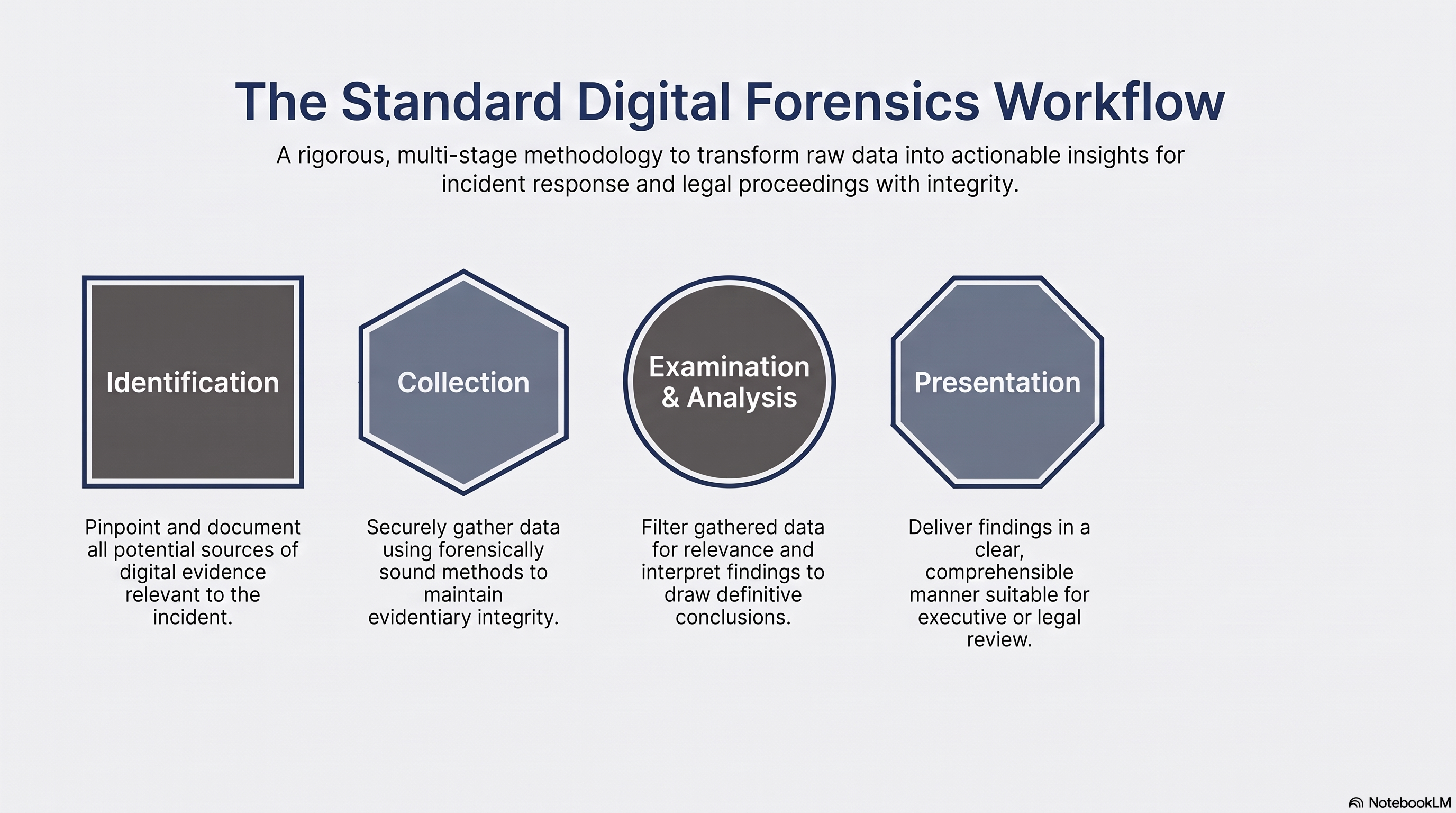
The investigation follows a structured workflow to ensure all data is handled correctly:
- The Forensic Process: Investigations move through five key stages: Identification of evidence sources, Collection using sound methods, Examination, Analysis to draw conclusions, and Presentation of the findings.
- Core Technical Steps: In practice, this includes creating a forensic image, documenting the system’s state, performing timeline analysis, and identifying Indicators of Compromise (IoCs).
Within a Security Operations Center (SOC), digital forensics shifts from a reactive to a proactive tool. It provides a detailed post-mortem of incidents, allowing analysts to understand an attacker’s motives and methods to better fix vulnerabilities. Beyond just identifying what happened, it enables rapid incident response by pinpointing the exact moment of a breach to contain threats faster. Finally, by leveraging Tactics, Techniques, and Procedures (TTPs) from past cases, SOC teams can proactively hunt for hidden threats and foster a culture of continuous learning and improvement.
Windows Forensics Overview
I supplemented the course material where the execution guidance was outdated. The most important correction is that Shimcache and Amcache support file presence. On modern Windows, they do not by themselves prove execution.
1. NTFS Fundamentals
Master File Table
The $MFT stores metadata for every file and directory on an NTFS volume, including names, timestamps, permissions, size, and disk location.
When a file is deleted, its MFT entry and disk space are marked available for reuse. The data may remain recoverable until overwritten.
USN Journal
The $UsnJrnl records file-system changes such as file creation, deletion, modification, movement, and renaming.
It is useful for building timelines and identifying activity involving files that no longer exist. Tools such as MFTECmd can parse the MFT and USN Journal into CSV output.
MACB Timestamps
| Timestamp | Meaning |
|---|---|
| Modified | File content changed |
| Accessed | File was accessed |
| Changed | MFT metadata changed |
| Birth | File was created |
The Changed timestamp is a metadata-change timestamp, not a creation timestamp.
Unallocated Space and File Slack
Unallocated space contains deleted files or fragments that are no longer assigned to active files.
File slack is unused space between the end of a file and the end of its final allocated cluster.
File Signatures
File signatures identify a file by its internal header instead of its extension. They help detect renamed or disguised files.
Alternate Data Streams
NTFS Alternate Data Streams allow additional data to be stored behind a normal file.
Example:
document.txt:hidden.exe
Attackers may use ADS to hide scripts, executables, or configuration data.
Volume Shadow Copies
Volume Shadow Copies are point-in-time snapshots that may contain older files, registry hives, event logs, and deleted evidence.
Windows Event Logs: Various Windows event logs, such as the Security, Application, and System logs, record events related to program execution, including process creation and termination, application crashes, and more.
2. Windows Registry
System hives are stored under:
C:\Windows\System32\Config
Important hives include SYSTEM, SOFTWARE, SAM, SECURITY, and DEFAULT.
User activity is mainly stored in:
-
NTUSER.DAT -
UsrClass.dat
Registry transaction logs such as .LOG1, .LOG2, and .regtrans-ms may contain changes not yet written to the main hive.
Deleted registry keys and values may remain recoverable in unallocated registry cells until overwritten.
Only registry keys have Last Write timestamps. Individual values do not have timestamps.
Registry Explorer is useful for manual analysis, while RECmd can parse multiple artifacts into CSV or JSON.
3. File Presence Artifacts
Shimcache
Location:
HKLM\SYSTEM\<ControlSet>\Control\Session Manager\AppCompatCache
Shimcache may record an executable’s path, size, and last modification timestamp.
It proves that Windows encountered the file, but it does not reliably prove execution on Windows 10 or 11.
Entries may remain after the file is deleted. Files can also enter Shimcache when a folder is viewed.
Amcache
Location:
C:\Windows\appcompat\Programs\Amcache.hve
Amcache may contain:
-
File path
-
File size
-
Publisher
-
Compilation timestamp
-
SHA-1-based File ID
-
Driver information
Amcache records file inventory and presence, not definitive execution.
The File ID may contain four leading zeros that must be removed before comparing the SHA-1 value.
For large files, Amcache may hash only the first 30 MB.
4. Evidence of Execution
Prefetch
Location:
C:\Windows\Prefetch
Prefetch files may contain:
-
Executable name
-
Path-based hash
-
Run count
-
Up to eight recent execution times
-
Referenced files and directories
-
Volume information
A valid Prefetch file is strong evidence that the executable ran.
Prefetch is normally enabled on Windows desktop systems but disabled by default on Windows Server.
Absence of Prefetch does not prove that execution did not occur.
UserAssist
Location:
HKCU\Software\Microsoft\Windows\CurrentVersion\Explorer\UserAssist
UserAssist records GUI-based program and shortcut launches. It may include run count, focus count, focus duration, and last execution time.
Value names are encoded using ROT13.
It mainly records interactive GUI launches, not command-line tools, services, or scheduled tasks.
MUICache
Location:
UsrClass.dat\Software\Classes\Local Settings\Software\Microsoft\Windows\Shell\MuiCache
MUICache stores application-friendly names and company metadata taken from the executable.
It can reveal the original metadata of malware renamed to look legitimate.
MUICache has no reliable execution timestamp and should not be treated as definitive execution evidence.
SRUM
Location:
C:\Windows\System32\sru\SRUDB.dat
SRUM stores approximately 30 to 60 days of system resource activity.
It may show:
-
Application activity
-
User SID
-
CPU usage
-
Application end time
-
Bytes sent and received
-
Network interface used
SRUM is useful for connecting a process to a user and identifying network activity.
5. ShellBags
ShellBags are mainly stored in UsrClass.dat and NTUSER.DAT.
They record folders viewed through Windows Explorer, including local directories, network shares, and removable drives.
ShellBags can remain after the original folder is deleted.
They prove folder navigation, not file opening or execution.
ZIP files may appear because Windows Explorer treats them as folders.
6. User File Interaction
LNK Files
Location:
%APPDATA%\Microsoft\Windows\Recent
LNK files are commonly created when a user opens a file through the Windows shell.
They may contain:
-
Target path
-
Target timestamps
-
Target size
-
Volume serial number
-
Volume label
-
Hostname
-
Network path
-
Removable-device information
LNK files may remain after the original target is deleted.
Jump Lists
Locations:
%APPDATA%\Microsoft\Windows\Recent\AutomaticDestinations
%APPDATA%\Microsoft\Windows\Recent\CustomDestinations
Jump Lists connect recently used or pinned files with a specific application.
They may contain target paths, timestamps, access counts, volume details, and embedded LNK records.
RunMRU
Location:
HKCU\Software\Microsoft\Windows\CurrentVersion\Explorer\RunMRU
RunMRU records commands entered through the Win + R dialog.
Values are stored as letters such as a, b, and c. The MRUList value stores their relative order.
RunMRU proves the command was entered, not that it completed successfully.
7. Persistence
Run Keys
Per-user locations:
HKCU\Software\Microsoft\Windows\CurrentVersion\Run
HKCU\Software\Microsoft\Windows\CurrentVersion\RunOnce
System-wide locations:
HKLM\Software\Microsoft\Windows\CurrentVersion\Run
HKLM\Software\Microsoft\Windows\CurrentVersion\RunOnce
Run keys execute during logon. RunOnce entries are intended to execute once and then be removed.
Scheduled Tasks
Task files are stored under:
C:\Windows\System32\Tasks
Important information includes the task trigger, user account, executable path, arguments, and working directory.
Scheduled-task configuration proves persistence setup, not successful execution.
Services
Location:
HKLM\SYSTEM\CurrentControlSet\Services
Important fields include ImagePath, start type, service account, and service name.
Service creation or modification should be correlated with Service Control Manager events and process-creation evidence.
8. USB Forensics
Important locations:
| Artifact | Location |
|---|---|
| VID and PID | SYSTEM\CurrentControlSet\Enum\USB |
| Storage device details | SYSTEM\CurrentControlSet\Enum\USBSTOR |
| Drive-letter mapping | SYSTEM\MountedDevices |
| Volume name | SOFTWARE\Microsoft\Windows Portable Devices\Devices |
| Installation log | C:\Windows\inf\setupapi.dev.log |
| User attribution | NTUSER.DAT\Software\Microsoft\Windows\CurrentVersion\Explorer\MountPoints2 |
USBSTOR provides manufacturer, product, revision, and serial-number information.
SetupAPI records when Windows first installed the device.
MountedDevices connects the device or volume to a drive letter and Volume GUID.
To identify the user who mounted the USB:
-
Find the device serial number in USBSTOR.
-
Match it in MountedDevices.
-
Extract the Volume GUID.
-
Search each user’s MountPoints2 for that GUID.
9. Network Artifacts
TCP/IP Interfaces
Location:
HKLM\SYSTEM\CurrentControlSet\Services\Tcpip\Parameters\Interfaces\<GUID>
May contain:
-
IP address
-
Subnet mask
-
Gateway
-
DHCP information
-
DNS servers
-
Domain information
Network List Profiles
Location:
HKLM\SOFTWARE\Microsoft\Windows NT\CurrentVersion\NetworkList
May contain:
-
Wired or wireless network name
-
SSID
-
Gateway MAC address
-
First connection time
-
Last connection time
These artifacts help identify networks previously used by the system.
10. Additional Artifacts
Browser Artifacts
Browser databases may contain history, downloads, cookies, cache, autofill data, saved passwords, and session information.
Thumbnail Cache
thumbcache.db files store previews of images and documents.
A thumbnail may prove that Windows generated a preview, but not necessarily that the user opened the file.
Recycle Bin
Location:
C:\$Recycle.Bin\<User SID>
$I files contain the original path, size, and deletion time.
$R files contain the deleted file data.
Artifact Correlation Reference
| Question | Useful artifacts |
|---|---|
| Did the file exist? | MFT, USN Journal, Shimcache, Amcache |
| Was it deleted? | MFT, USN Journal, Recycle Bin |
| Did it execute? | Prefetch, UserAssist, SRUM, Event ID |
| Was a file opened? | LNK files, Jump Lists |
| Was a folder viewed? | ShellBags |
| Was persistence configured? | Run keys, tasks, services |
| Was a USB connected? | USBSTOR, SetupAPI, MountedDevices |
| Which user mounted it? | MountedDevices and MountPoints2 |
| Did an application use the network? | SRUM and network logs |
Always correlate multiple artifacts. Each artifact proves only a specific part of the activity.
Evidence Acquisition and Host-Based Evidence
Creating a Forensic Image with FTK Imager
- Select
File→Create Disk Image. - Select the media source:
Physical DriveorLogical Drive. - Specify the image destination.
- Select the required image type.
- Enter the evidence details.
- Choose the destination folder and filename, then set compression if required.
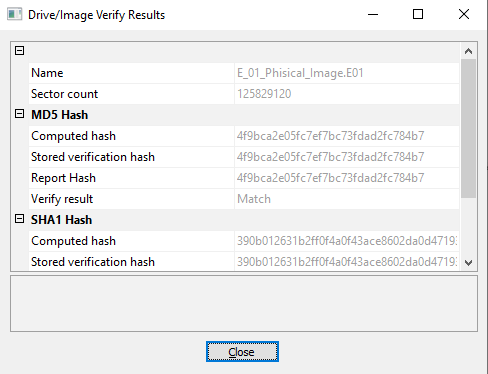
- Start the acquisition. If verification was selected, FTK Imager validates the completed image and displays the result.
Example 2: Mounting a Disk Image with Arsenal Image Mounter
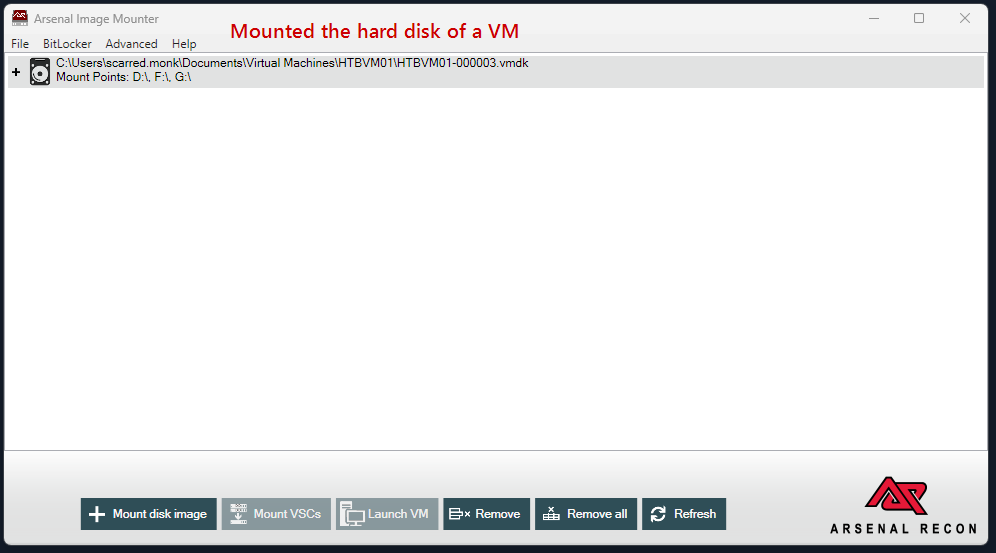
Mounting the image makes later artifact extraction much easier while retaining a controlled forensic workflow.
- Launch Arsenal Image Mounter with administrative rights.
- Click
Mount disk image. - Navigate to the
.VMDKfile and select it. - Allow Arsenal Image Mounter to analyze the VMDK.
- Choose the mount mode required by the investigation.
- For forensic examination, mount the image read-only to preserve the evidence state.
-
The image then appears as a normal drive that can be navigated with forensic tools.
Volatile and Non-Volatile Host Evidence
Modern operating systems, with Microsoft Windows being a prime example, generate a plethora of evidence artifacts. These can arise from application execution, file modifications, or even the creation of user accounts. Each of these actions leaves behind a trail, providing invaluable insights for incident response analysts.
Evidence on a host system varies in its nature. The term volatility refers to the persistence of data on a host system, with volatile data being information that disappears after events such as logoffs or power shutdowns. One crucial type of volatile evidence is the system’s active memory. During investigations, especially those concerning malware infections, this live system memory becomes indispensable. Malware often leaves traces within system memory, and losing this evidence can hinder an analyst’s investigation. To capture memory, tools like FTK Imager are commonly employed.
Some other memory acquisition solutions are:
- WinPmem: WinPmem has been the default open source memory acquisition driver for windows for a long time. It used to live in the Rekall project, but has recently been separated into its own repository.
- DumpIt: A simplistic utility that generates a physical memory dump of Windows and Linux machines. On Windows, it concatenates 32-bit and 64-bit system physical memory into a single output file, making it extremely easy to use.
- MemDump: MemDump is a free, straightforward command-line utility that enables us to capture the contents of a system’s RAM. It’s quite beneficial in forensics investigations or when analyzing a system for malicious activity. Its simplicity and ease of use make it a popular choice for memory acquisition.
- Belkasoft RAM Capturer: This is another powerful tool we can use for memory acquisition, provided free of charge by Belkasoft. It can capture the RAM of a running Windows computer, even if there’s active anti-debugging or anti-dumping protection. This makes it a highly effective tool for extracting as much data as possible during a live forensics investigation.
- Magnet RAM Capture: Developed by Magnet Forensics, this tool provides a free and simple way to capture the volatile memory of a system.
- LiME (Linux Memory Extractor): LiME is a Loadable Kernel Module (LKM) which allows the acquisition of volatile memory. LiME is unique in that it’s designed to be transparent to the target system, evading many common anti-forensic measures.
Example : WinPmem
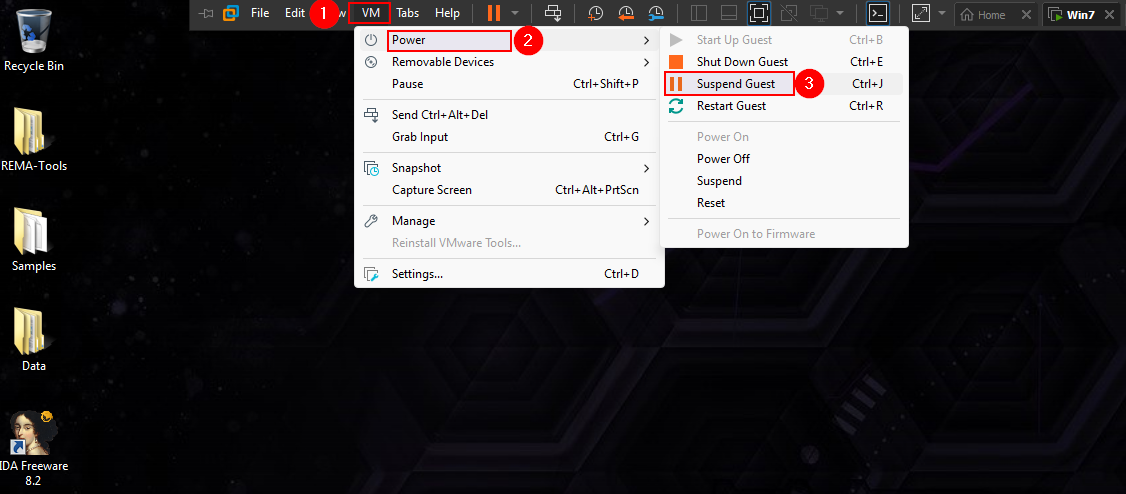
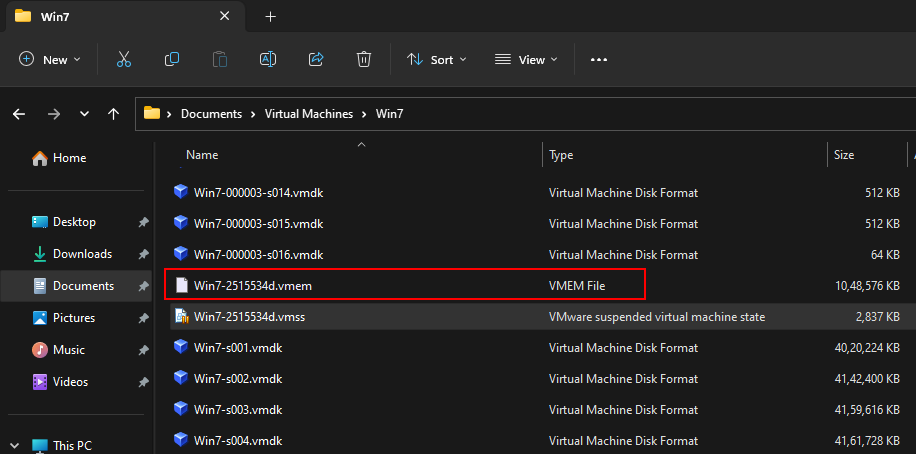
Example 2 : Acquire the vm memory
Usage
C:\Users\X\Downloads> winpmem_mini_x64_rc2.exe memdump.raw
Open vm options suspend
locate vmem file
Non-volatile evidence remains on disk and includes:
- Registry
- Windows Event Log
- System-related artifacts (e.g., Prefetch, Amcache)
- Application-specific artifacts (e.g., IIS logs, Browser history)
Rapid Triage
Rapid triage collects high-value forensic artifacts from potentially compromised systems and centralizes them for faster analysis. This helps analysts quickly identify systems that require deeper investigation and reconstruct attacker activity.
KAPE (Kroll Artifact Parser and Extractor) is a widely used Windows forensic triage tool. It can quickly collect and parse artifacts from a live system or mounted forensic image, such as the D:\ drive mounted using Arsenal Image Mounter.
KAPE works in two stages:
-
Targets: Collect specific forensic files and artifacts.
-
Modules: Run parsing tools against the collected data.
This allows analysts to rapidly extract useful evidence without manually searching the entire disk.
The collection flow is shown below.
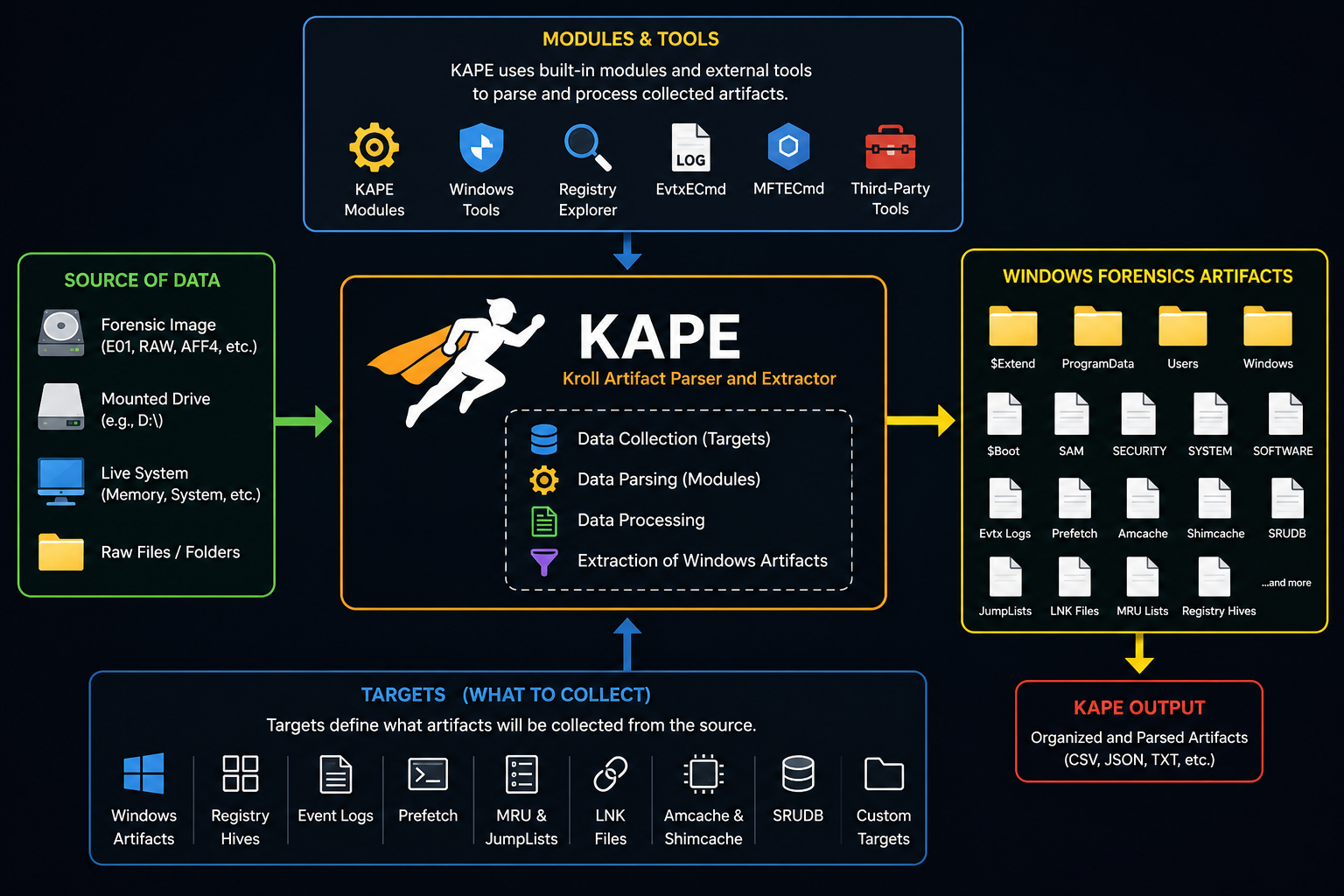
The key is selecting the correct target configuration for the artifacts the investigation actually needs.
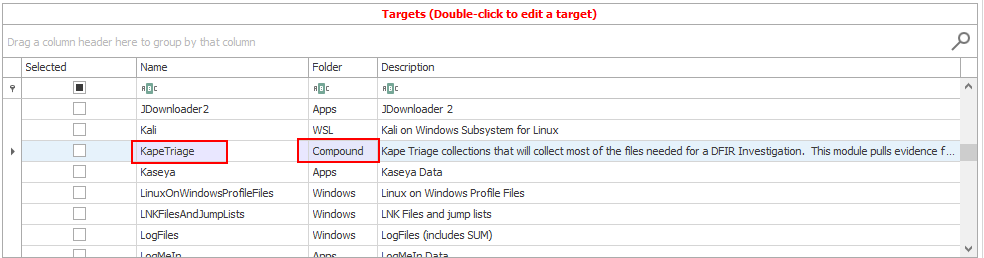
KAPE’s target files have a .tkape extension
Example RegistryHivesSystem.tkape contains the masks associated with system-related registry hives and location
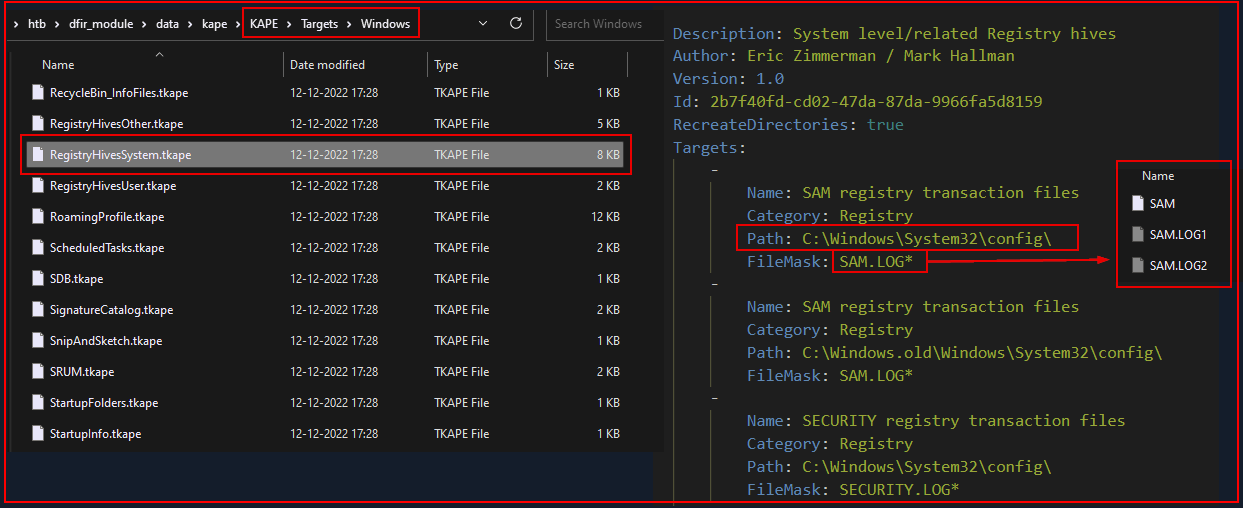
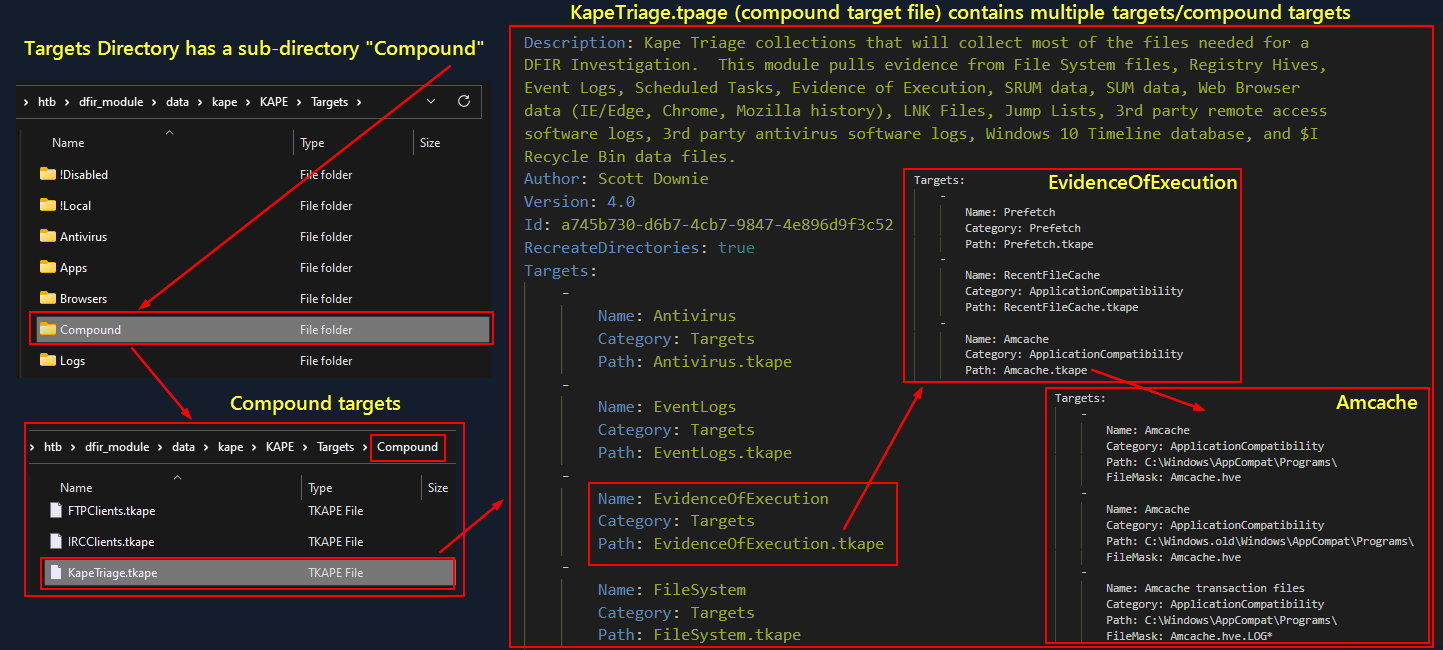
KAPE also offers Compound Targets, which are essentially amalgamations of multiple targets.
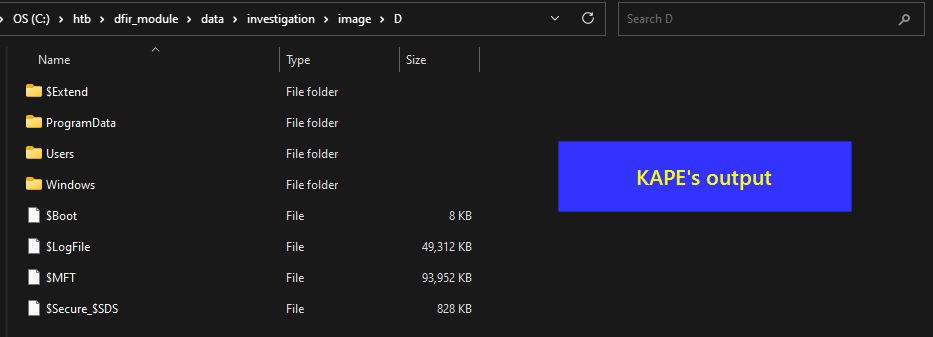
With only a Target selected, KAPE collects and copies the artifacts to the destination folder.
It does not parse them.
Target = collect/copy Module = parse/process
 For remote collection at scale, Velociraptor provides an endpoint visibility and collection workflow.
Velociraptor is a potent tool for gathering host-based information using Velociraptor Query Language (VQL) queries. Beyond this, Velociraptor can execute Hunts to amass various artifacts.
Kape target files can be also utilized by velociraptor one being Windows.KapeFiles.Targets Kape is not open source but its file collection logic, encoded in YAML, is accessible via the KapeFiles project. This approach is a staple in Rapid Triage.
The following screenshots show the flow after creating a new hunt.
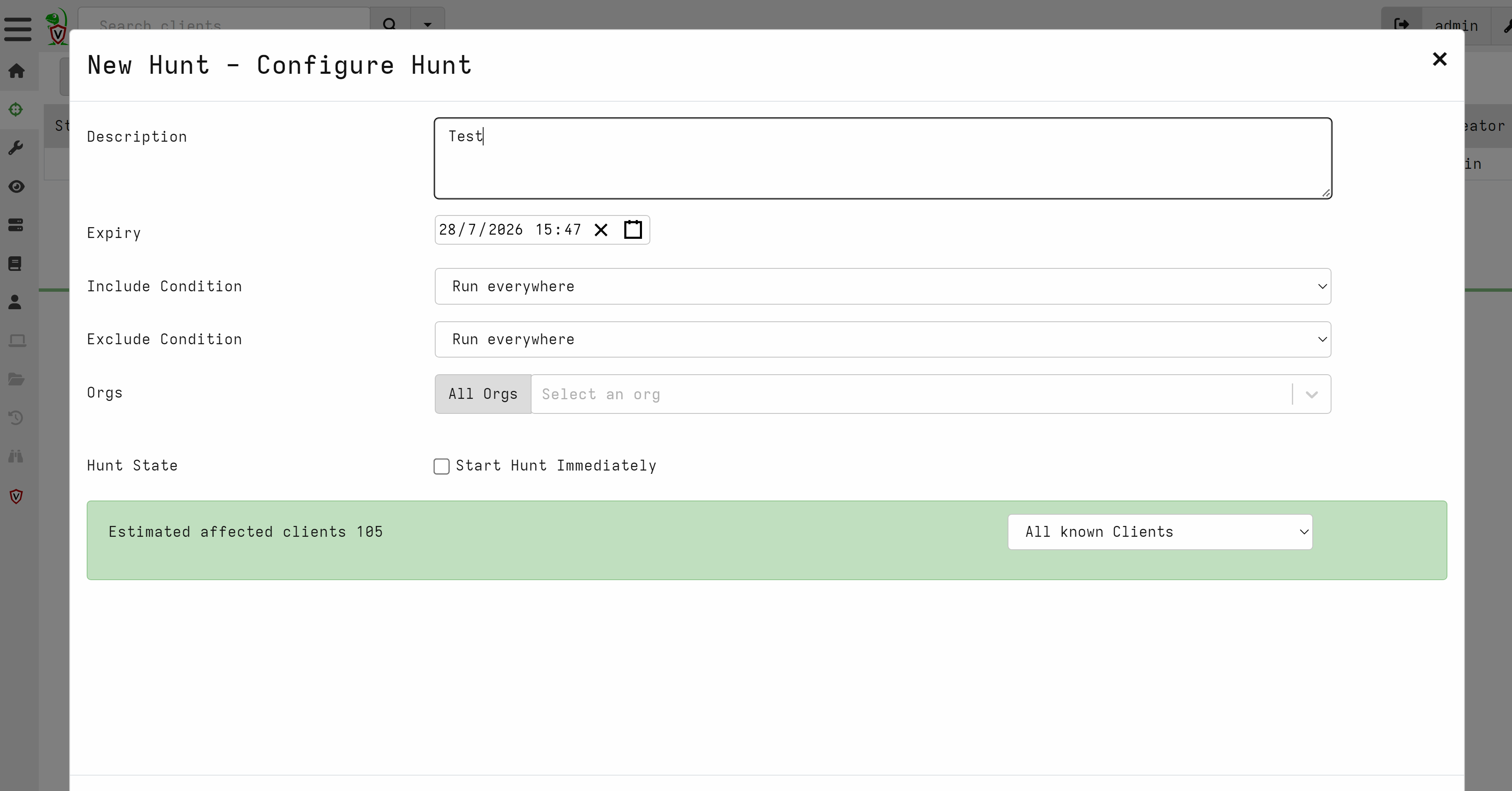
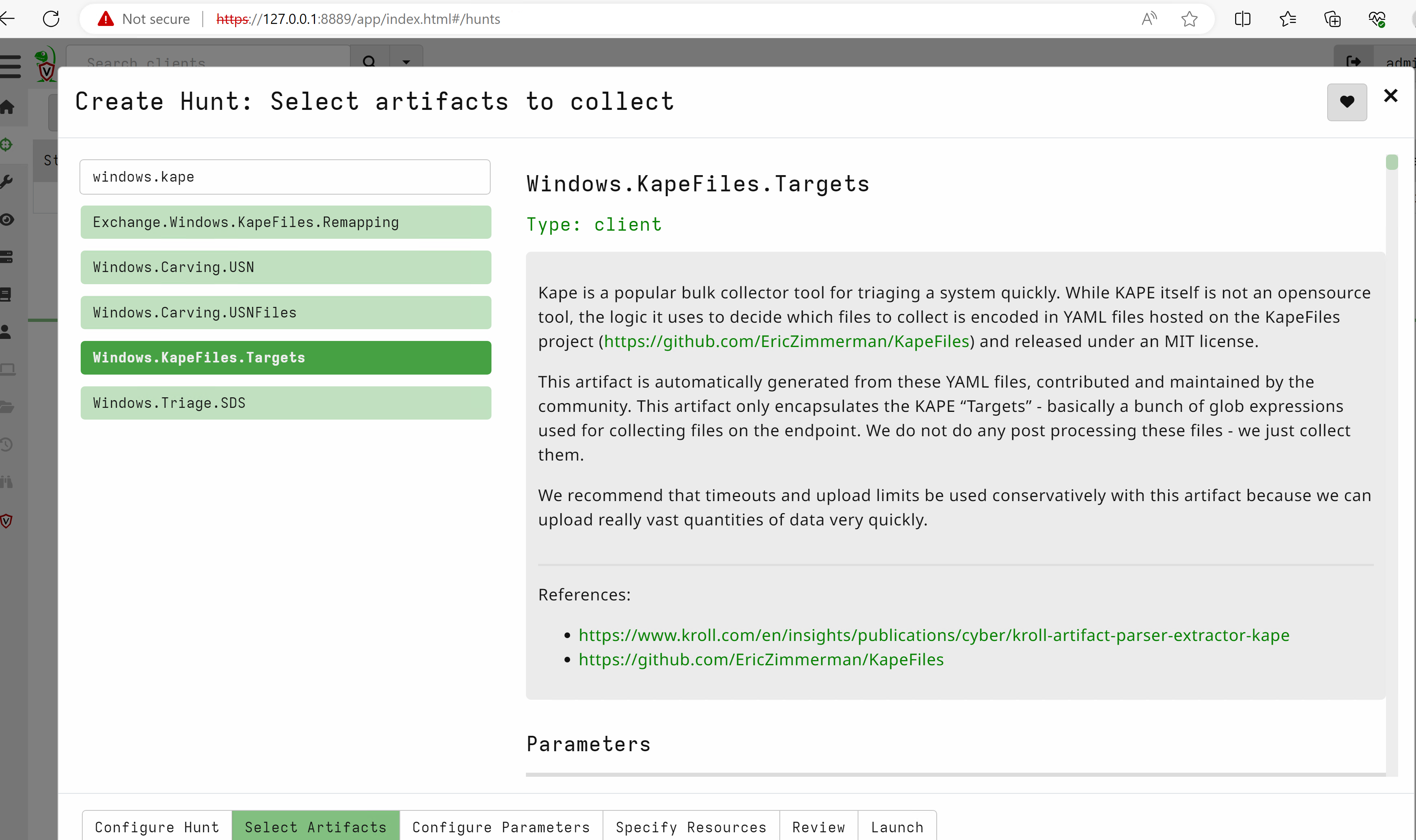
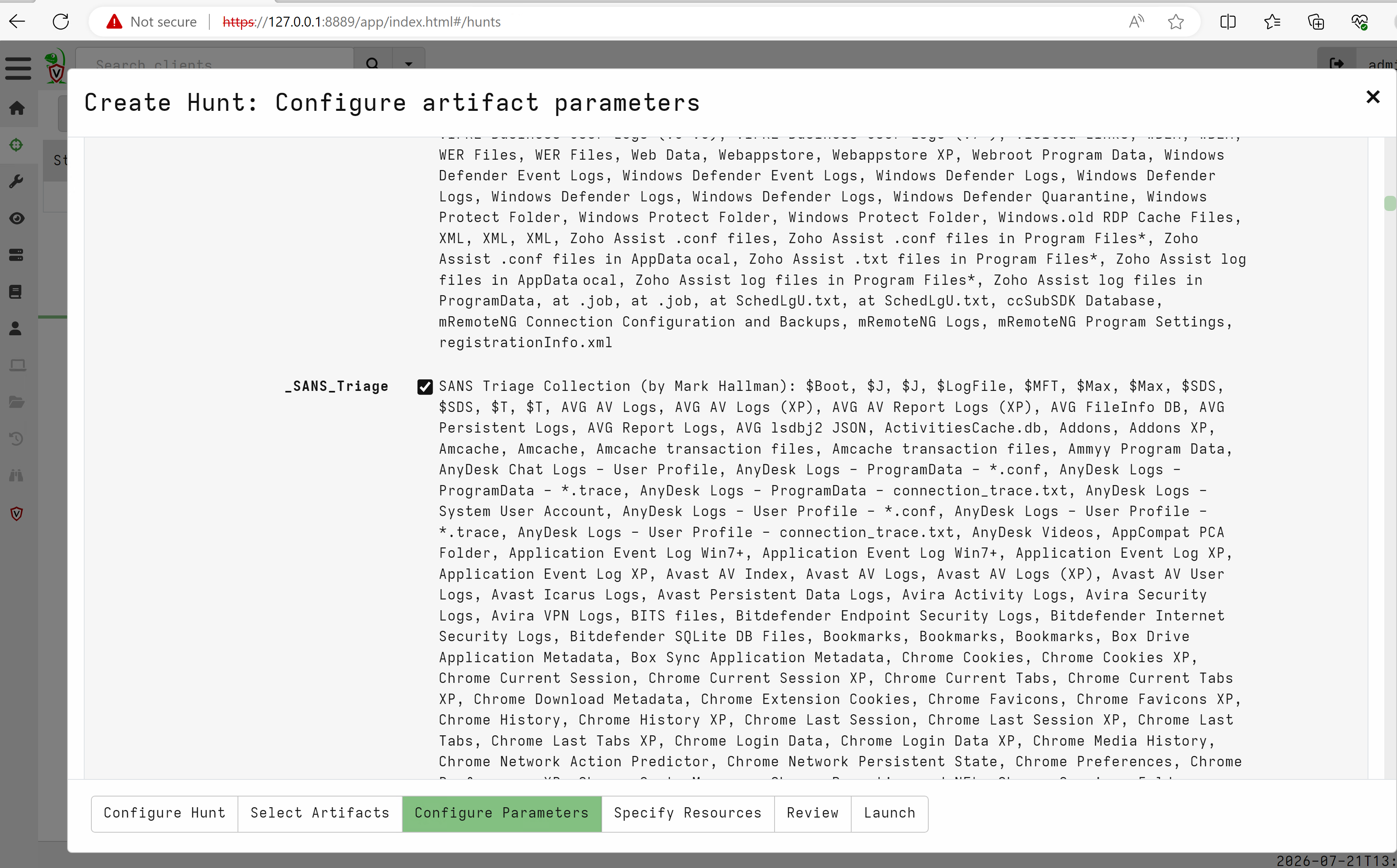
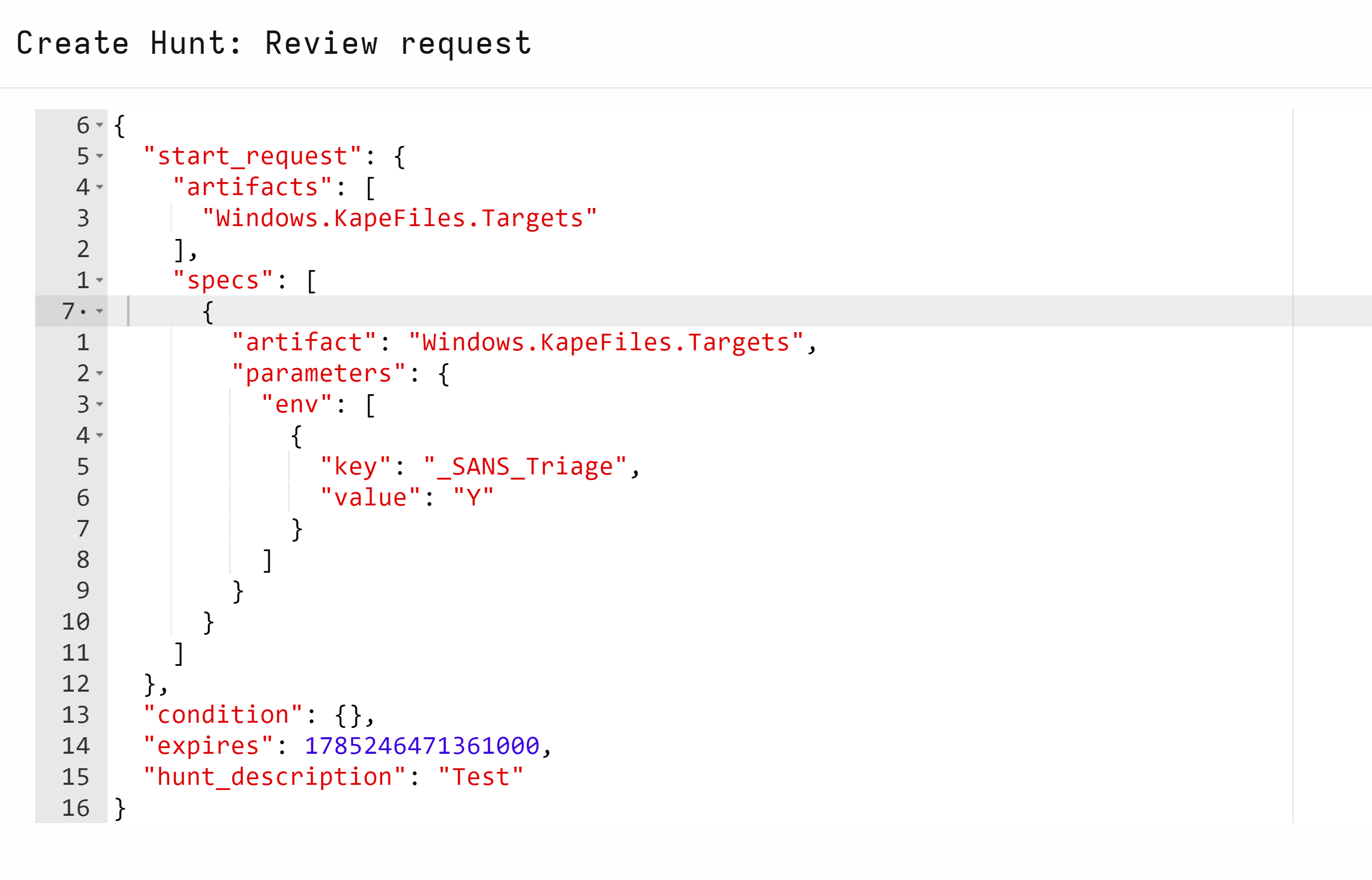 This provides a repeatable way to triage artifacts across endpoints.
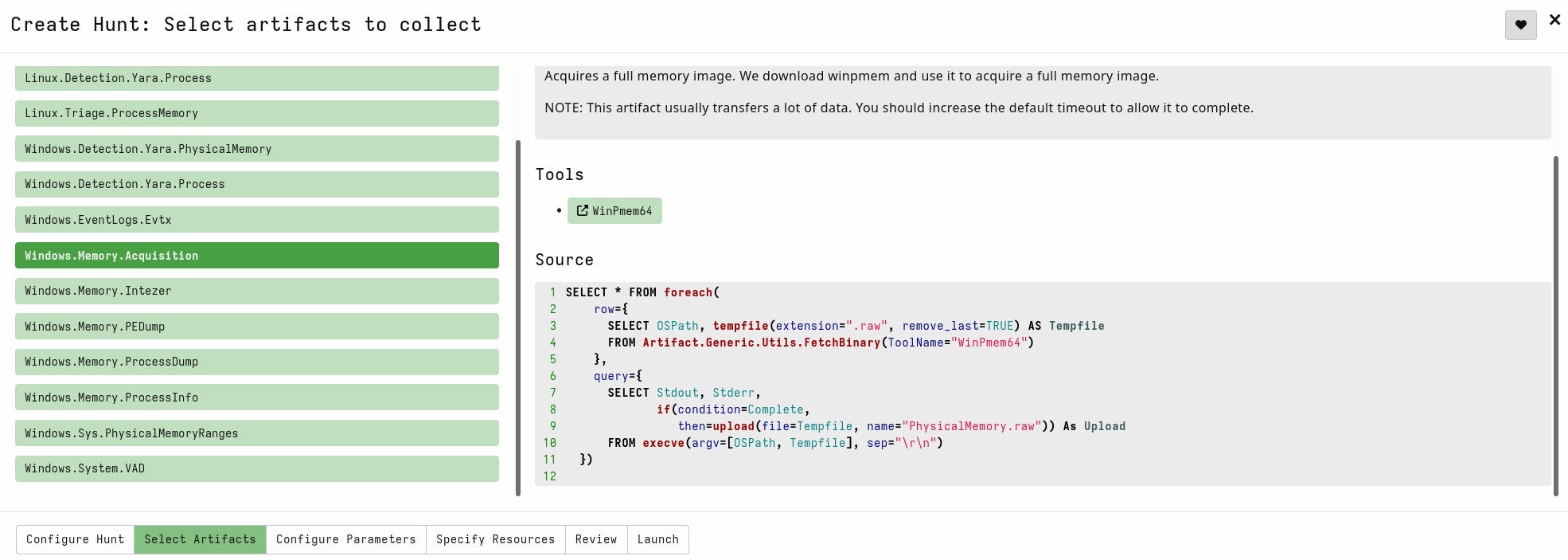
Velociraptor can also collect memory remotely:
- Start a new Hunt, but this time, select the
Windows.Memory.Acquisitionartifact
Extracting Network Evidence
Network evidence helps connect host activity to suspicious communication and attacker infrastructure.
Packet captures provide packet-level evidence and can be analyzed with Wireshark or tcpdump, as covered in earlier modules.
IDS/IPS logs record detections. An IPS may also block traffic that matches configured rules.
NetFlow and sFlow provide high-level traffic metadata such as source, destination, ports, protocols, and volume, but not full packet contents.
Firewall logs show allowed and blocked connections and can reveal scanning, unauthorized access, exploitation attempts, and suspicious outbound traffic.
Velociraptor Collection Question
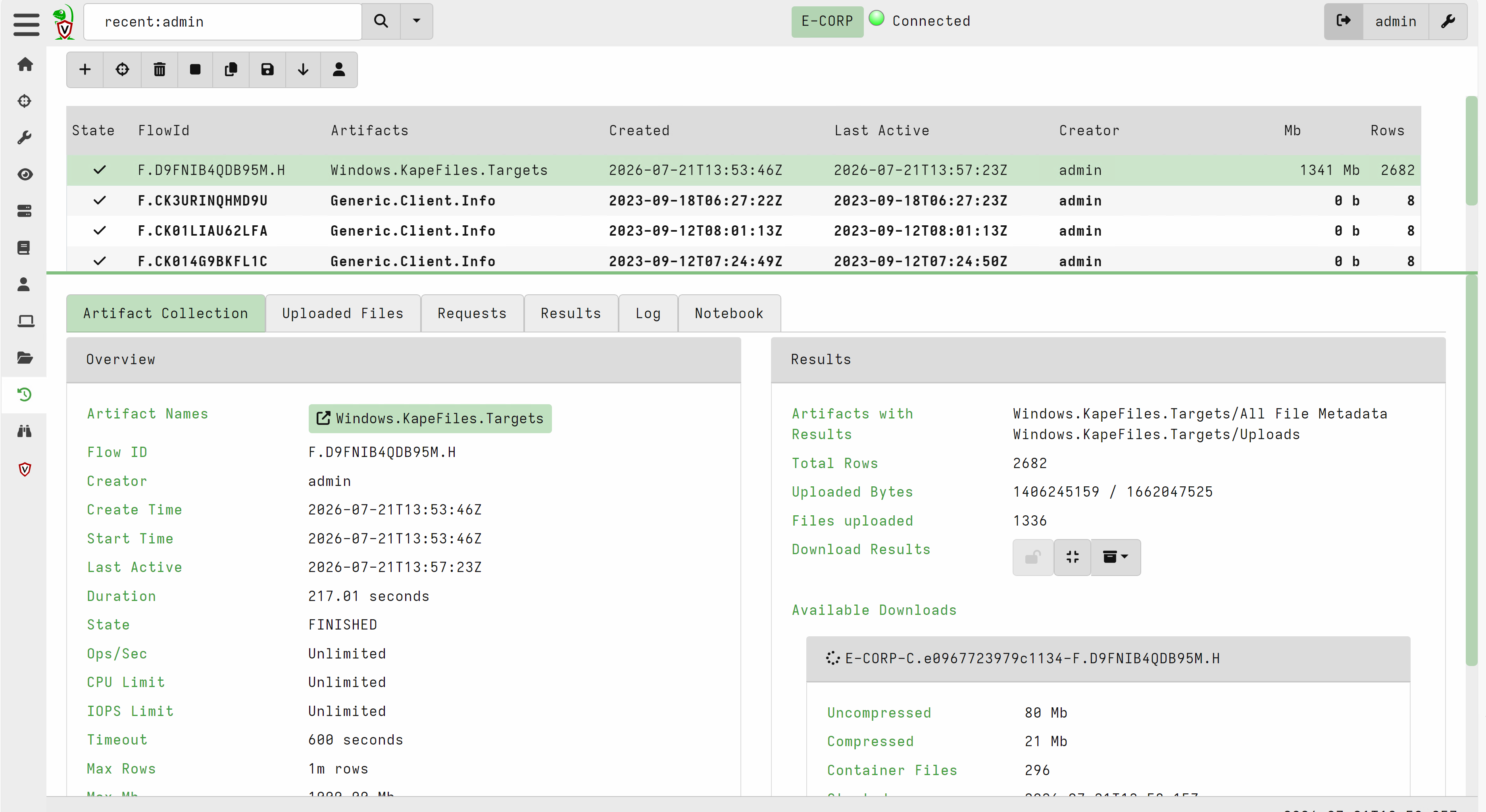
Question: Recover a Scheduled Task with Velociraptor
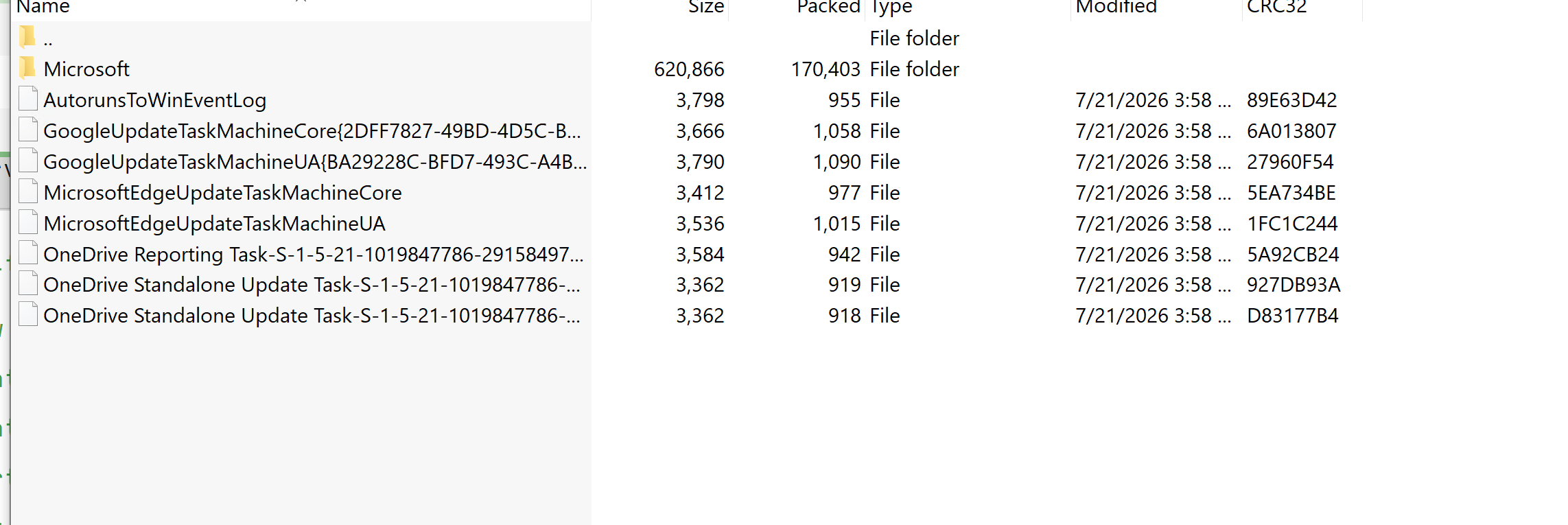
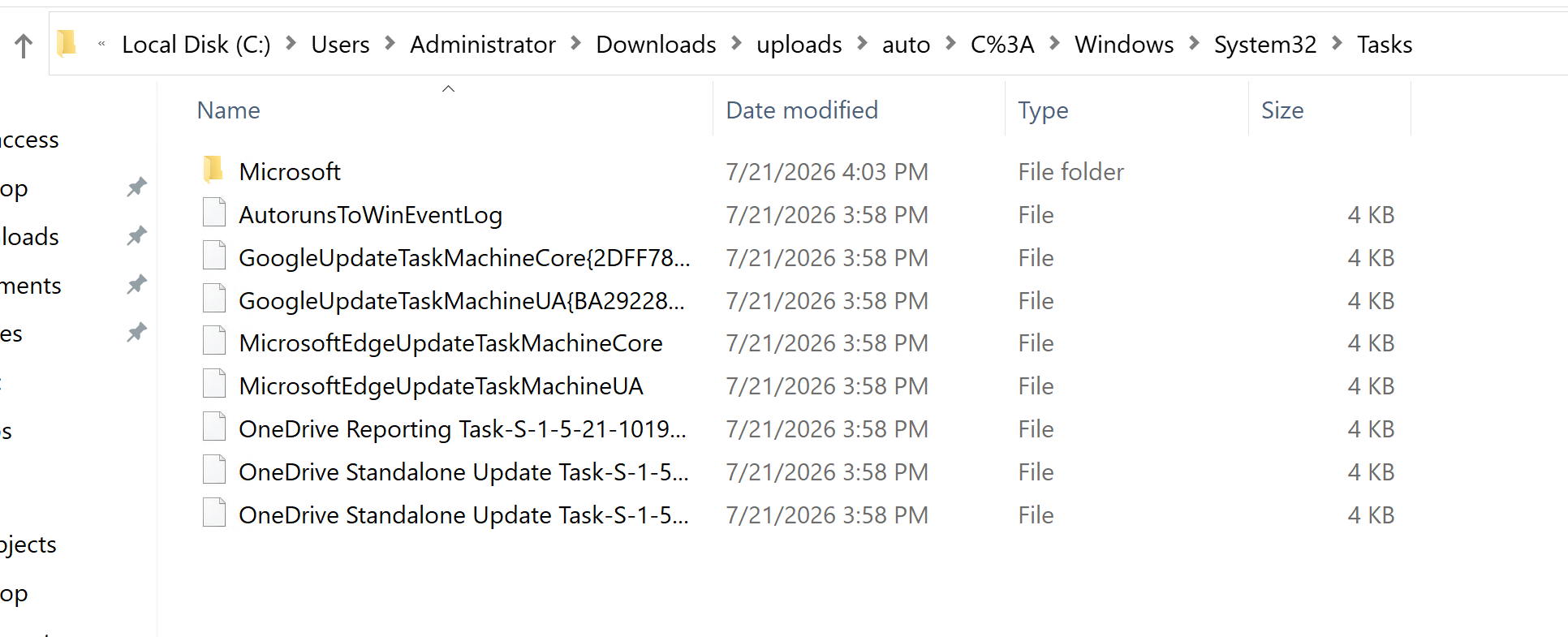
Prompt: Visit https://127.0.0.1:8889/app/index.html#/search/all, log in with the lab credentials, select the client, and collect Windows.KapeFiles.Targets using _SANS_Triage. Identify the scheduled task whose name begins with A and ends with g.
I selected the client, ran the relevant artifact collection, and downloaded the results.
After extraction, the scheduled-task files were under uploads\auto\C%3A\Windows\System32\Tasks.
Memory Forensics
Memory forensics is the analysis of data stored in RAM. It shows what was happening on a system at the time the memory was captured. Since RAM is volatile, this evidence may disappear after shutdown or restart.
RAM can contain running processes, network connections, open files, registry keys, loaded DLLs and drivers, command history, credentials, malware, encryption keys, and process memory.
Investigation Process
1. Identify Processes
List running processes and check their names, paths, parent processes, and start times. Look for misspelled process names, unusual locations, hidden processes, or strange parent-child relationships.
2. Review DLLs and Handles
Check the DLLs, files, registry keys, and other resources used by suspicious processes. DLLs loaded from temporary folders or user directories may indicate injection or hijacking.
3. Analyze Network Activity
Review active and recent connections. Map external IP addresses and ports back to the responsible process. Confirm whether the process normally requires network access and check its parent process.
4. Detect Code Injection
Look for process hollowing, DLL injection, executable private memory, unmapped memory, or memory regions with unusual permissions such as RWX.
5. Check for Rootkits
Search for hidden processes, drivers, hooks, or kernel changes. Compare different process and driver listings to identify objects that may be hiding from normal tools.
6. Extract Suspicious Files
Dump suspicious processes, DLLs, drivers, or memory regions. Save them securely and analyze them using tools such as YARA, antivirus scanners, debuggers, or malware sandboxes.
Memory forensics helps investigators find malware, detect hidden activity, recover important data, and understand what an attacker did on the system.
Volatility Framework
Volatility is an open-source framework used to analyze memory dumps. It is Python-based, works across multiple platforms, and supports memory images from Windows, Linux, and macOS.
Volatility uses plugins to extract specific information from memory.
Common Plugins
pslist– Shows running processescmdline– Displays process command-line argumentsnetscan– Shows network connections and open portsmalfind– Detects possible injected codehandles– Lists open process handlessvcscan– Lists Windows servicesdlllist– Shows DLLs loaded by a processhivelist– Lists registry hives found in memory
Volatility 2 and Volatility 3 use different commands and plugin formats, so always confirm which version is being used.
A useful Volatility (v2 & v3) cheatsheet can be found here: https://blog.onfvp.com/post/volatility-cheatsheet/
I started with a small set of plugins and expanded only when a result justified the next pivot.
Identify the Profile
Volatility 2 needs the correct profile to understand the operating system and memory structures. Use imageinfo and select one of the suggested profiles.
vol.py -f memory.vmem imageinfo
Example
htb-student@remnux:~$  vol.py -f /home/htb-student/MemoryDumps/Win7-2515534d.vmem imageinfo
Volatility Foundation Volatility Framework 2.6.1
/usr/local/lib/python2.7/dist-packages/volatility/plugins/community/YingLi/ssh_agent_key.py:12: CryptographyDeprecationWarning: Python 2 is no longer supported by the Python core team. Support for it is now deprecated in cryptography, and will be removed in the next release.
  from cryptography.hazmat.backends.openssl import backend
INFO    : volatility.debug    : Determining profile based on KDBG search...
          Suggested Profile(s) : Win7SP1x64, Win7SP0x64, Win2008R2SP0x64, Win2008R2SP1x64_24000, Win2008R2SP1x64_23418, Win2008R2SP1x64, Win7SP1x64_24000, Win7SP1x64_23418
                     AS Layer1 : WindowsAMD64PagedMemory (Kernel AS)
                     AS Layer2 : FileAddressSpace (/home/htb-student/MemoryDumps/Win7-2515534d.vmem)
                      PAE type : No PAE
                           DTB : 0x187000L
                          KDBG : 0xf80002be9120L
          Number of Processors : 1
     Image Type (Service Pack) : 1
                KPCR for CPU 0 : 0xfffff80002beb000L
             KUSER_SHARED_DATA : 0xfffff78000000000L
           Image date and time : 2023-06-22 12:34:03 UTC+0000
     Image local date and time : 2023-06-22 18:04:03 +0530
Identify Running Processes
Use pslist to view active processes, PIDs, parent PIDs, start times and exit times.
vol.py -f memory.vmem --profile=Win7SP1x64 pslist
Example
htb-student@remnux:~$ vol.py -f /home/htb-student/MemoryDumps/Win7-2515534d.vmem --profile=Win7SP1x64 pslist
Volatility Foundation Volatility Framework 2.6.1
/usr/local/lib/python2.7/dist-packages/volatility/plugins/community/YingLi/ssh_agent_key.py:12: CryptographyDeprecationWarning: Python 2 is no longer supported by the Python core team. Support for it is now deprecated in cryptography, and will be removed in the next release.
  from cryptography.hazmat.backends.openssl import backend
Offset(V)          Name                    PID   PPID   Thds     Hnds   Sess  Wow64 Start                          Exit
------------------ -------------------- ------ ------ ------ -------- ------ ------ ------------------------------ ------------------------------
0xfffffa8000ca8860 System                    4      0     97      446 ------      0 2023-06-22 12:04:39 UTC+0000
0xfffffa8001a64920 smss.exe                264      4      2       29 ------      0 2023-06-22 12:04:39 UTC+0000
0xfffffa80028a39a0 csrss.exe               352    344      8      626      0      0 2023-06-22 12:04:40 UTC+0000
0xfffffa8002a51730 wininit.exe             404    344      3       76      0      0 2023-06-22 12:04:41 UTC+0000
0xfffffa800291eb00 csrss.exe               416    396      9      307      1      0 2023-06-22 12:04:41 UTC+0000
0xfffffa8002a86340 winlogon.exe            464    396      3      113      1      0 2023-06-22 12:04:41 UTC+0000
0xfffffa8002ad8b00 services.exe            508    404      8      226      0      0 2023-06-22 12:04:41 UTC+0000
0xfffffa8002adbb00 lsass.exe               516    404      6      585      0      0 2023-06-22 12:04:41 UTC+0000
0xfffffa8002ae6b00 lsm.exe                 524    404      9      149      0      0 2023-06-22 12:04:41 UTC+0000
0xfffffa8002b4f720 svchost.exe             628    508     10      366      0      0 2023-06-22 12:04:42 UTC+0000
0xfffffa8002b7bb00 svchost.exe             696    508      7      288      0      0 2023-06-22 12:04:42 UTC+0000
0xfffffa8002ba0b00 svchost.exe             744    508     18      455      0      0 2023-06-22 12:04:42 UTC+0000
0xfffffa8002c00280 svchost.exe             868    508     19      443      0      0 2023-06-22 12:04:43 UTC+0000
0xfffffa8002c52710 svchost.exe             920    508     17      599      0      0 2023-06-22 12:04:43 UTC+0000
0xfffffa8002c5c680 svchost.exe             964    508     28      838      0      0 2023-06-22 12:04:43 UTC+0000
0xfffffa80022679b0 svchost.exe            1000    508     13      365      0      0 2023-06-22 12:04:44 UTC+0000
0xfffffa8002d15b00 spoolsv.exe            1120    508     13      273      0      0 2023-06-22 12:04:45 UTC+0000
0xfffffa8002d4f9b0 svchost.exe            1156    508     18      308      0      0 2023-06-22 12:04:45 UTC+0000
0xfffffa8002d2f060 svchost.exe            1268    508     11      165      0      0 2023-06-22 12:04:45 UTC+0000
0xfffffa8002d2d060 svchost.exe            1348    508     15      258      0      0 2023-06-22 12:04:45 UTC+0000
0xfffffa8000d78b00 VGAuthService.         1412    508      4       96      0      0 2023-06-22 12:04:45 UTC+0000
0xfffffa8002db6b00 vm3dservice.ex         1440    508      4       61      0      0 2023-06-22 12:04:46 UTC+0000
0xfffffa8002e2e9b0 vmtoolsd.exe           1468    508     13      299      0      0 2023-06-22 12:04:46 UTC+0000
0xfffffa8002e45a70 vm3dservice.ex         1488   1440      2       45      1      0 2023-06-22 12:04:46 UTC+0000
0xfffffa8002f58b00 svchost.exe            1724    508      6       92      0      0 2023-06-22 12:04:47 UTC+0000
0xfffffa8002fa2b00 WmiPrvSE.exe           1908    628      9      197      0      0 2023-06-22 12:04:47 UTC+0000
0xfffffa8002f8fb00 dllhost.exe            1968    508     13      190      0      0 2023-06-22 12:04:47 UTC+0000
0xfffffa8003007b00 msdtc.exe              1960    508     12      145      0      0 2023-06-22 12:04:51 UTC+0000
0xfffffa8001bfbb00 taskhost.exe           2432    508      9      241      1      0 2023-06-22 12:05:13 UTC+0000
0xfffffa80027ca970 dwm.exe                2484    868      5      152      1      0 2023-06-22 12:05:13 UTC+0000
0xfffffa8001d27b00 explorer.exe           2508   2472     24      843      1      0 2023-06-22 12:05:13 UTC+0000
0xfffffa80123fc590 vmtoolsd.exe           2600   2508      8      182      1      0 2023-06-22 12:05:14 UTC+0000
0xfffffa80027edb00 SearchIndexer.         2756    508     17      800      0      0 2023-06-22 12:05:22 UTC+0000
0xfffffa80023e7750 cmd.exe                3040   2508      1       21      1      0 2023-06-22 12:05:39 UTC+0000
0xfffffa8001d19060 conhost.exe            3048    416      2       53      1      0 2023-06-22 12:05:39 UTC+0000
0xfffffa8002d95870 taskmgr.exe            2648    464      6      113      1      0 2023-06-22 12:05:59 UTC+0000
0xfffffa8000e0fb00 ProcessHacker.          716   2508      9      476      1      0 2023-06-22 12:06:29 UTC+0000
0xfffffa8000eee060 sppsvc.exe             1080    508      4      146      0      0 2023-06-22 12:06:47 UTC+0000
0xfffffa8000ea6a00 svchost.exe             608    508     15      431      0      0 2023-06-22 12:06:47 UTC+0000
0xfffffa8000e2e620 wmpnetwk.exe           2968    508     18      442      0      0 2023-06-22 12:06:48 UTC+0000
0xfffffa80022af430 ida64.exe              2248   2508      7      340      1      0 2023-06-22 12:16:18 UTC+0000
0xfffffa8001420300 x32dbg.exe             2820   2508     20      480      1      1 2023-06-22 12:23:34 UTC+0000
0xfffffa8000ee96d0 Ransomware.wan         1512   2820     11      167      1      1 2023-06-22 12:23:41 UTC+0000
0xfffffa8002ca4240 Ransomware.wan         2320    508    117      497      0      1 2023-06-22 12:30:19 UTC+0000
0xfffffa8002ad9560 dllhost.exe            1876    628      4       79      1      0 2023-06-22 12:30:20 UTC+0000
0xfffffa8001d0f8b0 tasksche.exe           2972   1512      0 --------      1      0 2023-06-22 12:31:13 UTC+0000   2023-06-22 12:31:43 UTC+0000
0xfffffa8001d22b00 tasksche.exe           1792   1044      8       82      0      1 2023-06-22 12:31:13 UTC+0000
0xfffffa8002fa3060 SearchProtocol          852   2756      8      289      0      0 2023-06-22 12:31:15 UTC+0000
0xfffffa8002572060 @WanaDecryptor         1060   1792      2       71      0      1 2023-06-22 12:31:27 UTC+0000
0xfffffa8001568060 taskhsvc.exe           3012   1060      4      101      0      1 2023-06-22 12:31:29 UTC+0000
0xfffffa8001ddb060 conhost.exe            2348    352      1       32      0      0 2023-06-22 12:31:29 UTC+0000
0xfffffa8000df81b0 VSSVC.exe               288    508      6      116      0      0 2023-06-22 12:31:43 UTC+0000
0xfffffa800141e9a0 @WanaDecryptor         3252   3212      1       75      1      1 2023-06-22 12:31:45 UTC+0000
0xfffffa80014e4a70 MpCmdRun.exe           3436   3412      5      116      0      0 2023-06-22 12:32:12 UTC+0000
0xfffffa80014c12c0 SearchFilterHo         3904   2756      6      109      0      0 2023-06-22 12:33:18 UTC+0000
0xfffffa8000f2f1c0 audiodg.exe            4048    744      6      128      0      0 2023-06-22 12:33:33 UTC+0000
0xfffffa8000dbc5a0 cmd.exe                2080   1468      0 --------      0      0 2023-06-22 12:34:03 UTC+0000   2023-06-22 12:34:03 UTC+0000
0xfffffa8000f90b00 conhost.exe            3292    352      0 --------      0      0 2023-06-22 12:34:03 UTC+0000   2023-06-22 12:34:03 UTC+0000
0xfffffa8000f7b790 ipconfig.exe           2360   2080      0 --------      0      0 2023-06-22 12:34:03 UTC+0000   2023-06-22 12:34:03 UTC+0000
Check for unusual names, suspicious parent-child relationships and processes running from unexpected locations.
Analyze Network Activity
netscan shows active connections, listening ports, IP addresses and the process responsible.
vol.py -f memory.vmem --profile=Win7SP1x64 netscan
``
htb-student@remnux:~$ vol.py -f /home/htb-student/MemoryDumps/Win7-2515534d.vmem --profile=Win7SP1x64 netscan
Volatility Foundation Volatility Framework 2.6.1
/usr/local/lib/python2.7/dist-packages/volatility/plugins/community/YingLi/ssh_agent_key.py:12: CryptographyDeprecationWarning: Python 2 is no longer supported by the Python core team. Support for it is now deprecated in cryptography, and will be removed in the next release.
  from cryptography.hazmat.backends.openssl import backend
Offset(P)          Proto    Local Address                  Foreign Address      State            Pid      Owner          Created
0x1a15caa0         UDPv4    0.0.0.0:3702                   *:*                                   1348     svchost.exe    2023-06-22 12:05:10 UTC+0000
0x1a15caa0         UDPv6    :::3702                        *:*                                   1348     svchost.exe    2023-06-22 12:05:10 UTC+0000
0x1fd7cac0         TCPv4    0.0.0.0:49155                  0.0.0.0:0            LISTENING        508      services.exe
0x1fd7cac0         TCPv6    :::49155                       :::0                 LISTENING        508      services.exe
0x3da01a70         UDPv4    0.0.0.0:3702                   *:*                                   1348     svchost.exe    2023-06-22 12:05:10 UTC+0000
0x3da0b130         UDPv4    0.0.0.0:0                      *:*                                   1000     svchost.exe    2023-06-22 12:05:02 UTC+0000
0x3da0b130         UDPv6    :::0                           *:*                                   1000     svchost.exe    2023-06-22 12:05:02 UTC+0000
0x3dcf1010         UDPv4    0.0.0.0:62718                  *:*                                   1348     svchost.exe    2023-06-22 12:04:46 UTC+0000
0x3dcf15b0         UDPv4    0.0.0.0:62719                  *:*                                   1348     svchost.exe    2023-06-22 12:04:46 UTC+0000
0x3dcf15b0         UDPv6    :::62719                       *:*                                   1348     svchost.exe    2023-06-22 12:04:46 UTC+0000
0x3da15010         TCPv4    0.0.0.0:49156                  0.0.0.0:0            LISTENING        516      lsass.exe
0x3da15010         TCPv6    :::49156                       :::0                 LISTENING        516      lsass.exe
0x3dc69860         TCPv4    0.0.0.0:5357                   0.0.0.0:0            LISTENING        4        System
0x3dc69860         TCPv6    :::5357                        :::0                 LISTENING        4        System
0x3dca3ee0         TCPv4    0.0.0.0:49154                  0.0.0.0:0            LISTENING        964      svchost.exe
0x3dca3ee0         TCPv6    :::49154                       :::0                 LISTENING        964      svchost.exe
0x3dcf7280         TCPv4    0.0.0.0:49155                  0.0.0.0:0            LISTENING        508      services.exe
0x3dd07540         TCPv4    0.0.0.0:445                    0.0.0.0:0            LISTENING        4        System
0x3dd07540         TCPv6    :::445                         :::0                 LISTENING        4        System
0x3e5f7cd0         UDPv4    0.0.0.0:3702                   *:*                                   1348     svchost.exe    2023-06-22 12:05:10 UTC+0000
0x3e5f7cd0         UDPv6    :::3702                        *:*                                   1348     svchost.exe    2023-06-22 12:05:10 UTC+0000
0x3deff8d0         TCPv4    0.0.0.0:10243                  0.0.0.0:0            LISTENING        4        System
0x3deff8d0         TCPv6    :::10243                       :::0                 LISTENING        4        System
0x3df01ba0         TCPv4    0.0.0.0:49154                  0.0.0.0:0            LISTENING        964      svchost.exe
0x3e194410         TCPv4    0.0.0.0:135                    0.0.0.0:0            LISTENING        696      svchost.exe
0x3e195840         TCPv4    0.0.0.0:135                    0.0.0.0:0            LISTENING        696      svchost.exe
0x3e195840         TCPv6    :::135                         :::0                 LISTENING        696      svchost.exe
0x3e1ab8f0         TCPv4    0.0.0.0:49152                  0.0.0.0:0            LISTENING        404      wininit.exe
0x3e1fe300         TCPv4    0.0.0.0:49153                  0.0.0.0:0            LISTENING        744      svchost.exe
0x3e1fe300         TCPv6    :::49153                       :::0                 LISTENING        744      svchost.exe
0x3e1fecd0         TCPv4    0.0.0.0:49153                  0.0.0.0:0            LISTENING        744      svchost.exe
0x3e963ad0         TCPv4    127.0.0.1:9050                 0.0.0.0:0            LISTENING        3012     taskhsvc.exe
0x3ec4f620         TCPv4    0.0.0.0:49152                  0.0.0.0:0            LISTENING        404      wininit.exe
0x3ec4f620         TCPv6    :::49152                       :::0                 LISTENING        404      wininit.exe
0x3f1fd6f0         TCPv4    0.0.0.0:554                    0.0.0.0:0            LISTENING        2968     wmpnetwk.exe
0x3f1fd6f0         TCPv6    :::554                         :::0                 LISTENING        2968     wmpnetwk.exe
0x3ec2d010         TCPv4    127.0.0.1:50313                127.0.0.1:50314      ESTABLISHED      -1
0x3ecb1220         TCPv4    127.0.0.1:50314                127.0.0.1:50313      ESTABLISHED      -1
0x3f3ced90         UDPv4    0.0.0.0:3702                   *:*                                   1348     svchost.exe    2023-06-22 12:05:10 UTC+0000
0x3f2284c0         TCPv4    0.0.0.0:49156                  0.0.0.0:0            LISTENING        516      lsass.exe
0x3fcfd930         UDPv4    127.0.0.1:1900                 *:*                                   1348     svchost.exe    2023-06-22 12:06:48 UTC+0000
0x3fd1bbf0         UDPv6    ::1:61543                      *:*                                   1348     svchost.exe    2023-06-22 12:06:48 UTC+0000
0x3fd28310         UDPv4    127.0.0.1:61544                *:*                                   1348     svchost.exe    2023-06-22 12:06:48 UTC+0000
0x3fd2b420         UDPv6    ::1:1900                       *:*                                   1348     svchost.exe    2023-06-22 12:06:48 UTC+0000
0x3fd4a4a0         UDPv4    0.0.0.0:5004                   *:*                                   2968     wmpnetwk.exe   2023-06-22 12:06:48 UTC+0000
0x3fd4a4a0         UDPv6    :::5004                        *:*                                   2968     wmpnetwk.exe   2023-06-22 12:06:48 UTC+0000
0x3fd4aa90         UDPv4    0.0.0.0:5005                   *:*                                   2968     wmpnetwk.exe   2023-06-22 12:06:48 UTC+0000
0x3fd4adb0         UDPv4    0.0.0.0:5004                   *:*                                   2968     wmpnetwk.exe   2023-06-22 12:06:48 UTC+0000
0x3fd5fec0         UDPv4    0.0.0.0:5005                   *:*                                   2968     wmpnetwk.exe   2023-06-22 12:06:48 UTC+0000
0x3fd5fec0         UDPv6    :::5005                        *:*                                   2968     wmpnetwk.exe   2023-06-22 12:06:48 UTC+0000
0x3fc02ca0         TCPv4    0.0.0.0:554                    0.0.0.0:0            LISTENING        2968     wmpnetwk.exe
0x3fca6010         TCPv4    0.0.0.0:2869                   0.0.0.0:0            LISTENING        4        System
0x3fca6010         TCPv6    :::2869                        :::0                 LISTENING        4        System
0x3fc4f600         TCPv4    127.0.0.1:55206                127.0.0.1:9050       ESTABLISHED      -1
0x3fe604f0         TCPv4    127.0.0.1:9050                 127.0.0.1:55206      ESTABLISHED      -1
connscan can also recover older TCP connection artifacts that are no longer active.
connscan searches raw RAM for Windows TCP connection records, called _TCPT_OBJECT structures.
Detect Injected Code
malfind searches for suspicious executable memory, including injected code and memory regions with permissions such as PAGE_EXECUTE_READWRITE.
vol.py -f memory.vmem --profile=Win7SP1x64 malfind --pid=608
A malfind result is suspicious, but it should still be validated before calling it malicious.
htb-student@remnux:~$  vol.py -f /home/htb-student/MemoryDumps/Win7-2515534d.vmem --profile=Win7SP1x64 malfind --pid=608
Volatility Foundation Volatility Framework 2.6.1
/usr/local/lib/python2.7/dist-packages/volatility/plugins/community/YingLi/ssh_agent_key.py:12: CryptographyDeprecationWarning: Python 2 is no longer supported by the Python core team. Support for it is now deprecated in cryptography, and will be removed in the next release.
  from cryptography.hazmat.backends.openssl import backend
Process: svchost.exe Pid: 608 Address: 0x12350000
Vad Tag: VadS Protection: PAGE_EXECUTE_READWRITE
Flags: CommitCharge: 128, MemCommit: 1, PrivateMemory: 1, Protection: 6

0x0000000012350000  00 00 00 00 00 00 00 00 00 00 00 00 00 00 00 00   ................
0x0000000012350010  00 00 00 00 00 00 00 00 00 00 00 00 00 00 00 00   ................
0x0000000012350020  00 00 00 00 00 00 00 00 00 00 00 00 00 00 00 00   ................
0x0000000012350030  00 00 00 00 00 00 00 00 00 00 00 00 00 00 00 00   ................

0x0000000012350000 0000             ADD [EAX], AL
0x0000000012350002 0000             ADD [EAX], AL
0x0000000012350004 0000             ADD [EAX], AL
0x0000000012350006 0000             ADD [EAX], AL
0x0000000012350008 0000             ADD [EAX], AL
0x000000001235000a 0000             ADD [EAX], AL
0x000000001235000c 0000             ADD [EAX], AL
0x000000001235000e 0000             ADD [EAX], AL
0x0000000012350010 0000             ADD [EAX], AL
0x0000000012350012 0000             ADD [EAX], AL
0x0000000012350014 0000             ADD [EAX], AL
0x0000000012350016 0000             ADD [EAX], AL
0x0000000012350018 0000             ADD [EAX], AL
0x000000001235001a 0000             ADD [EAX], AL
0x000000001235001c 0000             ADD [EAX], AL
0x000000001235001e 0000             ADD [EAX], AL
0x0000000012350020 0000             ADD [EAX], AL
0x0000000012350022 0000             ADD [EAX], AL
0x0000000012350024 0000             ADD [EAX], AL
0x0000000012350026 0000             ADD [EAX], AL
0x0000000012350028 0000             ADD [EAX], AL
0x000000001235002a 0000             ADD [EAX], AL
0x000000001235002c 0000             ADD [EAX], AL
0x000000001235002e 0000             ADD [EAX], AL
0x0000000012350030 0000             ADD [EAX], AL
0x0000000012350032 0000             ADD [EAX], AL
0x0000000012350034 0000             ADD [EAX], AL
0x0000000012350036 0000             ADD [EAX], AL
0x0000000012350038 0000             ADD [EAX], AL
0x000000001235003a 0000             ADD [EAX], AL
0x000000001235003c 0000             ADD [EAX], AL
0x000000001235003e 0000             ADD [EAX], AL
Examine Process Handles
handles shows files, registry keys, processes and other objects being accessed by a process.
vol.py -f memory.vmem --profile=Win7SP1x64 handles -p 1512
Filtering handles by object type-such as File, Key, or Process-helps explain what the process was interacting with at capture time.
htb-student@remnux:~$ vol.py -f /home/htb-student/MemoryDumps/Win7-2515534d.vmem --profile=Win7SP1x64 handles -p 1512 --object-type=Key
Volatility Foundation Volatility Framework 2.6.1
/usr/local/lib/python2.7/dist-packages/volatility/plugins/community/YingLi/ssh_agent_key.py:12: CryptographyDeprecationWarning: Python 2 is no longer supported by the Python core team. Support for it is now deprecated in cryptography, and will be removed in the next release.
  from cryptography.hazmat.backends.openssl import backend
Offset(V)             Pid             Handle             Access Type             Details
------------------ ------ ------------------ ------------------ ---------------- -------
0xfffff8a001628ee0   1512                0x4                0x9 Key              MACHINE\SOFTWARE\MICROSOFT\WINDOWS NT\CURRENTVERSION\IMAGE FILE EXECUTION OPTIONS
0xfffff8a00221e7e0   1512               0x14                0x9 Key              MACHINE\SOFTWARE\MICROSOFT\WINDOWS NT\CURRENTVERSION\IMAGE FILE EXECUTION OPTIONS
0xfffff8a0023b3490   1512               0x20            0x20019 Key              MACHINE\SYSTEM\CONTROLSET001\CONTROL\NLS\SORTING\VERSIONS
0xfffff8a001f1e300   1512               0x38            0xf003f Key              MACHINE
0xfffff8a001f3b410   1512               0x40                0x1 Key              MACHINE\SYSTEM\CONTROLSET001\CONTROL\SESSION MANAGER
0xfffff8a001f35280   1512               0x58                0x1 Key              MACHINE\SYSTEM\CONTROLSET001\CONTROL\NLS\CUSTOMLOCALE
0xfffff8a001f18440   1512               0x9c            0xf003f Key              USER\S-1-5-21-3232251811-3497904625-37069028-1001
0xfffff8a001d4e1f0   1512               0xa0            0x2001f Key              USER\S-1-5-21-3232251811-3497904625-37069028-1001\SOFTWARE\MICROSOFT\WINDOWS\CURRENTVERSION\INTERNET SETTINGS
0xfffff8a00080e8a0   1512               0xc0            0xf003f Key              USER
0xfffff8a00237dc10   1512               0xe0                0x1 Key              USER\S-1-5-21-3232251811-3497904625-37069028-1001\SOFTWARE\MICROSOFT\WINDOWS\CURRENTVERSION\EXPLORER
0xfffff8a001f63a80   1512              0x120                0x1 Key              MACHINE\SOFTWARE\WOW6432NODE\MICROSOFT\INTERNET EXPLORER\MAIN\FEATURECONTROL
0xfffff8a00208b750   1512              0x124            0x20019 Key              MACHINE\SOFTWARE\POLICIES\MICROSOFT\WINDOWS\CURRENTVERSION\INTERNET SETTINGS
0xfffff8a0022b6850   1512              0x128            0x20019 Key              USER\S-1-5-21-3232251811-3497904625-37069028-1001\SOFTWARE\POLICIES\MICROSOFT\WINDOWS\CURRENTVERSION\INTERNET SETTINGS
0xfffff8a000d807b0   1512              0x12c            0x20019 Key              USER\S-1-5-21-3232251811-3497904625-37069028-1001\SOFTWARE\MICROSOFT\WINDOWS\CURRENTVERSION\INTERNET SETTINGS
0xfffff8a0013b2920   1512              0x130            0x20019 Key              MACHINE\SOFTWARE\POLICIES
0xfffff8a001f7b610   1512              0x134            0x20019 Key              USER\S-1-5-21-3232251811-3497904625-37069028-1001\SOFTWARE\POLICIES
0xfffff8a0022f8ad0   1512              0x138            0x20019 Key              USER\S-1-5-21-3232251811-3497904625-37069028-1001\SOFTWARE
0xfffff8a0026778a0   1512              0x13c            0x20019 Key              MACHINE\SOFTWARE\WOW6432NODE
0xfffff8a000f4fb00   1512              0x140            0x20019 Key              MACHINE\SOFTWARE\WOW6432NODE\MICROSOFT\WINDOWS\CURRENTVERSION\INTERNET SETTINGS
0xfffff8a001efb870   1512              0x154            0xf003f Key              MACHINE\SYSTEM\CONTROLSET001\SERVICES\WINSOCK2\PARAMETERS\PROTOCOL_CATALOG9
0xfffff8a001f683c0   1512              0x15c            0xf003f Key              MACHINE\SYSTEM\CONTROLSET001\SERVICES\WINSOCK2\PARAMETERS\NAMESPACE_CATALOG5
0xfffff8a001f17660   1512              0x164            0x20019 Key              USER\S-1-5-21-3232251811-3497904625-37069028-1001\SOFTWARE\MICROSOFT\INTERNET EXPLORER\MAIN
0xfffff8a0012cbe90   1512              0x168            0x20019 Key              MACHINE\SOFTWARE\WOW6432NODE\MICROSOFT\INTERNET EXPLORER\MAIN
0xfffff8a00000c610   1512              0x1b8            0x2001f Key              USER\S-1-5-21-3232251811-3497904625-37069028-1001\SOFTWARE\MICROSOFT\WINDOWS\CURRENTVERSION\INTERNET SETTINGS\ZONEMAP
0xfffff8a0025cf4c0   1512              0x1bc            0x20019 Key              MACHINE\SOFTWARE\WOW6432NODE\MICROSOFT\WINDOWS\CURRENTVERSION\INTERNET SETTINGS\ZONEMAP
0xfffff8a00125d610   1512              0x1d0                0xf Key              USER\S-1-5-21-3232251811-3497904625-37069028-1001\SOFTWARE\MICROSOFT\WINDOWS\CURRENTVERSION\INTERNET SETTINGS\5.0\CACHE
0xfffff8a0023dcdd0   1512              0x22c            0xf003f Key              MACHINE\SOFTWARE\CLASSES
htb-student@remnux:~$  vol.py -f /home/htb-student/MemoryDumps/Win7-2515534d.vmem --profile=Win7SP1x64 handles -p 1512 --object-type=File
Volatility Foundation Volatility Framework 2.6.1
/usr/local/lib/python2.7/dist-packages/volatility/plugins/community/YingLi/ssh_agent_key.py:12: CryptographyDeprecationWarning: Python 2 is no longer supported by the Python core team. Support for it is now deprecated in cryptography, and will be removed in the next release.
  from cryptography.hazmat.backends.openssl import backend
Offset(V)             Pid             Handle             Access Type             Details
------------------ ------ ------------------ ------------------ ---------------- -------
0xfffffa8001d162e0   1512               0x10           0x100020 File             \Device\HarddiskVolume2\Windows
0xfffffa800228adc0   1512               0x1c           0x100020 File             \Device\HarddiskVolume2\Users\Analyst\Desktop\Samples
0xfffffa8000df8070   1512              0x110           0x12019f File             \Device\HarddiskVolume2\Users\Analyst\AppData\Local\Microsoft\Windows\Temporary Internet Files\counters.dat
0xfffffa8002210cd0   1512              0x170           0x100080 File             \Device\Nsi
0xfffffa8000dedf20   1512              0x1e4           0x100001 File             \Device\KsecDD
0xfffffa8002f70700   1512              0x23c           0x120089 File             \Device\HarddiskVolume2\Windows\Registration\R000000000006.clb
htb-student@remnux:~$ vol.py -f /home/htb-student/MemoryDumps/Win7-2515534d.vmem --profile=Win7SP1x64 handles -p 1512 --object-type=Process
Volatility Foundation Volatility Framework 2.6.1
/usr/local/lib/python2.7/dist-packages/volatility/plugins/community/YingLi/ssh_agent_key.py:12: CryptographyDeprecationWarning: Python 2 is no longer supported by the Python core team. Support for it is now deprecated in cryptography, and will be removed in the next release.
  from cryptography.hazmat.backends.openssl import backend
Offset(V)             Pid             Handle             Access Type             Details
------------------ ------ ------------------ ------------------ ---------------- -------
0xfffffa8001d0f8b0   1512              0x29c           0x1fffff Process          tasksche.exe(2972)
Identify Windows Services
svcscan lists Windows services, their state, startup type, PID and binary path.
vol.py -f memory.vmem --profile=Win7SP1x64 svcscan
htb-student@remnux:~$ vol.py -f /home/htb-student/MemoryDumps/Win7-2515534d.vmem --profile=Win7SP1x64 svcscan | more
Volatility Foundation Volatility Framework 2.6.1
/usr/local/lib/python2.7/dist-packages/volatility/plugins/community/YingLi/ssh_agent_key.py:12: CryptographyDeprecationWarning: Python 2 is no longer supported by the Python core team. Support for it is now deprecated in cryptography, and will be removed in the next release.
  from cryptography.hazmat.backends.openssl import backend
Offset: 0xb755a0
Order: 71
Start: SERVICE_AUTO_START
Process ID: 628
Service Name: DcomLaunch
Display Name: DCOM Server Process Launcher
Service Type: SERVICE_WIN32_SHARE_PROCESS
Service State: SERVICE_RUNNING
Binary Path: C:\Windows\system32\svchost.exe -k DcomLaunch

Offset: 0xb754b0
Order: 70
Start: SERVICE_DEMAND_START
Process ID: -
Service Name: dc21x4vm
Display Name: dc21x4vm
Service Type: SERVICE_KERNEL_DRIVER
Service State: SERVICE_STOPPED
Binary Path: -

Offset: 0xb753c0
Order: 69
Start: SERVICE_AUTO_START
Process ID: 868
Service Name: CscService
Display Name: Offline Files
Service Type: SERVICE_WIN32_SHARE_PROCESS
Service State: SERVICE_RUNNING
Binary Path: C:\Windows\System32\svchost.exe -k LocalSystemNetworkRestricted
--More--
DLLs loaded from temporary or user-writable directories may be suspicious.
Identify Registry Hives
hivelist lists registry hives available in memory, including SYSTEM, SOFTWARE, SAM, SECURITY and user NTUSER.DAT files.
vol.py -f memory.vmem --profile=Win7SP1x64 hivelist
The hive memory offset can later be used to extract registry keys or values.
htb-student@remnux:~$ vol.py -f /home/htb-student/MemoryDumps/Win7-2515534d.vmem --profile=Win7SP1x64 hivelist
Volatility Foundation Volatility Framework 2.6.1
/usr/local/lib/python2.7/dist-packages/volatility/plugins/community/YingLi/ssh_agent_key.py:12: CryptographyDeprecationWarning: Python 2 is no longer supported by the Python core team. Support for it is now deprecated in cryptography, and will be removed in the next release.
  from cryptography.hazmat.backends.openssl import backend
Virtual            Physical           Name
------------------ ------------------ ----
0xfffff8a001710010 0x000000002c2e4010 \??\C:\Users\Analyst\AppData\Local\Microsoft\Windows\UsrClass.dat
0xfffff8a001d4b410 0x000000001651f410 \??\C:\System Volume Information\Syscache.hve
0xfffff8a00000f010 0x0000000026de8010 [no name]
0xfffff8a000024010 0x00000000273f3010 \REGISTRY\MACHINE\SYSTEM
0xfffff8a000058010 0x0000000026727010 \REGISTRY\MACHINE\HARDWARE
0xfffff8a0000f7410 0x0000000019824410 \SystemRoot\System32\Config\DEFAULT
0xfffff8a000844010 0x000000001a979010 \Device\HarddiskVolume1\Boot\BCD
0xfffff8a0009d6010 0x000000001998d010 \SystemRoot\System32\Config\SOFTWARE
0xfffff8a000e0a010 0x000000000724e010 \SystemRoot\System32\Config\SAM
0xfffff8a000e36010 0x0000000012f0e010 \SystemRoot\System32\Config\SECURITY
0xfffff8a000f7e010 0x0000000012f7b010 \??\C:\Windows\ServiceProfiles\NetworkService\NTUSER.DAT
0xfffff8a00100c410 0x0000000006de7410 \??\C:\Windows\ServiceProfiles\LocalService\NTUSER.DAT
0xfffff8a0016a8010 0x000000002aecd010 \??\C:\Users\Analyst\ntuser.dat
Rootkit Analysis with Volatility 2
Windows keeps information about every running process inside a kernel structure called EPROCESS.
Each EPROCESS structure contains ActiveProcessLinks, which connects all running processes in a doubly linked list:
flinkpoints to the next process.blinkpoints to the previous process.
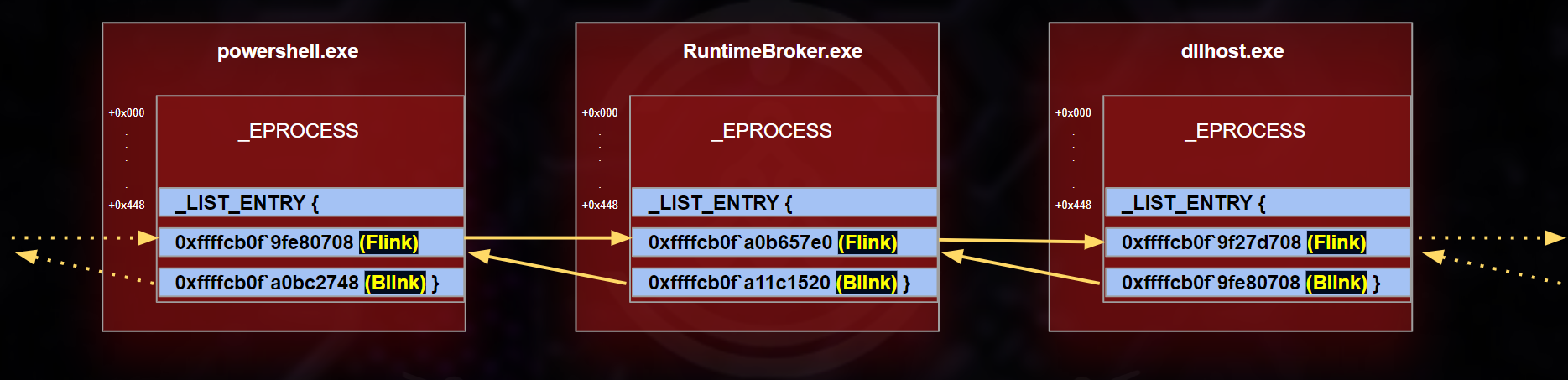
Windows and normal monitoring tools follow this list to identify running processes.
How a Rootkit Hides a Process
A rootkit can use Direct Kernel Object Manipulation (DKOM) to remove its process from the ActiveProcessLinks list.
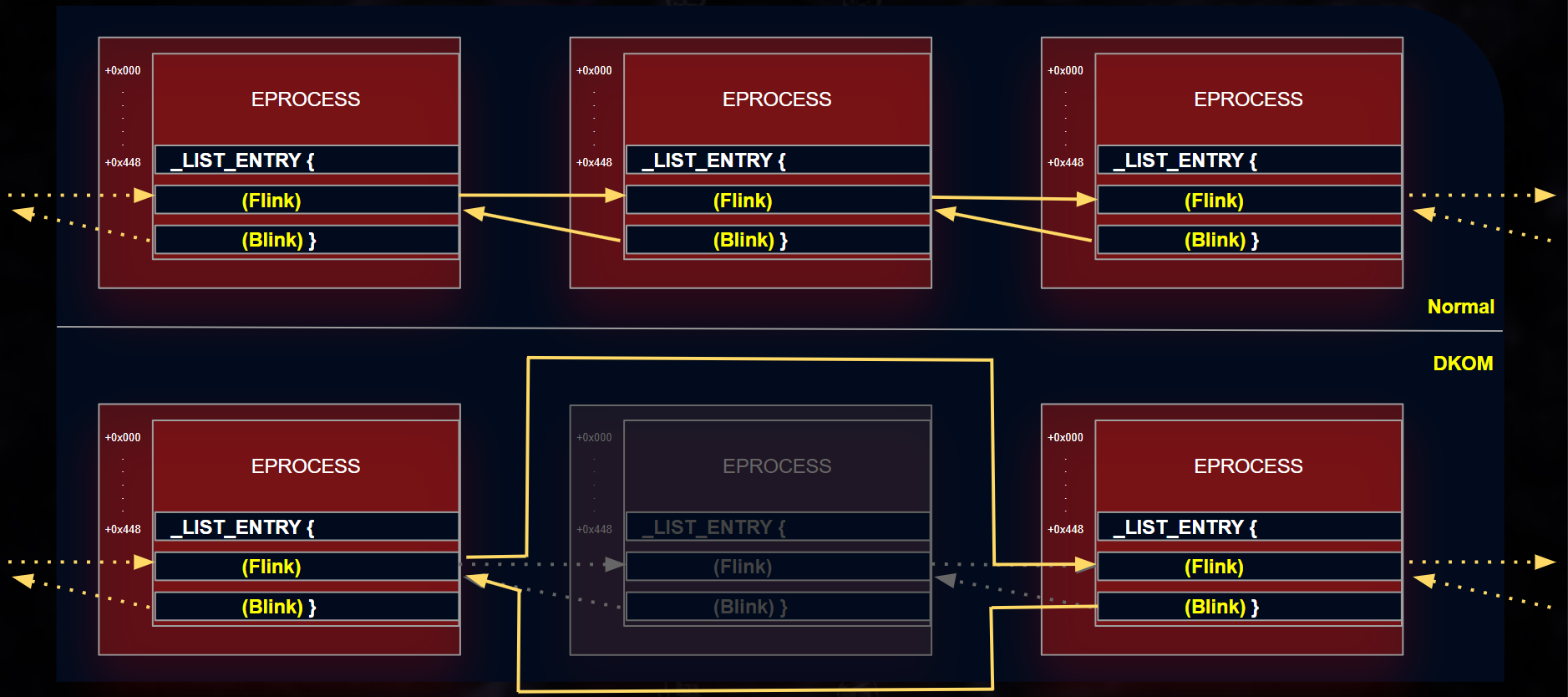
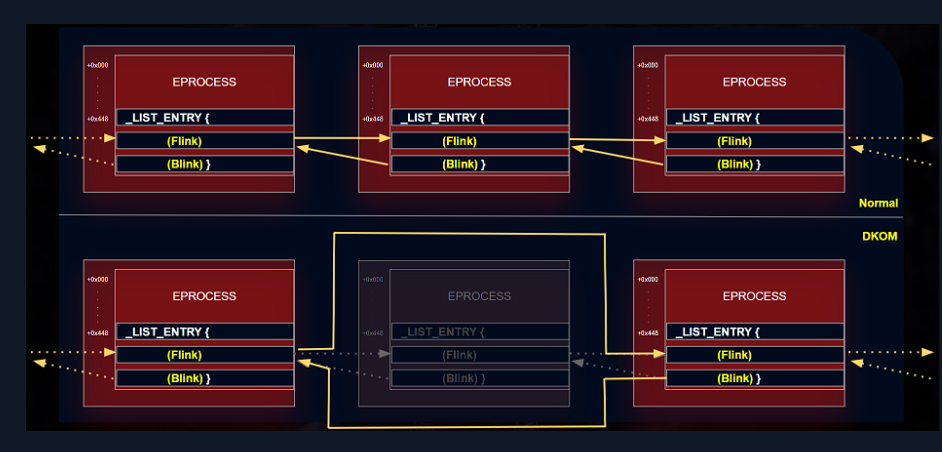
The malicious process is still running and its EPROCESS structure may still exist in memory, but normal tools cannot see it because it has been unlinked from the process list.
Think of it like removing a person’s name from an attendance sheet while the person is still inside the room.
Detecting the Hidden Process
The psscan plugin scans raw memory for EPROCESS structures instead of relying only on the linked process list.
vol.py -f rootkit.vmem --profile=<PROFILE> psscan
Because of this, psscan may find a process that a rootkit tried to hide using DKOM.
htb-student@remnux:~$  vol.py -f /home/htb-student/MemoryDumps/rootkit.vmem psscan
Volatility Foundation Volatility Framework 2.6.1
/usr/local/lib/python2.7/dist-packages/volatility/plugins/community/YingLi/ssh_agent_key.py:12: CryptographyDeprecationWarning: Python 2 is no longer supported by the Python core team. Support for it is now deprecated in cryptography, and will be removed in the next release.
  from cryptography.hazmat.backends.openssl import backend
Offset(P)          Name                PID   PPID PDB        Time created                   Time exited
------------------ ---------------- ------ ------ ---------- ------------------------------ ------------------------------
0x0000000001a404b8 ipconfig.exe       2988   2980 0x091403c0 2023-06-24 07:31:16 UTC+0000   2023-06-24 07:31:17 UTC+0000
0x0000000001a63138 cmd.exe            2980   2004 0x091401c0 2023-06-24 07:31:16 UTC+0000   2023-06-24 07:31:17 UTC+0000
0x0000000001b24888 explorer.exe       1444    624 0x09140320 2023-06-23 16:34:38 UTC+0000
0x0000000001bc62a8 tasksche.exe       1084   1684 0x091403e0 2023-06-24 07:28:16 UTC+0000
0x0000000001c3d2d8 @WanaDecryptor@    2248   1084 0x091403a0 2023-06-24 07:29:20 UTC+0000
0x0000000001c4e020 cmd.exe            1932   1444 0x09140380 2023-06-24 07:27:16 UTC+0000
0x0000000001c54da0 cmd.exe            2396   2264 0x091401c0 2023-06-24 07:29:30 UTC+0000   2023-06-24 07:29:37 UTC+0000
0x0000000001c8a020 @WanaDecryptor@    2324   2284 0x09140440 2023-06-24 07:29:20 UTC+0000
0x0000000001cb7628 test.exe           1344    668 0x09140360 2023-06-24 07:28:15 UTC+0000
0x0000000002063ab8 svchost.exe        1220    668 0x09140160 2023-06-23 16:14:54 UTC+0000
0x0000000002093020 services.exe        668    624 0x09140080 2023-06-23 16:14:53 UTC+0000
0x0000000002094da0 ctfmon.exe          564    232 0x09140240 2023-06-23 16:15:09 UTC+0000
0x0000000002095020 csrss.exe           600    368 0x09140040 2023-06-23 16:14:51 UTC+0000
0x000000000209fa78 vmtoolsd.exe       2004    668 0x091402a0 2023-06-23 16:15:24 UTC+0000
0x00000000020a2a90 spoolsv.exe        1556    668 0x091401a0 2023-06-23 16:14:59 UTC+0000
0x00000000020ceb40 alg.exe            1520    668 0x091402c0 2023-06-23 16:15:26 UTC+0000
0x00000000020ff870 wmiprvse.exe        560    880 0x09140300 2023-06-23 16:15:26 UTC+0000
0x000000000216a650 taskhsvc.exe       2340   2248 0x09140340 2023-06-24 07:29:22 UTC+0000
0x0000000002172da0 winlogon.exe        624    368 0x09140060 2023-06-23 16:14:52 UTC+0000
0x00000000021adda0 msmsgs.exe          548    232 0x09140220 2023-06-23 16:15:09 UTC+0000
0x000000000224b128 svchost.exe         992    668 0x09140100 2023-06-23 16:14:53 UTC+0000
0x000000000225cda0 VGAuthService.e    1832    668 0x09140280 2023-06-23 16:15:16 UTC+0000
0x0000000002269490 vmacthlp.exe        848    668 0x091400c0 2023-06-23 16:14:53 UTC+0000
0x0000000002288770 wmic.exe           2416   2396 0x09140400 2023-06-24 07:29:30 UTC+0000   2023-06-24 07:29:37 UTC+0000
0x00000000022ee020 cmd.exe            1628   1444 0x091402e0 2023-06-24 07:25:01 UTC+0000
0x0000000002346990 svchost.exe         880    668 0x091400e0 2023-06-23 16:14:53 UTC+0000
0x00000000023c7618 taskmgr.exe         260   1444 0x091401e0 2023-06-24 07:27:55 UTC+0000
0x0000000002419850 svchost.exe        1136    668 0x09140120 2023-06-23 16:14:53 UTC+0000
0x000000000248c020 smss.exe            368      4 0x09140020 2023-06-23 16:14:49 UTC+0000
0x000000000248f020 svchost.exe        1176    668 0x09140140 2023-06-23 16:14:53 UTC+0000
0x000000000249fda0 vmtoolsd.exe        540    232 0x09140180 2023-06-23 16:15:09 UTC+0000
0x00000000024a57a8 lsass.exe           680    624 0x091400a0 2023-06-23 16:14:53 UTC+0000
0x00000000024cb928 svchost.exe        1708    668 0x09140260 2023-06-23 16:15:16 UTC+0000
0x000000000250e020 rundll32.exe        532    232 0x09140200 2023-06-23 16:15:09 UTC+0000
0x00000000025c8830 System                4      0 0x0031c000
In the output below, pslist could not find the rootkit-hidden test.exe, while psscan recovered its EPROCESS structure from memory.
htb-student@remnux:~$ vol.py -f /home/htb-student/MemoryDumps/rootkit.vmem pslist
Volatility Foundation Volatility Framework 2.6.1
/usr/local/lib/python2.7/dist-packages/volatility/plugins/community/YingLi/ssh_agent_key.py:12: CryptographyDeprecationWarning: Python 2 is no longer supported by the Python core team. Support for it is now deprecated in cryptography, and will be removed in the next release.
  from cryptography.hazmat.backends.openssl import backend
Offset(V)  Name                    PID   PPID   Thds     Hnds   Sess  Wow64 Start                          Exit
---------- -------------------- ------ ------ ------ -------- ------ ------ ------------------------------ ------------------------------
0x823c8830 System                    4      0     58      476 ------      0
0x8228c020 smss.exe                368      4      3       19 ------      0 2023-06-23 16:14:49 UTC+0000
0x81e95020 csrss.exe               600    368     14      544      0      0 2023-06-23 16:14:51 UTC+0000
0x81f72da0 winlogon.exe            624    368     19      514      0      0 2023-06-23 16:14:52 UTC+0000
0x81e93020 services.exe            668    624     16      277      0      0 2023-06-23 16:14:53 UTC+0000
0x822a57a8 lsass.exe               680    624     23      358      0      0 2023-06-23 16:14:53 UTC+0000
0x82069490 vmacthlp.exe            848    668      1       25      0      0 2023-06-23 16:14:53 UTC+0000
0x82146990 svchost.exe             880    668     18      202      0      0 2023-06-23 16:14:53 UTC+0000
0x8204b128 svchost.exe             992    668     11      272      0      0 2023-06-23 16:14:53 UTC+0000
0x82219850 svchost.exe            1136    668     84     1614      0      0 2023-06-23 16:14:53 UTC+0000
0x8228f020 svchost.exe            1176    668      5       77      0      0 2023-06-23 16:14:53 UTC+0000
0x81e63ab8 svchost.exe            1220    668     15      218      0      0 2023-06-23 16:14:54 UTC+0000
0x81ea2a90 spoolsv.exe            1556    668     11      129      0      0 2023-06-23 16:14:59 UTC+0000
0x8230e020 rundll32.exe            532    232      4       78      0      0 2023-06-23 16:15:09 UTC+0000
0x8229fda0 vmtoolsd.exe            540    232      6      247      0      0 2023-06-23 16:15:09 UTC+0000
0x81fadda0 msmsgs.exe              548    232      2      190      0      0 2023-06-23 16:15:09 UTC+0000
0x81e94da0 ctfmon.exe              564    232      1       75      0      0 2023-06-23 16:15:09 UTC+0000
0x822cb928 svchost.exe            1708    668      5       87      0      0 2023-06-23 16:15:16 UTC+0000
0x8205cda0 VGAuthService.e        1832    668      2       60      0      0 2023-06-23 16:15:16 UTC+0000
0x81e9fa78 vmtoolsd.exe           2004    668      7      278      0      0 2023-06-23 16:15:24 UTC+0000
0x81eff870 wmiprvse.exe            560    880     12      236      0      0 2023-06-23 16:15:26 UTC+0000
0x81eceb40 alg.exe                1520    668      6      107      0      0 2023-06-23 16:15:26 UTC+0000
0x81924888 explorer.exe           1444    624     17      524      0      0 2023-06-23 16:34:38 UTC+0000
0x821c7618 taskmgr.exe             260   1444      3       75      0      0 2023-06-24 07:27:55 UTC+0000
0x81a3d2d8 @WanaDecryptor@        2248   1084      3       57      0      0 2023-06-24 07:29:20 UTC+0000
0x81a8a020 @WanaDecryptor@        2324   2284      2       56      0      0 2023-06-24 07:29:20 UTC+0000
0x81f6a650 taskhsvc.exe           2340   2248      2       60      0      0 2023-06-24 07:29:22 UTC+0000
0x81863138 cmd.exe                2980   2004      0 --------      0      0 2023-06-24 07:31:16 UTC+0000   2023-06-24 07:31:17 UTC+0000
0x818404b8 ipconfig.exe           2988   2980      0 --------      0      0 2023-06-24 07:31:16 UTC+0000   2023-06-24 07:31:17 UTC+0000
htb-student@remnux:~$
The main idea is:
A rootkit unlinks the process from the normal list, but psscan searches memory directly and may still find its EPROCESS structure.
Memory Analysis Using Strings
The strings command extracts readable text from a memory dump. It can reveal IP addresses, email addresses, file paths, commands, passwords, and malware-related text.
Find IP Addresses
strings memory.vmem | grep -E "\b([0-9]{1,3}\.){3}[0-9]{1,3}\b"
This searches the dump for text that looks like an IPv4 address. The results may include real connections, configuration data, or harmless system values.
Find Email Addresses
strings memory.vmem | grep -oE "\b[A-Za-z0-9._%+-]+@[A-Za-z0-9.-]+\.[A-Za-z]{2,4}\b"
This searches for email-like patterns. Some results may be genuine, while others may be random text that only looks like an email address.
Find Command-Line Artifacts
strings memory.vmem | grep -E "(cmd|powershell|bash)[^\s]+"
This can reveal commands executed through Command Prompt, PowerShell, or Bash.
strings is useful for quickly finding clues in memory, but the results are not automatically proof of malicious activity. Suspicious findings should be confirmed using Volatility plugins and other forensic evidence.
Memory-Forensics Lab Questions
Question 1: Parent of @WanaDecryptor (PID 1060)
Prompt: Examine /home/htb-student/MemoryDumps/Win7-2515534d.vmem with Volatility and identify the parent process of @WanaDecryptor PID 1060.
I used an AI-assisted one-liner to search the process relationship while keeping the evidence visible in the output.
htb-student@remnux:~$ vol.py -f /home/htb-student/MemoryDumps/Win7-2515534d.vmem --profile=Win7SP1x64 pslist | awk '$3~/^[0-9]+$/{name[$3]=$2} $2=="@WanaDecryptor"&&$3==1060{ppid=$4} END{print name[ppid]}'
Volatility Foundation Volatility Framework 2.6.1
/usr/local/lib/python2.7/dist-packages/volatility/plugins/community/YingLi/ssh_agent_key.py:12: CryptographyDeprecationWarning: Python 2 is no longer supported by the Python core team. Support for it is now deprecated in cryptography, and will be removed in the next release.
  from cryptography.hazmat.backends.openssl import backend
tasksche.exe
tasksche.exe ``
Question 2: Suspicious .WNCRYT Handle
Prompt: In the same memory image, inspect the open handles for tasksche.exe PID 1792 and identify the suspicious filename ending in .WNCRYT.
htb-student@remnux:~$ vol.py -f /home/htb-student/MemoryDumps/Win7-2515534d.vmem --profile=Win7SP1x64 handles -p 1792 --object-type=File | grep -i '\.WNCRYT'
Volatility Foundation Volatility Framework 2.6.1
/usr/local/lib/python2.7/dist-packages/volatility/plugins/community/YingLi/ssh_agent_key.py:12: CryptographyDeprecationWarning: Python 2 is no longer supported by the Python core team. Support for it is now deprecated in cryptography, and will be removed in the next release.
  from cryptography.hazmat.backends.openssl import backend
0xfffffa8001e1e070   1792              0x148           0x120196 File             \Device\HarddiskVolume2\Windows\Temp\hibsys.WNCRYT
hibsys.WNCRYT
Question 3: Process That Loaded zlib1.dll
Prompt: Examine the same memory image and identify the PID of the process that loaded zlib1.dll.
htb-student@remnux:~$ vol.py -f /home/htb-student/MemoryDumps/Win7-2515534d.vmem --profile=Win7SP1x64 dlllist | awk '/ pid:/{pid=$NF} tolower($0)~/zlib1\.dll/{print pid}'
Volatility Foundation Volatility Framework 2.6.1
/usr/local/lib/python2.7/dist-packages/volatility/plugins/community/YingLi/ssh_agent_key.py:12: CryptographyDeprecationWarning: Python 2 is no longer supported by the Python core team. Support for it is now deprecated in cryptography, and will be removed in the next release.
  from cryptography.hazmat.backends.openssl import backend
WARNING : volatility.debug    : NoneObject as string: Invalid Address 0x0182E048, instantiating LoadTime
WARNING : volatility.debug    : NoneObject as string: Invalid Address 0x00487018, instantiating LoadTime
WARNING : volatility.debug    : NoneObject as string: Invalid Address 0x019AF018, instantiating LoadTime
3012
its 3012
Disk Forensics
Disk forensics examines a forensic image to recover and analyze files, metadata, deleted data, and user activity after volatile evidence has been captured.
Important tool capabilities include:
- File-system view: Browse folders and locate evidence.
- Hex viewer: Inspect raw file content and signatures.
- Web artifacts: Analyze history, downloads, cookies, and cache.
- Email carving: Recover email messages and attachments.
- Image viewer: Review stored images directly.
- Metadata analysis: Examine timestamps, hashes, size, and disk location.
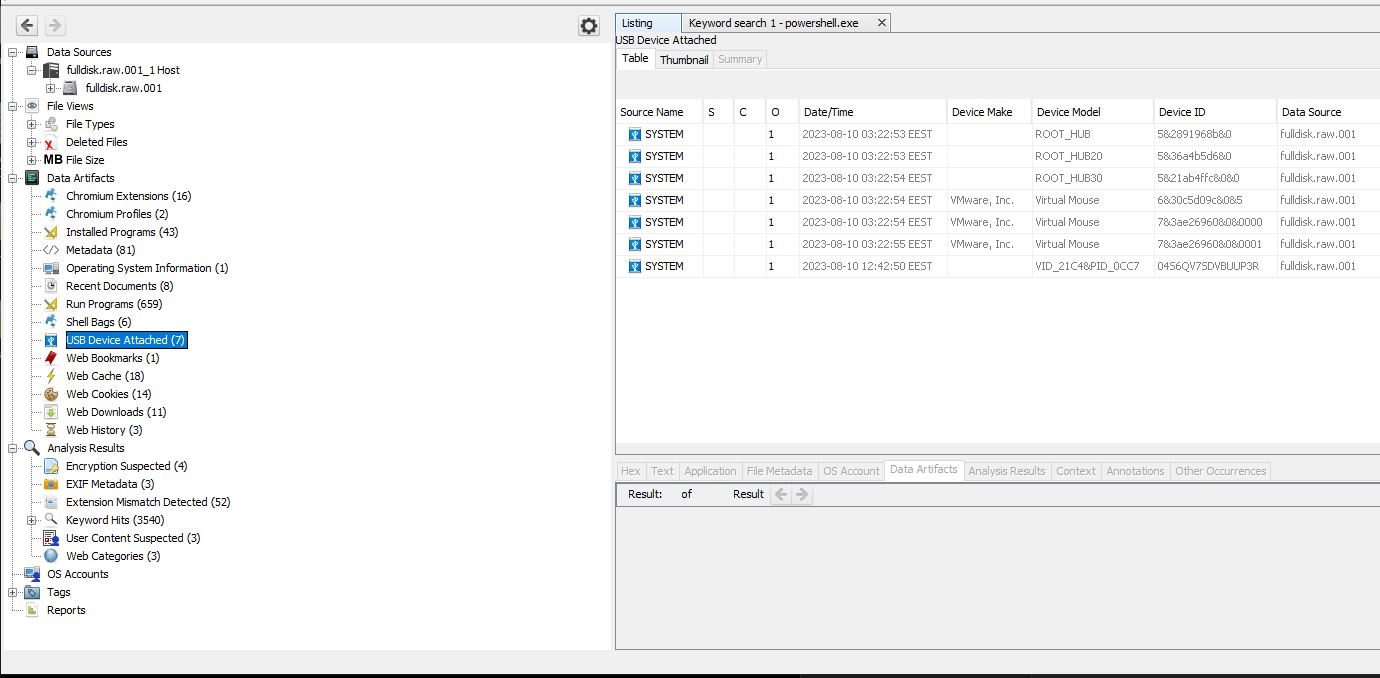
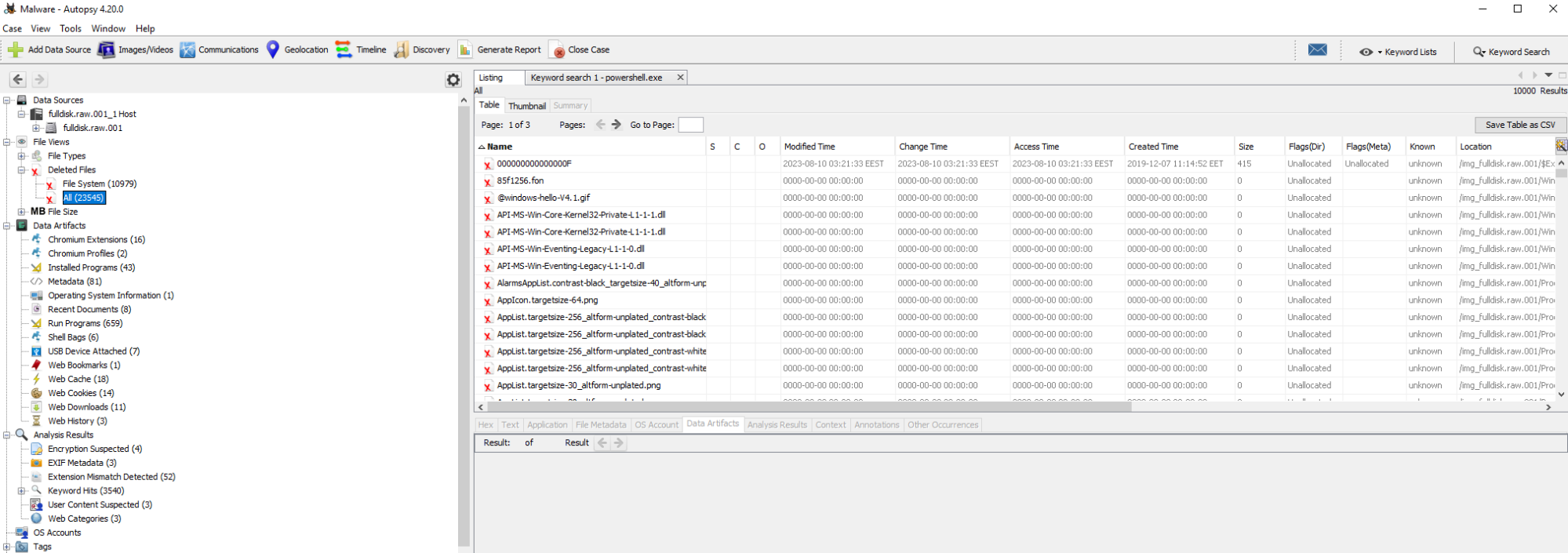
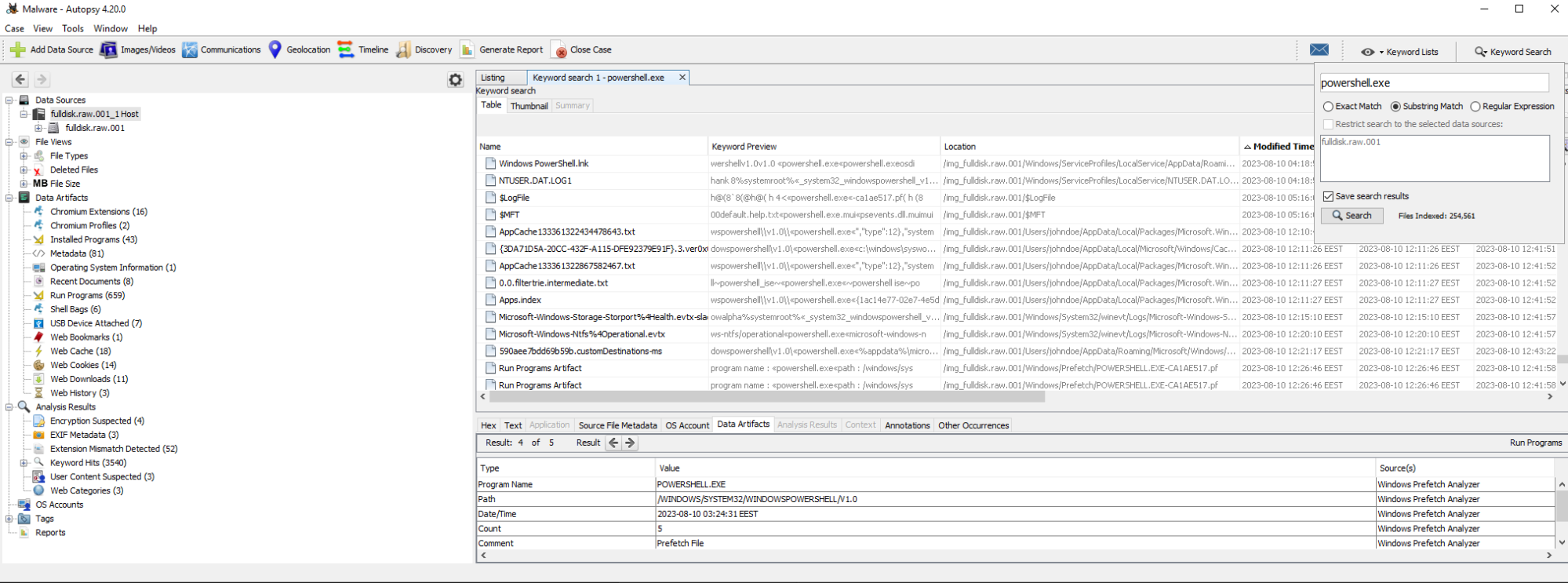
Autopsy is an open-source forensic platform built on The Sleuth Kit. It supports timeline analysis, keyword searches, web and email artifact extraction, deleted-file recovery, and known hash matching.
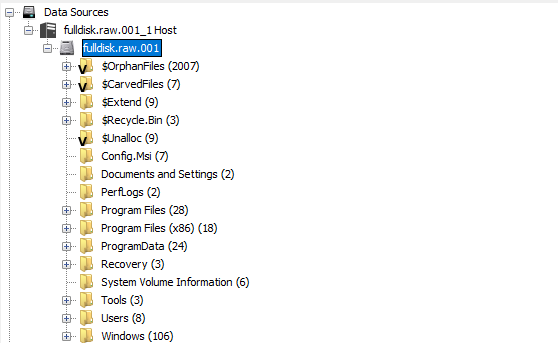
The following Autopsy screenshots come from the HTB Academy lab and are retained here as investigation references.
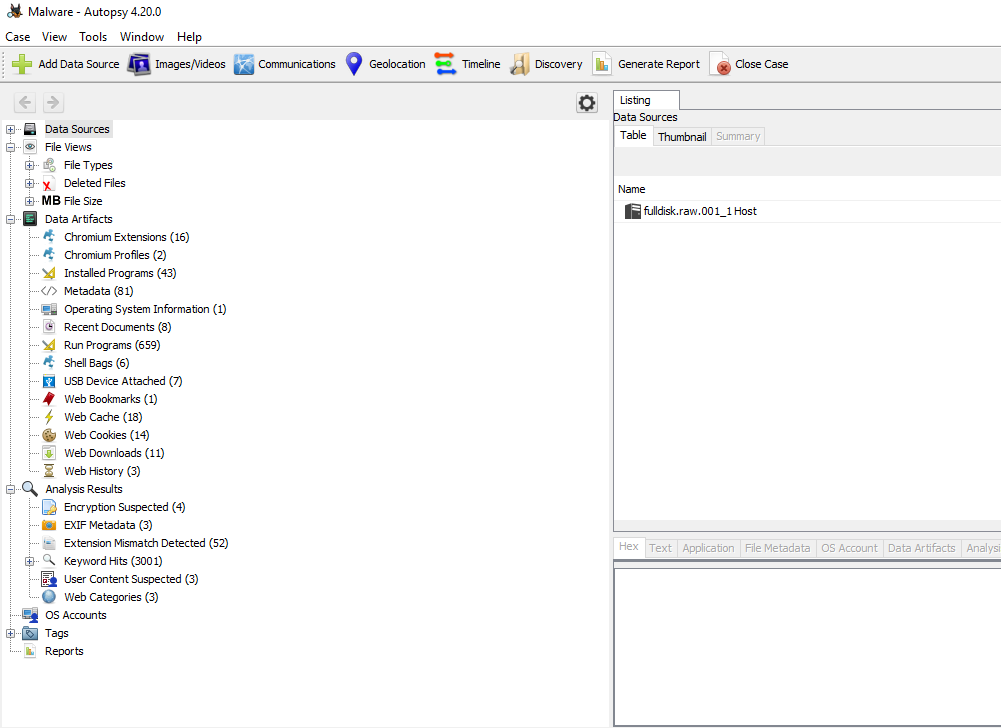
Click data sources for files and directories
Web Artifacts
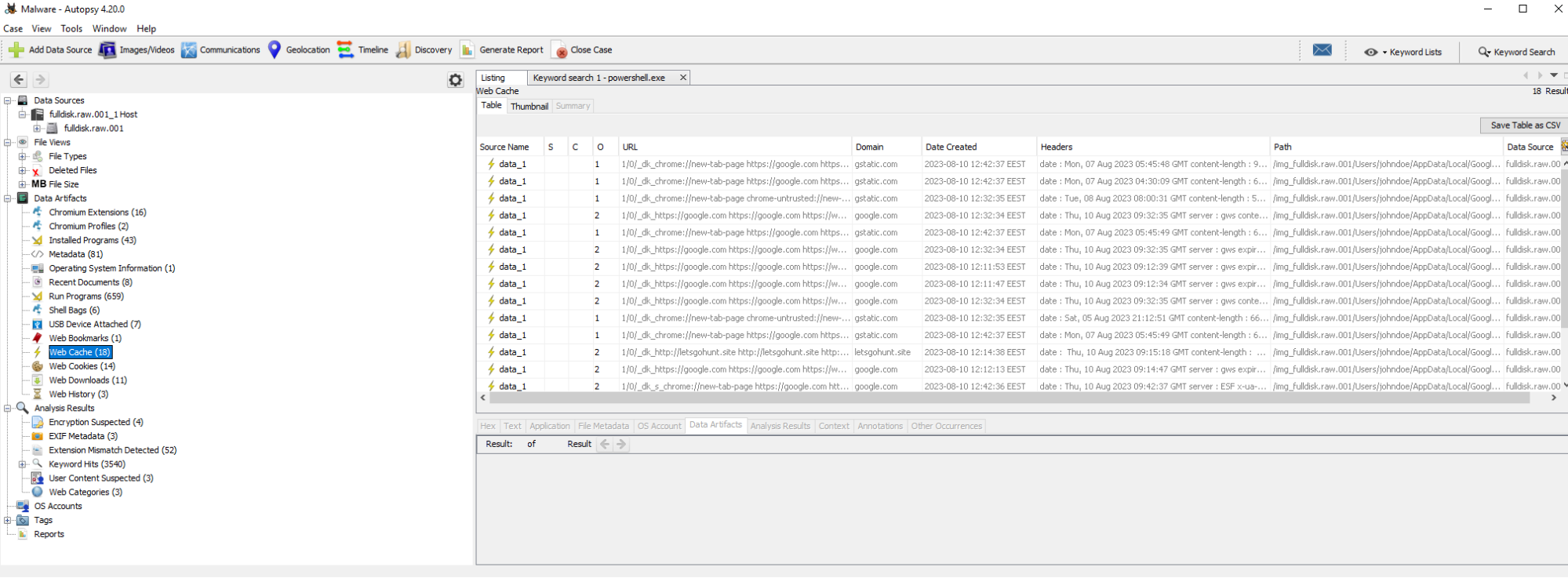
Check Attached Devices
Recover Deleted Files.
Conduct Keyword Searches
Timeline analysis
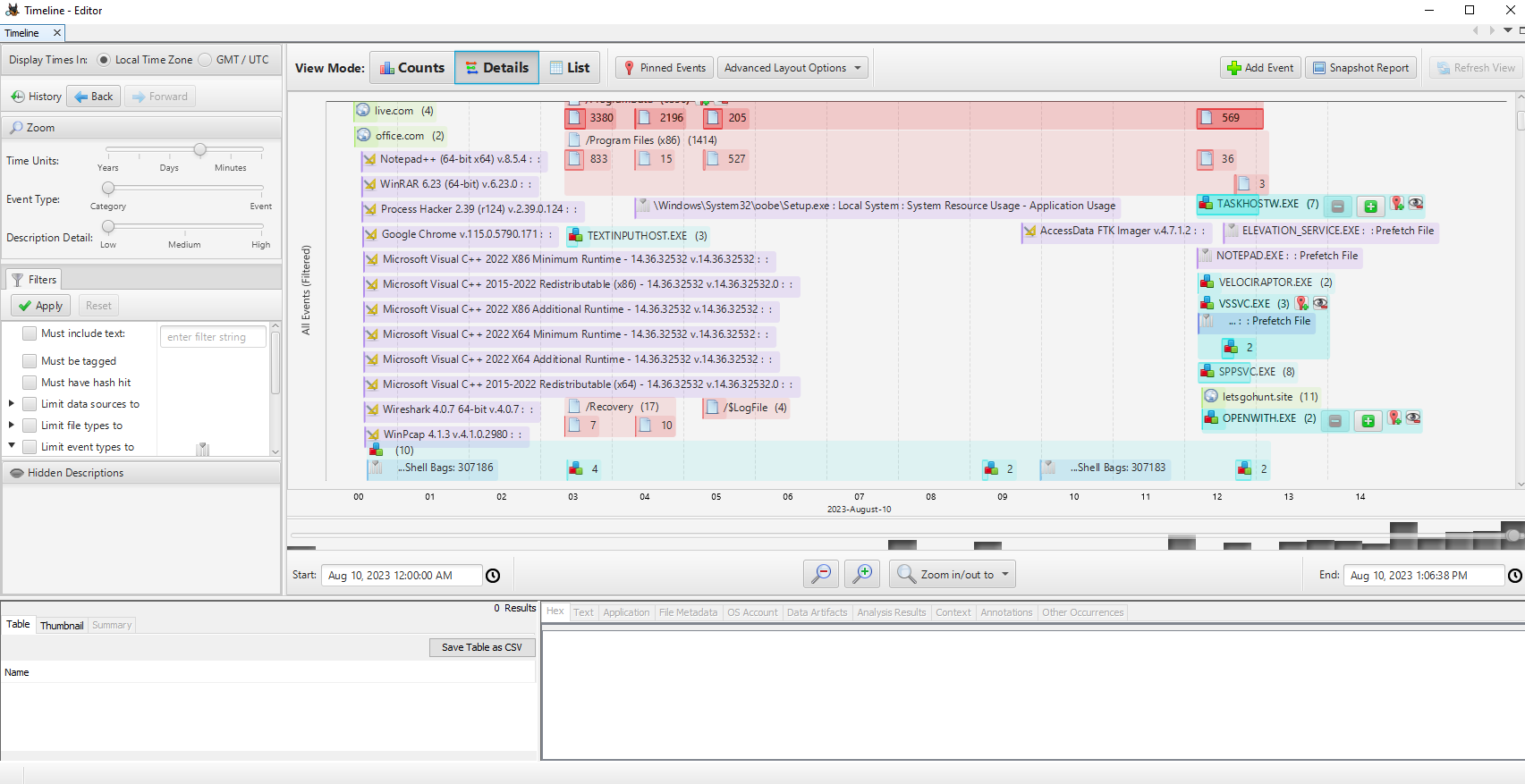
Rapid Triage Examination Tools
Eric Zimmerman’s toolset provides many of the parsers used throughout this triage workflow.
https://ericzimmerman.github.io/#!index.md
After installing the required .NET runtime, run the downloaded PowerShell installer script.
PS C:\Users\johndoe\Desktop\Get-ZimmermanTools> .\Get-ZimmermanTools.ps1
Tools Used
- Evidence location:
C:\Users\johndoe\Desktop\forensic_data- KAPE’s output location:
C:\Users\johndoe\Desktop\forensic_data\kape_output
- KAPE’s output location:
- Eric Zimmerman’s tools location:
C:\Users\johndoe\Desktop\Get-ZimmermanTools - Active@ Disk Editor’s location:
C:\Program Files\LSoft Technologies\Active@ Disk Editor - EQL’s location:
C:\Users\johndoe\Desktop\eqllib-master - RegRipper’s location:
C:\Users\johndoe\Desktop\RegRipper3.0-master
Every path below is from the HTB Academy lab.
NTFS Timeline Analysis
MACB Times in NTFS
MACB stands for Modified, Accessed, Changed, and Birth. The terminology and availability vary across file systems and APIs.
-
Modified (M): The file content was last changed.
-
Accessed (A): The file was last accessed. On modern Windows, updates may be delayed or disabled.
-
Changed (C): The MFT record metadata changed. This is not the file-creation timestamp.
-
Birth (B): The file was created in its current location.
NTFS Timestamp Notes
What Each Timestamp Means
-
Modified (M): When the file’s content or attributes were last changed.
-
Accessed (A): When the file was last opened or accessed.
-
Birth/Created (B): When the file was created in its current location.
General Rules
| Operation | Modified (M) | Accessed (A) | Created (B) |
|---|---|---|---|
| File Create | Updated | Updated | Updated |
| File Modify | Updated | Usually unchanged | Unchanged |
| File Copy | Inherited from source | May update | Set to copy time |
| File Access | Unchanged | May update | Unchanged |
Examples
File Create
report.txt is created at 10:00 AM.
-
Modified = 10:00 AM
-
Accessed = 10:00 AM
-
Created = 10:00 AM
File Modify
report.txt is edited at 11:00 AM.
-
Modified changes to 11:00 AM
-
Accessed usually remains unchanged
-
Created remains 10:00 AM
File Copy
report.txt is copied to another folder at 12:00 PM.
-
Modified keeps the original modification time
-
Accessed may update
-
Created changes to 12:00 PM
File Access
report.txt is opened at 1:00 PM without editing.
-
Modified remains unchanged
-
Accessed may change to 1:00 PM
-
Created remains unchanged
Quick Memory Rule
-
Create: All timestamps are set.
-
Modify: Only Modified changes.
-
Copy: Old Modified time, new Created time.
-
Access: Only Accessed may change.
Timestamp Storage
NTFS timestamps are stored in the Master File Table ($MFT) under:
-
$STANDARD_INFORMATION -
$FILE_NAME
Windows File Explorer normally displays timestamps from $STANDARD_INFORMATION.
Timestomping Investigation
Timestomping manipulates the timestamps shown by normal tools such as File Explorer to make a file look older or otherwise blend into the system.
https://attack.mitre.org/techniques/T1070/006/
Loading MFT from MFT explorer
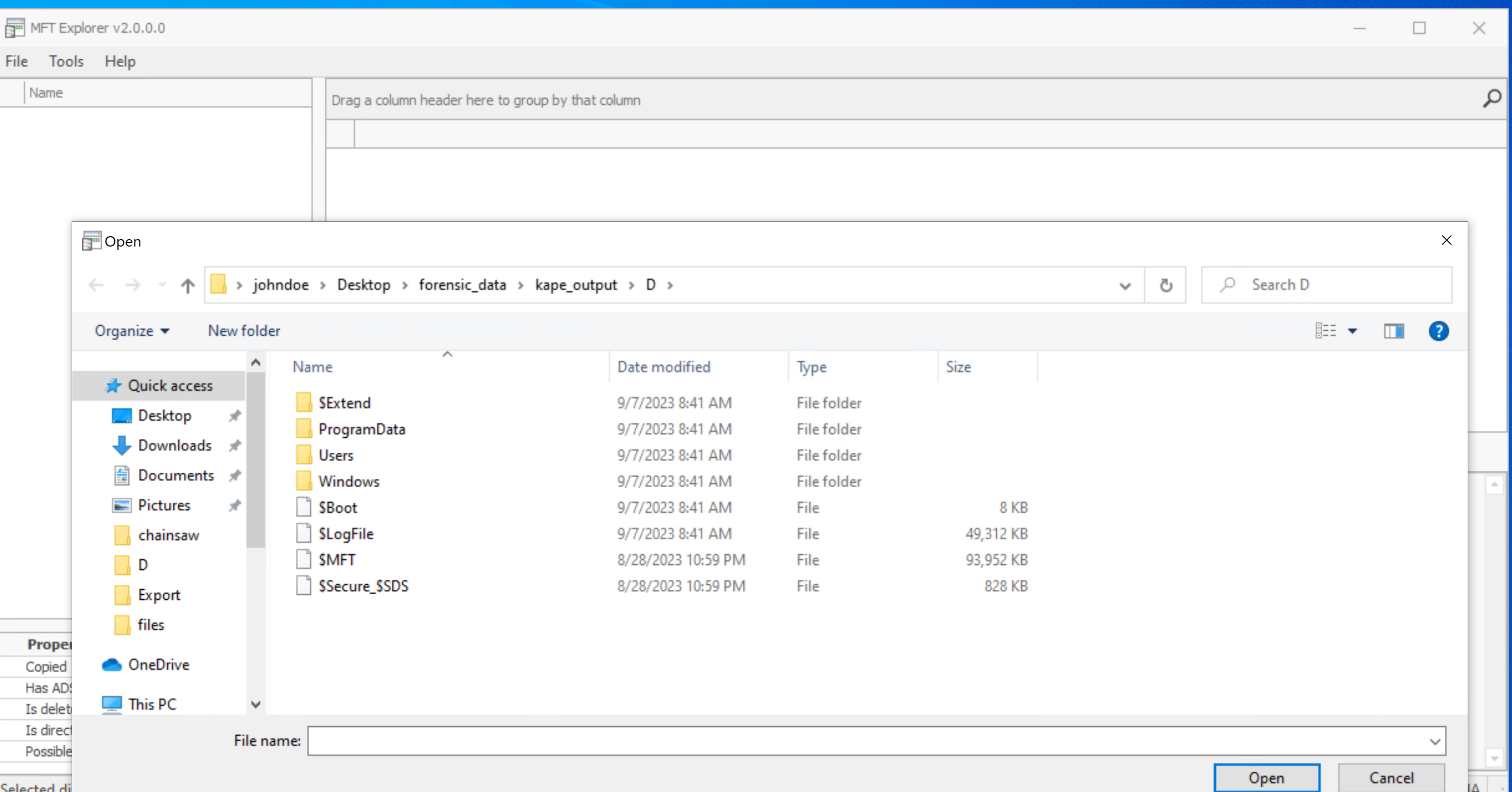
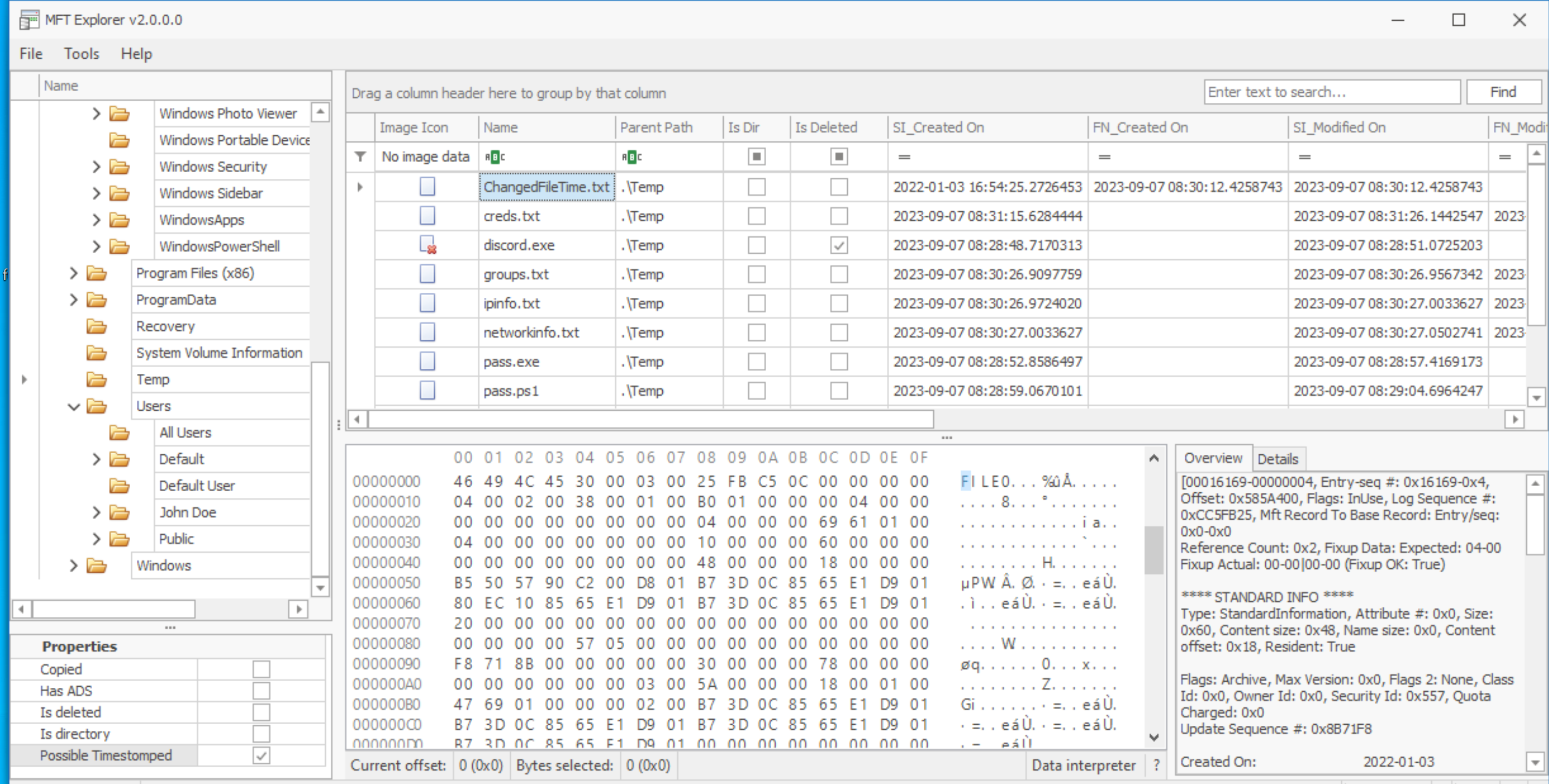
Note entry sequence on the bottom right 0x16169
The timestamps shown by File Explorer normally come from $STANDARD_INFORMATION.
I cross-checked them against $FILE_NAME using the MFT entry sequence noted above.
PS C:\Users\johndoe\Desktop\Get-ZimmermanTools\net6> .\MFTECmd.exe -f 'C:\Users\johndoe\Desktop\forensic_data\kape_output\D\$MFT' --de 0x16169
MFTECmd version 1.2.2.1

Author: Eric Zimmerman ([email protected])
https://github.com/EricZimmerman/MFTECmd

Command line: -f C:\Users\johndoe\Desktop\forensic_data\kape_output\D\$MFT --de 0x16169

Warning: Administrator privileges not found!

File type: Mft

Processed C:\Users\johndoe\Desktop\forensic_data\kape_output\D\$MFT in 6.8454 seconds

C:\Users\johndoe\Desktop\forensic_data\kape_output\D\$MFT: FILE records found: 93,615 (Free records: 287) File size: 91.8MB


Dumping details for file record with key 00016169-00000004

Entry-seq #: 0x16169-0x4, Offset: 0x585A400, Flags: InUse, Log seq #: 0xCC5FB25, Base Record entry-seq: 0x0-0x0
Reference count: 0x2, FixUp Data Expected: 04-00, FixUp Data Actual: 00-00 | 00-00 (FixUp OK: True)

**** STANDARD INFO ****
  Attribute #: 0x0, Size: 0x60, Content size: 0x48, Name size: 0x0, ContentOffset 0x18. Resident: True
  Flags: Archive, Max Version: 0x0, Flags 2: None, Class Id: 0x0, Owner Id: 0x0, Security Id: 0x557, Quota charged: 0x0, Update sequence #: 0x8B71F8

  Created On:         2022-01-03 16:54:25.2726453
  Modified On:        2023-09-07 08:30:12.4258743
  Record Modified On: 2023-09-07 08:30:12.4565632
  Last Accessed On:   2023-09-07 08:30:12.4258743

**** FILE NAME ****
  Attribute #: 0x3, Size: 0x78, Content size: 0x5A, Name size: 0x0, ContentOffset 0x18. Resident: True

  File name: CHANGE~1.TXT
  Flags: Archive, Name Type: Dos, Reparse Value: 0x0, Physical Size: 0x0, Logical Size: 0x0
  Parent Entry-seq #: 0x16947-0x2

  Created On:         2023-09-07 08:30:12.4258743
  Modified On:        2023-09-07 08:30:12.4258743
  Record Modified On: 2023-09-07 08:30:12.4258743
  Last Accessed On:   2023-09-07 08:30:12.4258743

**** FILE NAME ****
  Attribute #: 0x2, Size: 0x80, Content size: 0x68, Name size: 0x0, ContentOffset 0x18. Resident: True

  File name: ChangedFileTime.txt
  Flags: Archive, Name Type: Windows, Reparse Value: 0x0, Physical Size: 0x0, Logical Size: 0x0
  Parent Entry-seq #: 0x16947-0x2

  Created On:         2023-09-07 08:30:12.4258743
  Modified On:        2023-09-07 08:30:12.4258743
  Record Modified On: 2023-09-07 08:30:12.4258743
  Last Accessed On:   2023-09-07 08:30:12.4258743

**** DATA ****
  Attribute #: 0x1, Size: 0x18, Content size: 0x0, Name size: 0x0, ContentOffset 0x18. Resident: True

  Resident Data

  Data:

    ASCII:
    UNICODE:
User-mode timestomping commonly changes $STANDARD_INFORMATION. $FILE_NAME timestamps often retain the more reliable creation context.
The mismatch is evidence consistent with timestomping and should be correlated with other artifacts.
**** STANDARD INFO ****
  Attribute #: 0x0, Size: 0x60, Content size: 0x48, Name size: 0x0, ContentOffset 0x18. Resident: True
  Flags: Archive, Max Version: 0x0, Flags 2: None, Class Id: 0x0, Owner Id: 0x0, Security Id: 0x557, Quota charged: 0x0, Update sequence #: 0x8B71F8

  Created On:         2022-01-03 16:54:25.2726453
  Modified On:        2023-09-07 08:30:12.4258743
  Record Modified On: 2023-09-07 08:30:12.4565632
  Last Accessed On:   2023-09-07 08:30:12.4258743
SI Created On: 2022-01-03 16:54:25.2726453 =! FN Created On: 2023-09-07 08:30:12.4258743
**** FILE NAME ****
  Attribute #: 0x2, Size: 0x80, Content size: 0x68, Name size: 0x0, ContentOffset 0x18. Resident: True

  File name: ChangedFileTime.txt
  Flags: Archive, Name Type: Windows, Reparse Value: 0x0, Physical Size: 0x0, Logical Size: 0x0
  Parent Entry-seq #: 0x16947-0x2

  Created On:         2023-09-07 08:30:12.4258743
  Modified On:        2023-09-07 08:30:12.4258743
  Record Modified On: 2023-09-07 08:30:12.4258743
  Last Accessed On:   2023-09-07 08:30:12.4258743
MFT Analysis
I treated the MFT as the file system’s metadata database: every file and directory receives a record describing its structure and attributes.
The $MFT helps reconstruct file and directory activity, including creation, modification, deletion, and-in the right context-access.
MFT Explorer exposes filenames, timestamps, sizes, permissions, and attributes in a navigable view.
Its GUI makes the records easy to navigate without hiding the underlying artifact fields.
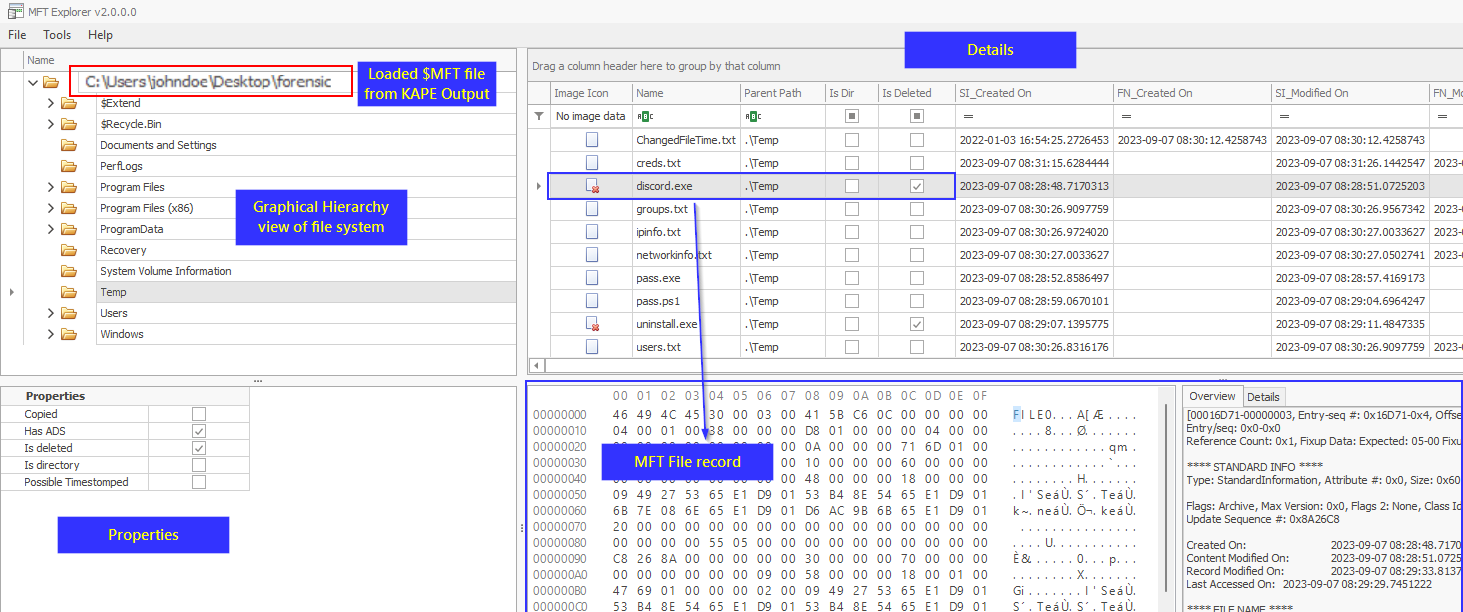
(Source image form HTB)
Note: It’s worth noting that MFT records, once created, aren’t discarded. Instead, as new files and directories emerge, new records are added to the MFT. Records corresponding to deleted files are flagged as “free” and stand ready for reuse.
Structure of MFT File Record
MFT File Record Structure
-
File Record Header: Record metadata such as signature and sequence number.
-
Standard Information: Timestamps, file attributes, and security information.
-
File Name: Filename, length, namespace, and Unicode data.
-
Data Attribute: Shows whether file data is resident or non-resident.
-
File Data: Small files may be stored inside the MFT record. Larger files reference disk clusters.
-
Additional Attributes: May include security descriptors, object IDs, indexes, and volume information.
The image below shows the relationship between those record components.
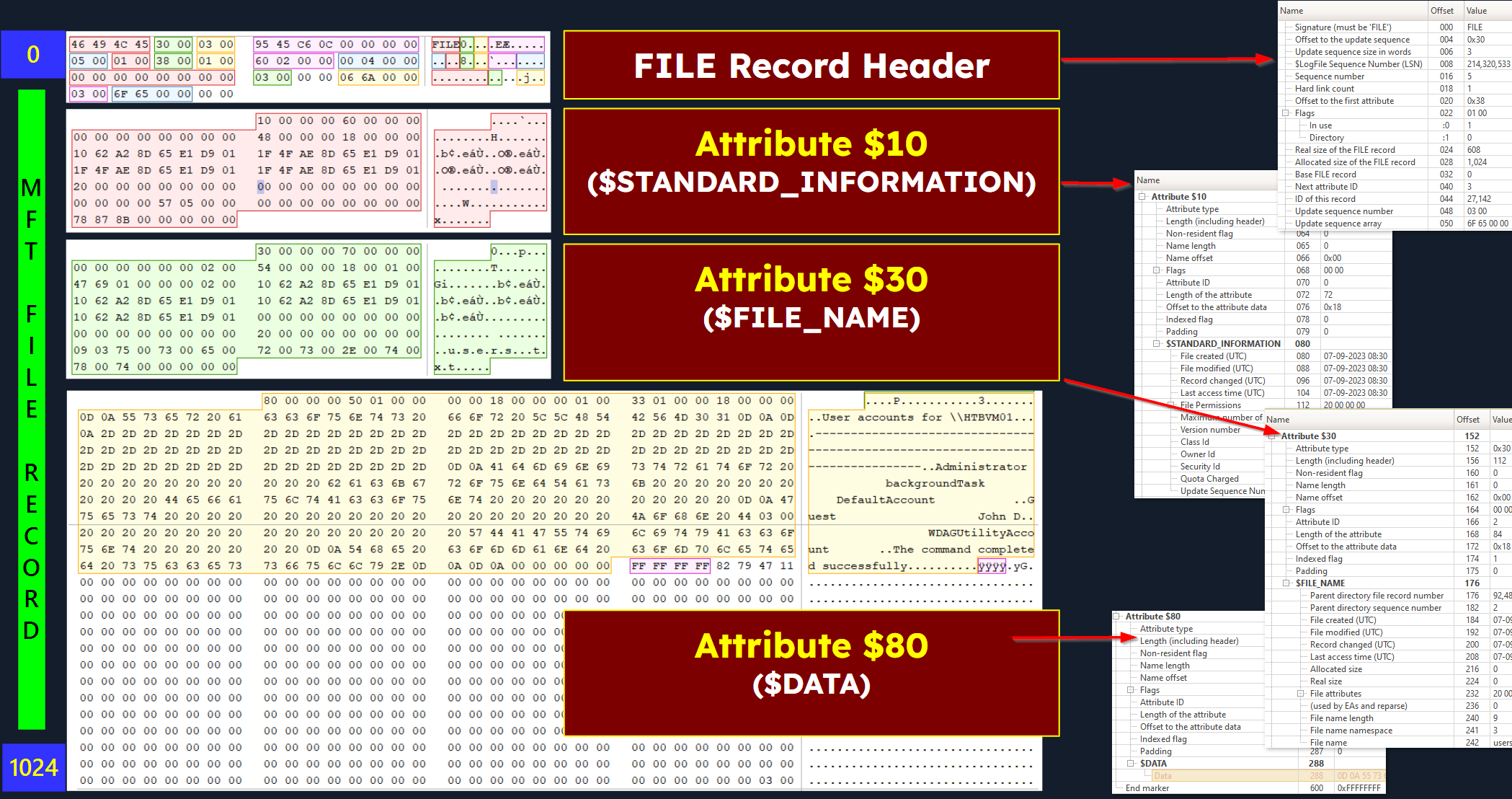
File Record Header
Contains metadata about the file record itself. Includes fields like signature, sequence number, and other administrative data.
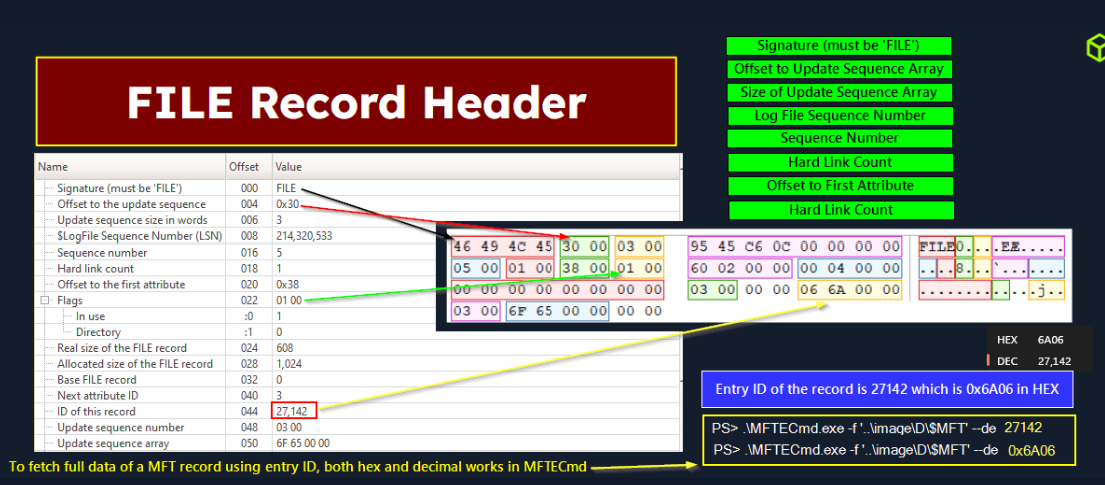
MFT File Record Header
-
Signature: Usually
FILE.BAADindicates a damaged record. -
USA Offset: Location of the Update Sequence Array used for record integrity.
-
USA Size: Number of entries in the Update Sequence Array.
-
Log Sequence Number: Identifies the latest logged update to the record.
-
Sequence Number: Increases when the MFT record is reused.
-
Hard Link Count: Number of directory entries pointing to the record.
-
First Attribute Offset: Location where the record’s first attribute begins.
The structure can be summarized as:
$MFT └── MFT File Record ├── File Record Header │ ├── Signature │ ├── Log sequence number │ ├── Sequence number │ ├── Hard link count │ ├── First attribute offset │ ├── Record flags │ └── Record size │ └── NTFS Attributes ├── $STANDARD_INFORMATION ├── $FILE_NAME ├── $DATA └── Other optional attributes
An MFT record can contain many typed attributes:
Each attribute signifies some entry information, identified by type.
| Type | Attribute | Description | | ———– | ———————- | ——————————————————————————– | | 0x10 (16) | $STANDARD_INFORMATION | General information - flags, MAC times, owner, and security id. | | 0x20 (32) | $ATTRIBUTE_LIST | Pointers to other attributes and a list of nonresident attributes. | | 0x30 (48) | $FILE_NAME | File name - (Unicode) and outdated MAC times | | 0x40 (64) | $VOLUME_VERSION | Volume information - NTFS v1.2 only and Windows NT, no longer used | | 0x40 (64) | $OBJECT_ID | 16B unique identifier - for file or directory (NTFS 3.0+, Windows 2000+) | | 0x50 (80) | $SECURITY_DESCRIPTOR | File’s access control list and security properties | | 0x60 (96) | $VOLUME_NAME | Volume name | | 0x70 (112) | $VOLUME_INFORMATION | File system version and other information | | 0x80 (128) | $DATA | File contents | | 0x90 (144) | $INDEX_ROOT | Root node of an index tree | | 0xA0 (160) | $INDEX_ALLOCATION | Nodes of an index tree - with a root in $INDEX_ROOT | | 0xB0 (176) | $BITMAP | Bitmap - for the $MFT file and for indexes (directories) | | 0xC0 (192) | $SYMBOLIC_LINK | Soft link information - (NTFS v1.2 only and Windows NT) | | 0xC0 (192) | $REPARSE_POINT | Data about a reparse point - used for a soft link (NTFS 3.0+, Windows 2000+) | | 0xD0 (208) | $EA_INFORMATION | Used for backward compatibility with OS/2 applications (HPFS) | | 0xE0 (224) | $EA | Used for backward compatibility with OS/2 applications (HPFS) | | 0x100 (256) | $LOGGED_UTILITY_STREAM | Keys and other information about encrypted attributes (NTFS 3.0+, Windows 2000+) | I opened a file record in the disk editor to connect the parsed fields back to their raw representation.
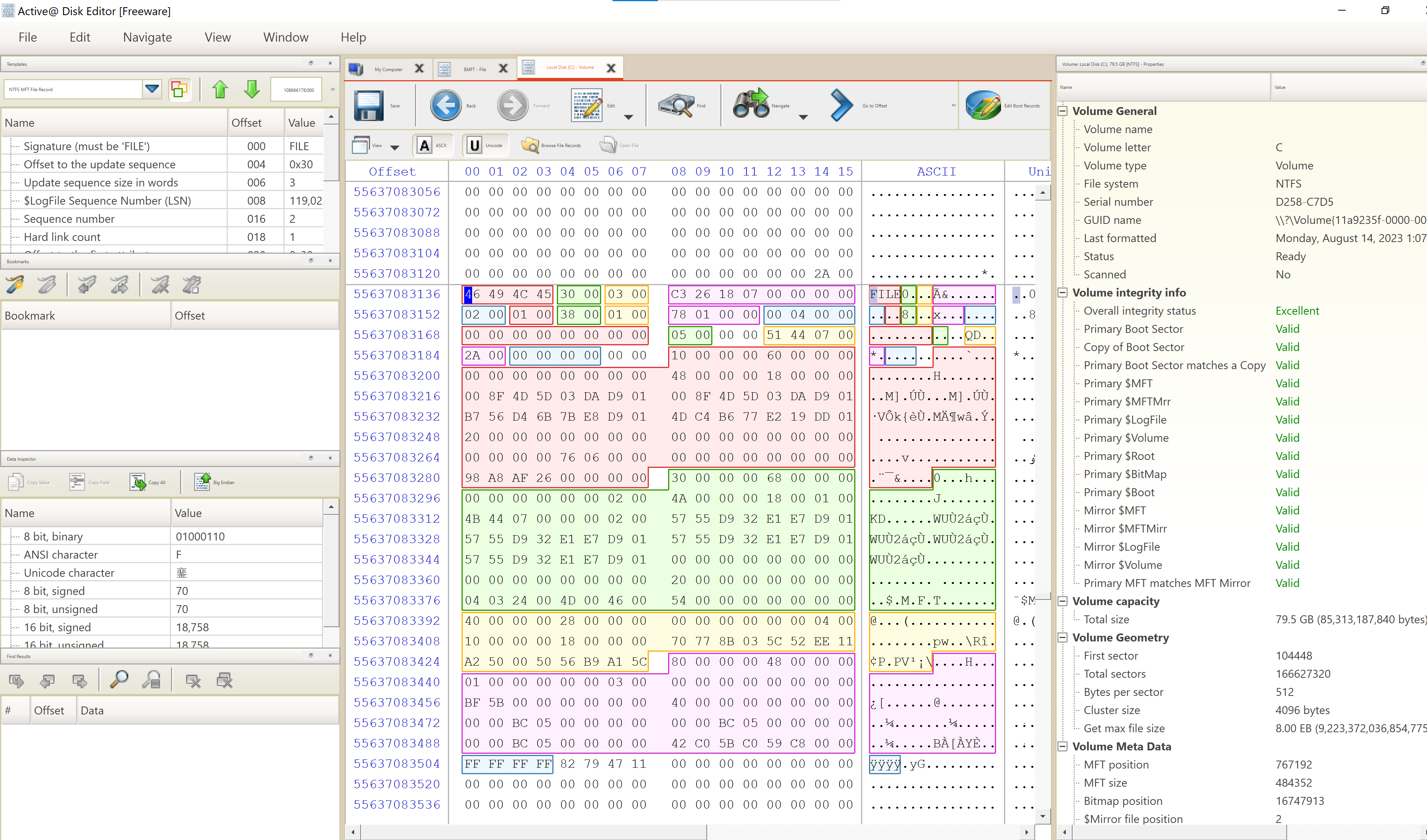
This includes a hexadecimal representation of the MFT record, complete with its header and attributes.
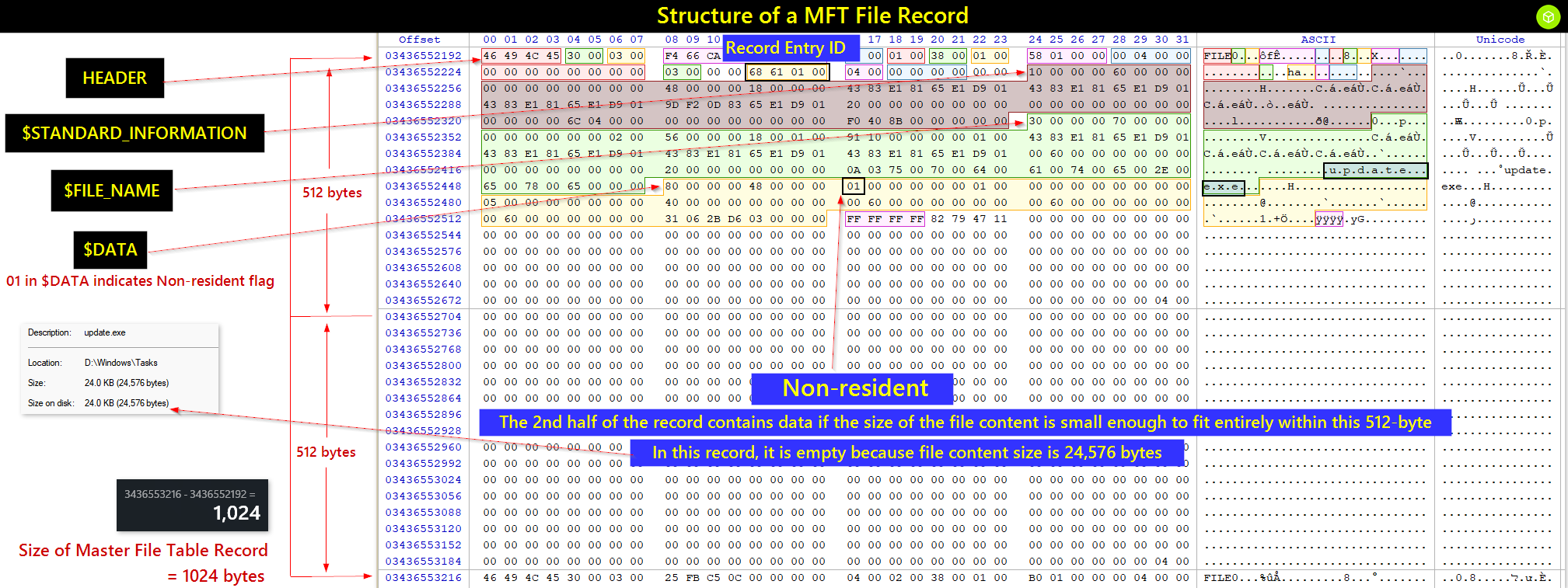
When parsing the entry in MFTECmd, this is how the non-resident data header appears.

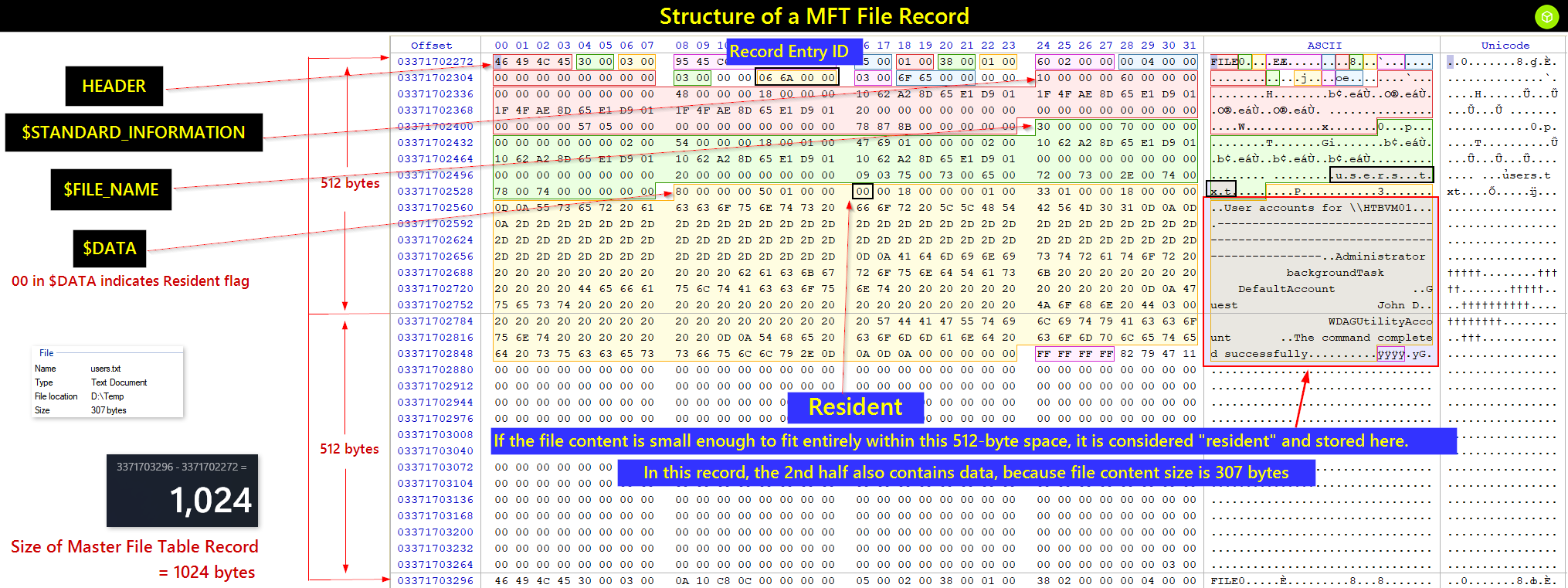
When parsing the entry in MFTECmd, this is how the resident data header appears.
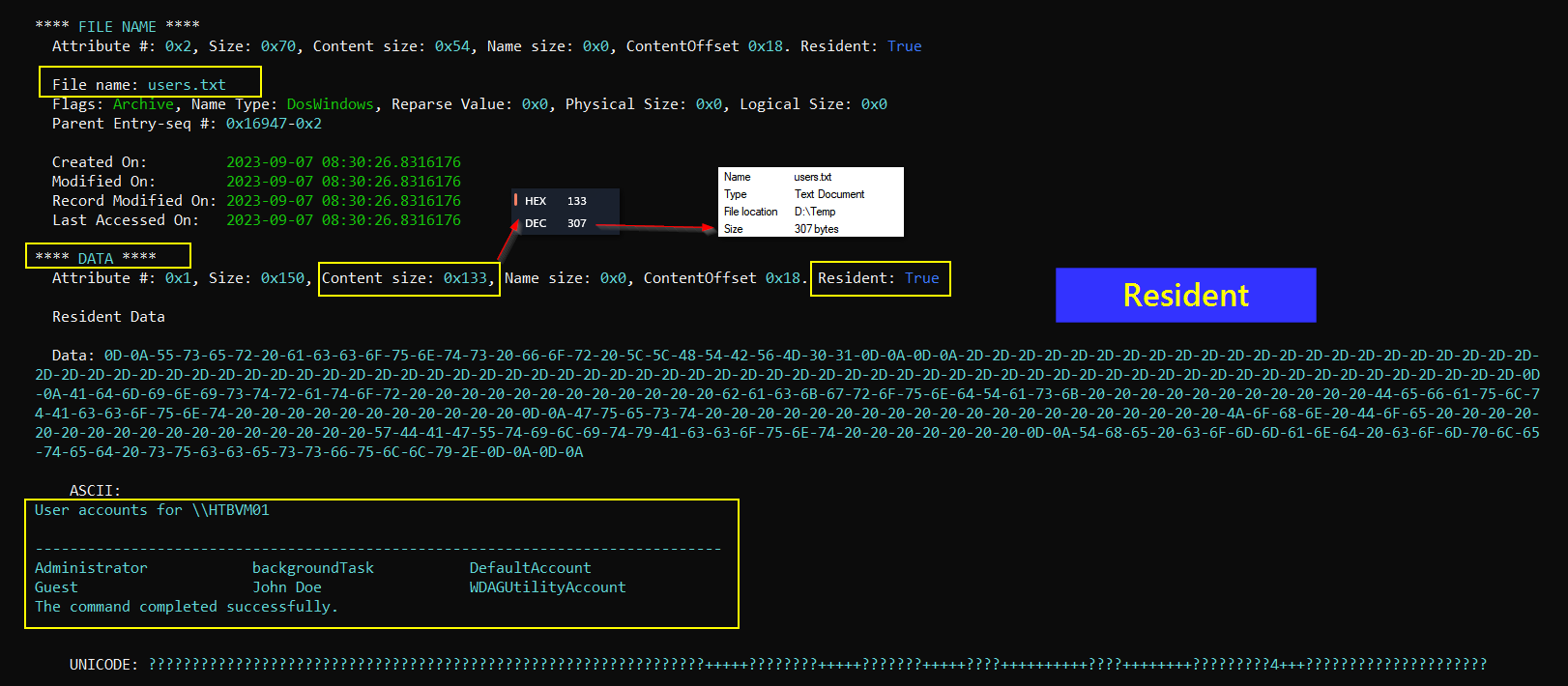
Zone.Identifier data in MFT File Record
Zone.Identifier is an NTFS Alternate Data Stream used by Windows attachment-security features to record the security zone and, sometimes, the source of a downloaded file.
When a file is fetched from the internet, Windows assigns it a Zone Identifier (ZoneId).
For instance, internet-sourced files typically bear a ZoneId of 3, denoting the Internet Zone.
Below, Autoruns.zip has a hidden Zone.Identifier stream. It shows that Windows marked the archive as downloaded and may preserve the source URL.
PS C:\Users\johndoe\Downloads> Get-Item * -Stream Zone.Identifier -ErrorAction SilentlyContinue


PSPath        : Microsoft.PowerShell.Core\FileSystem::C:\Users\johndoe\Downloads\Autoruns.zip:Zone.Identifier
PSParentPath  : Microsoft.PowerShell.Core\FileSystem::C:\Users\johndoe\Downloads
PSChildName   : Autoruns.zip:Zone.Identifier
PSDrive       : C
PSProvider    : Microsoft.PowerShell.Core\FileSystem
PSIsContainer : False
FileName      : C:\Users\johndoe\Downloads\Autoruns.zip
Stream        : Zone.Identifier
Length        : 130

PSPath        : Microsoft.PowerShell.Core\FileSystem::C:\Users\johndoe\Downloads\chainsaw_all_platforms+rules+examples.zip:Zone.Ident
                ifier
PSParentPath  : Microsoft.PowerShell.Core\FileSystem::C:\Users\johndoe\Downloads
PSChildName   : chainsaw_all_platforms+rules+examples.zip:Zone.Identifier
PSDrive       : C
PSProvider    : Microsoft.PowerShell.Core\FileSystem
PSIsContainer : False
FileName      : C:\Users\johndoe\Downloads\chainsaw_all_platforms+rules+examples.zip
Stream        : Zone.Identifier
Length        : 679
To inspect the Zone.Identifier for one file:
PS C:\Users\johndoe\Downloads> Get-Content .\Autoruns.zip -Stream Zone.Identifier
[ZoneTransfer]
ZoneId=3
ReferrerUrl=https://learn.microsoft.com/
HostUrl=https://download.sysinternals.com/files/Autoruns.zip
PS C:\Users\johndoe\Downloads>
To enumerate the streams for every file in a folder:
PS C:\Users\johndoe\Downloads> Get-Content .\Autoruns.zip -Stream Zone.Identifier
[ZoneTransfer]
ZoneId=3
ReferrerUrl=https://learn.microsoft.com/
HostUrl=https://download.sysinternals.com/files/Autoruns.zip
PS C:\Users\johndoe\Downloads> Get-Content * -Stream Zone.Identifier -ErrorAction SilentlyContinue
[ZoneTransfer]
ZoneId=3
ReferrerUrl=https://learn.microsoft.com/
HostUrl=https://download.sysinternals.com/files/Autoruns.zip
[ZoneTransfer]
ZoneId=3
ReferrerUrl=https://github.com/WithSecureLabs/chainsaw/releases
HostUrl=https://objects.githubusercontent.com/github-production-release-asset-2e65be/395658506/222c726c-0fe8-4a13-82c4-a4c9a45875c6?X-Amz-Algorithm=AWS4-HMAC-SHA256&X-Amz-Credential=AKIAIWNJYAX4CSVEH53A%2F20230813%2Fus-east-1%2Fs3%2Faws4_request&X-Amz-Date=20230813T181953Z&X-Amz-Expires=300&X-Amz-Signature=0968cc87b63f171b60eb525362c11cb6463ac5681db50dbb7807cc5384fcb771&X-Amz-SignedHeaders=host&actor_id=0&key_id=0&repo_id=395658506&response-content-disposition=attachment%3B%20filename%3Dchainsaw_all_platforms%2Brules%2Bexamples.zip&response-content-type=application%2Foctet-stream
[ZoneTransfer]
ZoneId=3
HostUrl=https://github.com/
[ZoneTransfer]
ZoneId=3
ReferrerUrl=https://github.com/PoorBillionaire/USN-Journal-Parser
HostUrl=https://codeload.github.com/PoorBillionaire/USN-Journal-Parser/zip/refs/heads/master
[ZoneTransfer]
ZoneId=3
ReferrerUrl=https://github.com/volatilityfoundation/volatility3
HostUrl=https://codeload.github.com/volatilityfoundation/volatility3/zip/refs/heads/develop
Mark of the Web (MotW) is the Windows security label applied to files obtained from the internet or another untrusted zone.
It is usually stored in the hidden Zone.Identifier stream.
Example:
report.docx
└── Zone.Identifier
    ├── ZoneId=3
    └── HostUrl=https://example.com/report.docx
Because the file has MotW, Microsoft Word may open it in Protected View.
Forensics use it to identify:
- Whether a file came from the internet
- The possible source URL
- How or where the file was obtained
Note: MotW is security metadata, not part of the file’s primary content. A recovered stream may begin with: ZoneId=3 ReferrerUrl=http://10.10.10.10:443/ HostUrl=http://10.10.10.10:443/pass.exe below
PS C:\Users\johndoe\Desktop\Get-ZimmermanTools\net6> .\MFTECmd.exe -f 'C:\Users\johndoe\Desktop\forensic_data\kape_output\D\$MFT' --de 0x0x69f1
MFTECmd version 1.2.2.1

Author: Eric Zimmerman ([email protected])
https://github.com/EricZimmerman/MFTECmd

Command line: -f C:\Users\johndoe\Desktop\forensic_data\kape_output\D\$MFT --de 0x0x69f1

Warning: Administrator privileges not found!

File type: Mft

Processed C:\Users\johndoe\Desktop\forensic_data\kape_output\D\$MFT in 1.6430 seconds

C:\Users\johndoe\Desktop\forensic_data\kape_output\D\$MFT: FILE records found: 93,615 (Free records: 287) File size: 91.8MB


Dumping details for file record with key 000069F1-0000000C

Entry-seq #: 0x69F1-0xC, Offset: 0x1A7C400, Flags: InUse, Log seq #: 0xCC9EB3E, Base Record entry-seq: 0x0-0x0
Reference count: 0x1, FixUp Data Expected: 04-00, FixUp Data Actual: 0D-0A | 00-00 (FixUp OK: True)

**** STANDARD INFO ****
  Attribute #: 0x0, Size: 0x60, Content size: 0x48, Name size: 0x0, ContentOffset 0x18. Resident: True
  Flags: Archive, Max Version: 0x0, Flags 2: None, Class Id: 0x0, Owner Id: 0x0, Security Id: 0x555, Quota charged: 0x0, Update sequence #: 0x8A2518

  Created On:         2023-09-07 08:28:52.8586497
  Modified On:        2023-09-07 08:28:57.4169173
  Record Modified On: 2023-09-07 08:29:33.8137195
  Last Accessed On:   2023-09-07 08:29:34.4386419

**** FILE NAME ****
  Attribute #: 0x9, Size: 0x70, Content size: 0x52, Name size: 0x0, ContentOffset 0x18. Resident: True

  File name: pass.exe
  Flags: Archive, Name Type: DosWindows, Reparse Value: 0x0, Physical Size: 0x14B000, Logical Size: 0x14AE00
  Parent Entry-seq #: 0x16947-0x2

  Created On:         2023-09-07 08:28:52.8586497
  Modified On:        2023-09-07 08:28:57.4169173
  Record Modified On: 2023-09-07 08:28:57.4169173
  Last Accessed On:   2023-09-07 08:28:57.4169173

**** DATA ****
  Attribute #: 0x4, Size: 0x58, Content size: 0x0, Name size: 0x0, ContentOffset 0x0. Resident: False

  Non-Resident Data
  Starting Virtual Cluster #: 0x0, Ending Virtual Cluster #: 0x14A, Allocated Size: 0x14B000, Actual Size: 0x14AE00, Initialized Size: 0x14AE00

  DataRuns Entries (Cluster offset -> # of clusters)
  0x3F4F0                          ->      0x70
  0xFFFFFFFFFFFFEABE               ->      0x1B
  0xFFFFFFFFFFFD8ACB               ->      0xAA
  0x1FB909                         ->      0x16

**** DATA ****
  Attribute #: 0x8, Size: 0xA0, Content size: 0x68, Name size: 0xF, ContentOffset 0x38. Resident: True
  Name: Zone.Identifier

  Resident Data

  Data: 5B-5A-6F-6E-65-54-72-61-6E-73-66-65-72-5D-0D-0A-5A-6F-6E-65-49-64-3D-33-0D-0A-52-65-66-65-72-72-65-72-55-72-6C-3D-68-74-74-70-3A-2F-2F-31-30-2E-31-30-2E-31-30-2E-31-30-3A-34-34-33-2F-0D-0A-48-6F-73-74-55-72-6C-3D-68-74-74-70-3A-2F-2F-31-30-2E-31-30-2E-31-30-2E-31-30-3A-34-34-33-2F-70-61-73-73-2E-65-78-65-0D-0A

    ASCII:   [ZoneTransfer]
ZoneId=3
ReferrerUrl=http://10.10.10.10:443/
HostUrl=http://10.10.10.10:443/pass.exe

    UNICODE: ????????????????????????????????????????????????????

PS C:\Users\johndoe\Desktop\Get-ZimmermanTools\net6>
Analyzing with Timeline Explorer
- Eric Zimmerman forensic tool for analyzing timeline data.
- Loads timestamped CSV files by drag and drop.
- Displays events in chronological order.
- Helps reconstruct what happened before and after an incident.
- Supports filtering by time, event type, and keywords.
- Useful for searching and correlating related system activity.
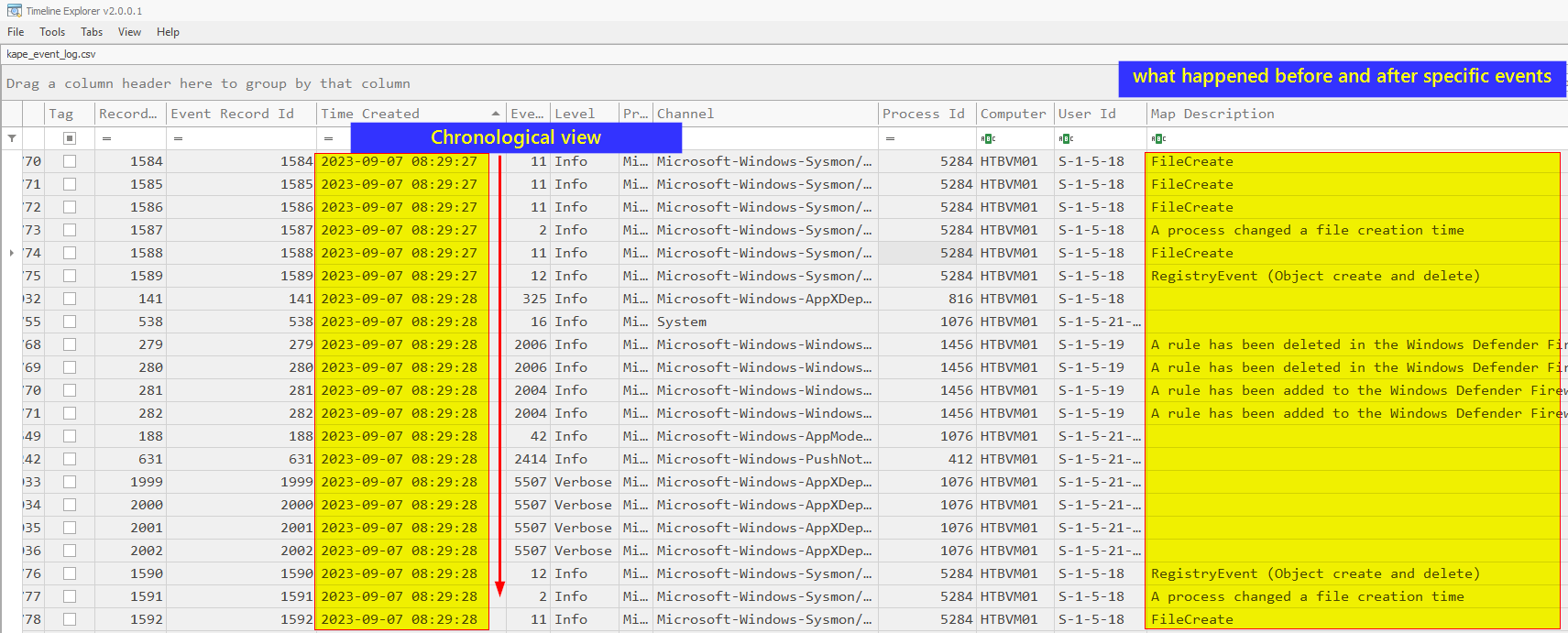
USN Journal
- NTFS change journal that records file and folder activity.
- Tracks actions such as create, rename, delete, and data overwrite.
- Useful in forensics for reconstructing file-system changes.
- Stored as
$UsnJrnl:$J.
The USN Journal can be correlated with the MFT to recognize file-operation patterns.
A copied file commonly produces the following timestamp pattern:
| Timestamp | Result | | ——————— | —————————————— | | M – Modified | Usually inherited from the original file | | A – Accessed | May update to the copy/access time | | C – MFT Changed | Updated when the new MFT record is created | | B – Birth/Created | Set to the time the copy was created |
Analyzing the USN Journal Using MFTECmd
PS C:\Users\johndoe\Desktop\Get-ZimmermanTools\net6> .\MFTECmd.exe -f 'C:\Users\johndoe\Desktop\forensic_data\kape_output\D\$Extend\$J' --csv C:\Users\johndoe\Desktop\forensic_data\mft_analysis\ --csvf MFT-J.csv
MFTECmd version 1.2.2.1

Author: Eric Zimmerman ([email protected])
https://github.com/EricZimmerman/MFTECmd

Command line: -f C:\Users\johndoe\Desktop\forensic_data\kape_output\D\$Extend\$J --csv C:\Users\johndoe\Desktop\forensic_data\mft_analysis\ --csvf MFT-J.csv

Warning: Administrator privileges not found!

File type: UsnJournal


Processed C:\Users\johndoe\Desktop\forensic_data\kape_output\D\$Extend\$J in 0.1016 seconds

Usn entries found in C:\Users\johndoe\Desktop\forensic_data\kape_output\D\$Extend\$J: 89,704
        CSV output will be saved to C:\Users\johndoe\Desktop\forensic_data\mft_analysis\MFT-J.csv
I used Timeline Explorer to isolate the file-operation sequence.
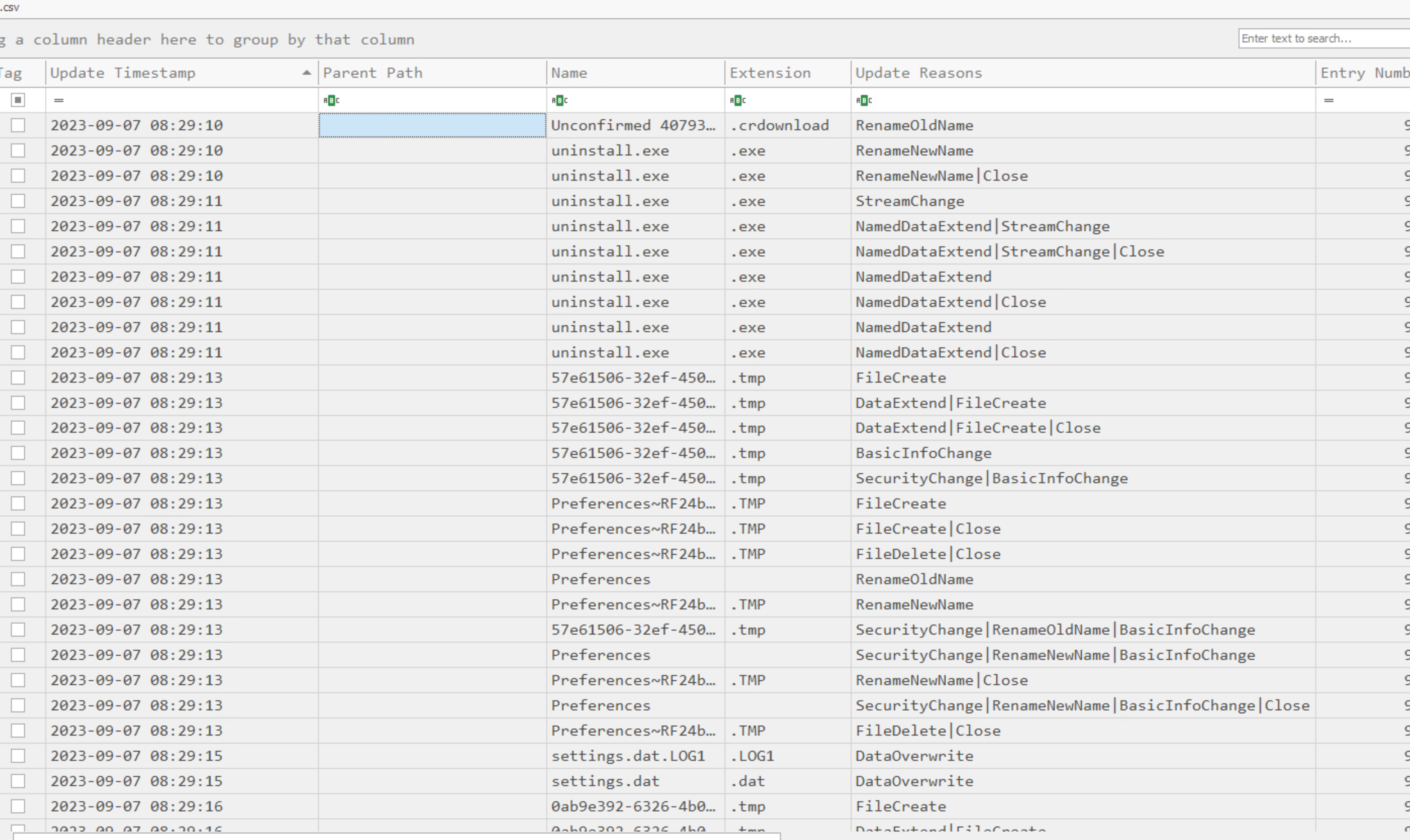
By applying a filter on the Entry Number 93866, which corresponds to the Entry ID for uninstall.exe, we can glean the nature of modifications executed on this specific file.
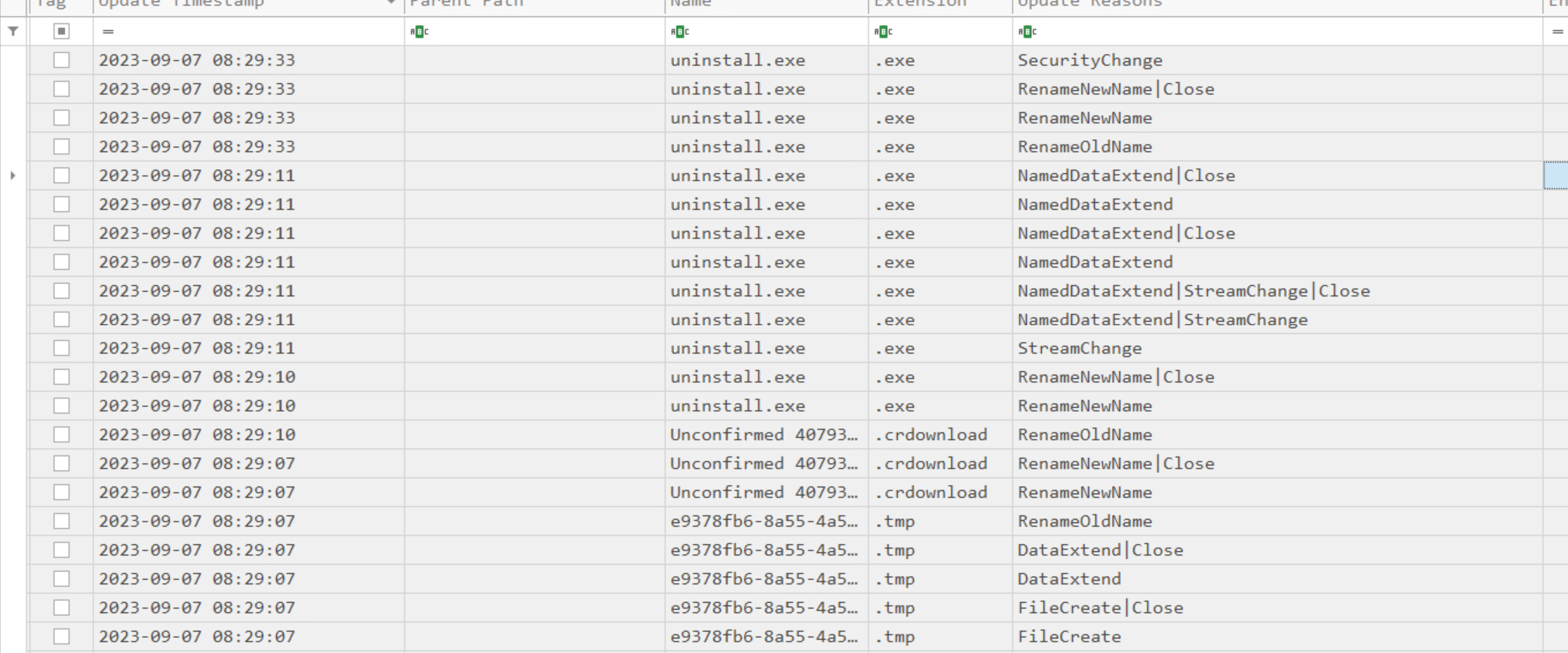
The .crdownload extension indicates a partial Chromium-family browser download.
That makes Zone.Identifier a useful pivot for the original source IP or domain.
I pivoted back to the MFT using that entry number.
PS C:\Users\johndoe\Desktop\Get-ZimmermanTools\net6> .\MFTECmd.exe -f 'C:\Users\johndoe\Desktop\forensic_data\kape_output\D\$MFT' --csv C:\Users\johndoe\Desktop\forensic_data\mft_analysis\ --csvf MFT.csv
MFTECmd version 1.2.2.1

Author: Eric Zimmerman ([email protected])
https://github.com/EricZimmerman/MFTECmd

Command line: -f C:\Users\johndoe\Desktop\forensic_data\kape_output\D\$MFT --csv C:\Users\johndoe\Desktop\forensic_data\mft_analysis\ --csvf MFT.csv

Warning: Administrator privileges not found!

File type: Mft

Processed C:\Users\johndoe\Desktop\forensic_data\kape_output\D\$MFT in 1.4854 seconds

C:\Users\johndoe\Desktop\forensic_data\kape_output\D\$MFT: FILE records found: 93,615 (Free records: 287) File size: 91.8MB
        CSV output will be saved to C:\Users\johndoe\Desktop\forensic_data\mft_analysis\MFT.csv
I then loaded the parsed output into Timeline Explorer.
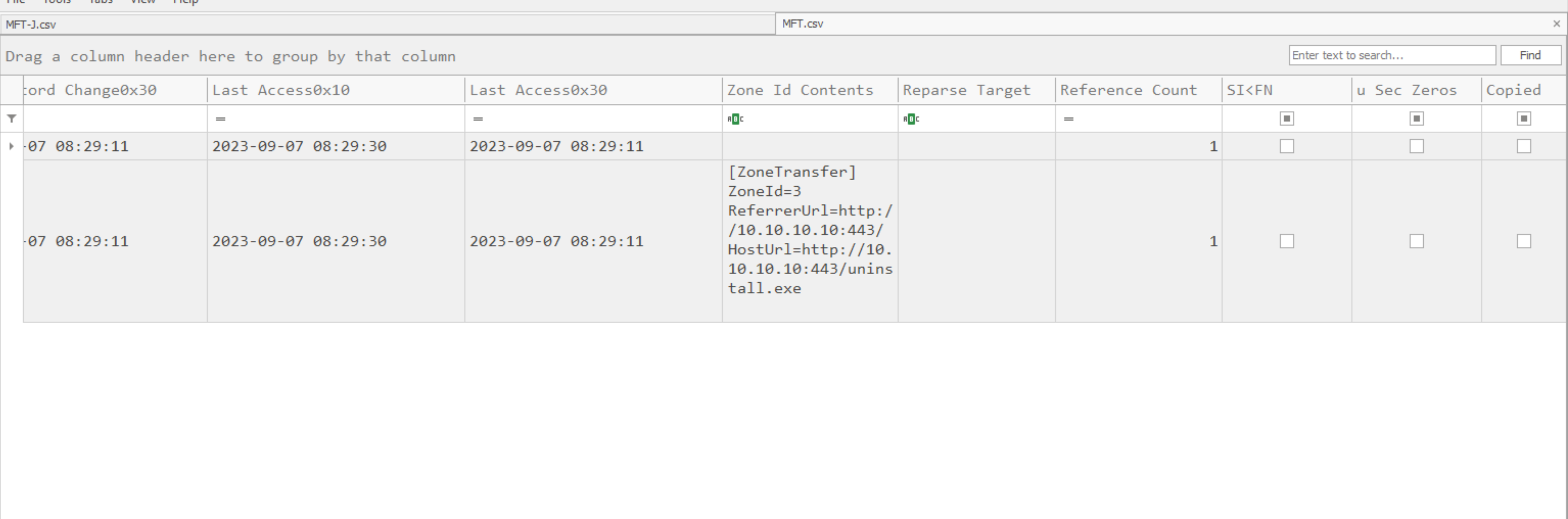
Windows Event Logs
- Stored as
.evtxfiles. - Common logs: Security, System, Application, and Sysmon.
- Analyze for suspicious events, IOCs, and attack patterns.
- Key fields: Event ID, timestamp, username, source IP, and process details.
- Correlate multiple logs to build an incident timeline.
EvtxECmd
The collected event logs are under <KAPE_output_folder>\Windows\System32\winevt\logs.
- Eric Zimmerman tool for parsing Windows Event Logs.
- Extracts events from
.evtxfiles. - Converts logs into CSV, JSON, or XML for easier analysis.
Run by
.\EvtxECmd.exe -f "C:\Users\johndoe\Desktop\forensic_data\kape_output\D\Windows\System32\winevt\logs\Microsoft-Windows-Sysmon%4Operational.evtx" --csv "C:\Users\johndoe\Desktop\forensic_data\event_logs\csv_timeline" --csvf kape_event_log.csv
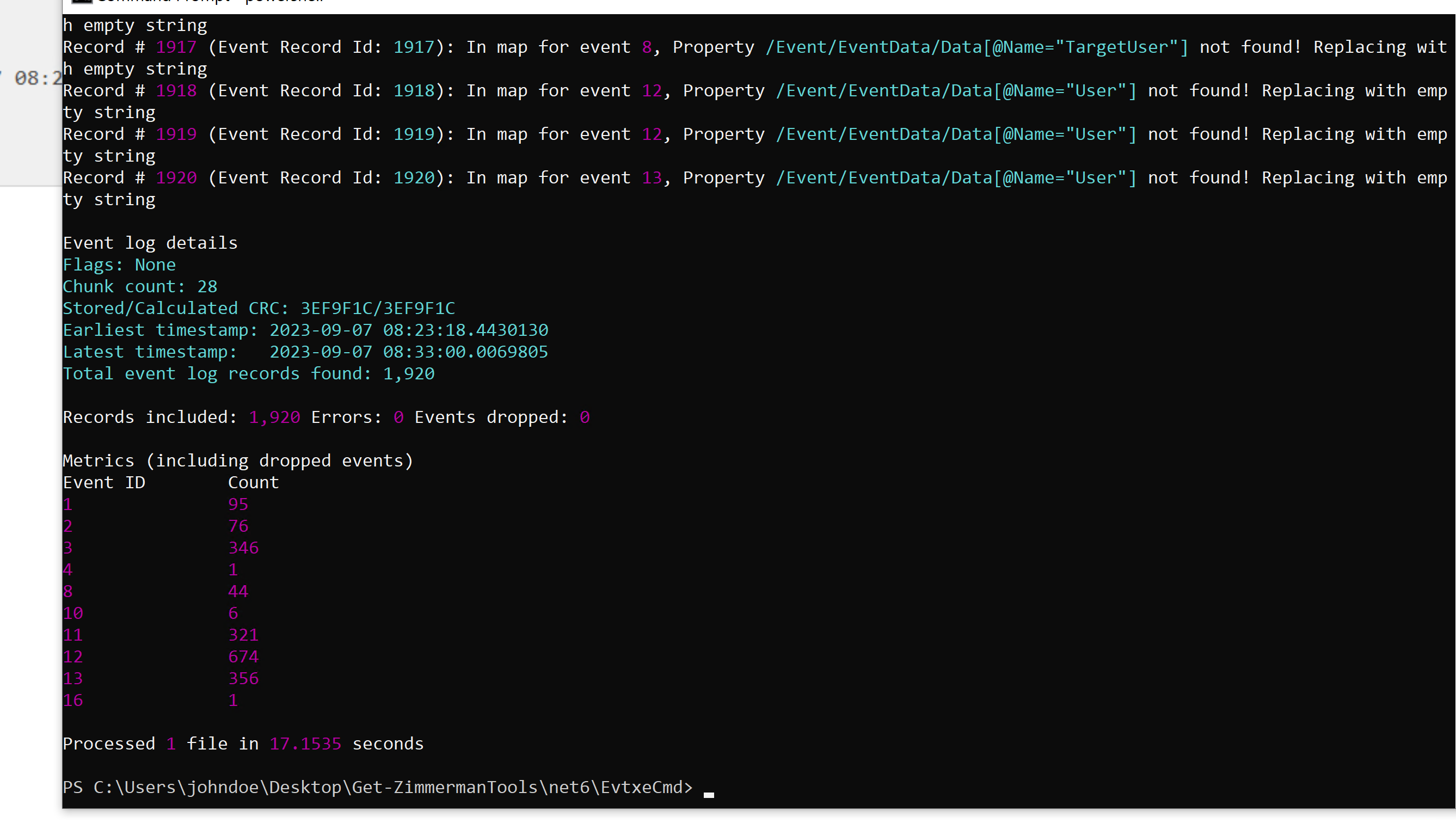
CSV is easier to filter than raw EVTX data, but manual review still needs event context. I retained the course screenshot here because it shows that context clearly.
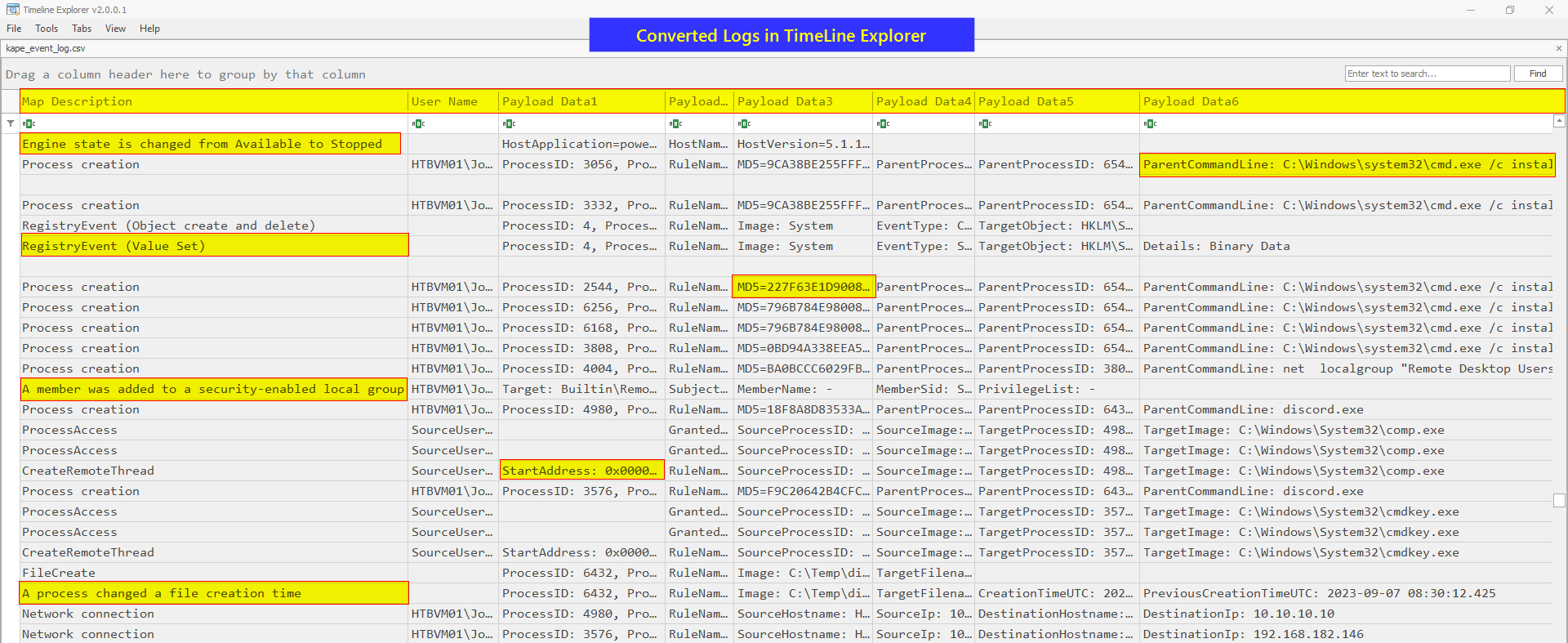
more information
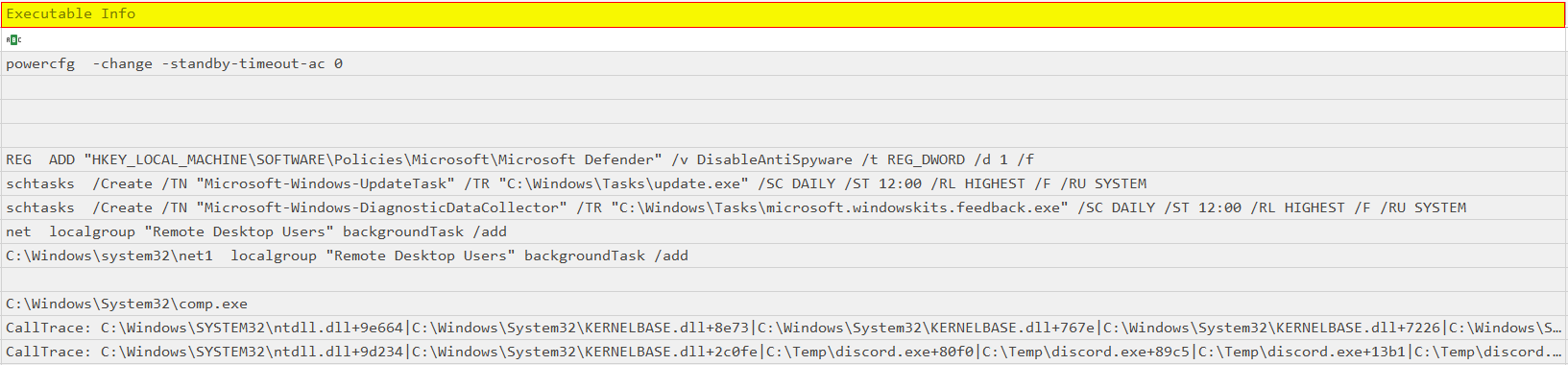
Investigating Windows Event Logs with EQL
EQL provides a structured language for filtering and correlating suspicious events across Windows log sources.
PS C:\Users\johndoe\Desktop\Get-ZimmermanTools\net6\EvtxeCmd> eql --version
eql 0.9.18
PS C:\Users\johndoe\Desktop\Get-ZimmermanTools\net6\EvtxeCmd>
Within EQL’s repository (available at C:\Users\johndoe\Desktop\eqllib-master), there’s a PowerShell module brimming with essential functions tailored for parsing Sysmon events from Windows Event Logs. This module resides in the utils directory of eqllib, and is named scrape-events.ps1.
PS C:\Users\johndoe\Desktop\eqllib-master\utils> import-module .\scrape-events.ps1
By doing so, we activate the Get-EventProps function, which is instrumental in parsing event properties from Sysmon logs
I converted Microsoft-Windows-Sysmon%4Operational.evtx into JSON for EQL:
Get-WinEvent -Path C:\Users\johndoe\Desktop\forensic_data\kape_output\D\Windows\System32\winevt\logs\Microsoft-Windows-Sysmon%4Operational.evtx -Oldest | Get-EventProps | ConvertTo-Json | Out-File -Encoding ASCII -FilePath C:\Users\johndoe\Desktop\forensic_data\event_logs\eql_format_json\eql-sysmon-data-kape.json
I then ran targeted EQL queries against the converted events.
PS C:\Users\johndoe\Desktop\eqllib-master\utils> eql query -f C:\Users\johndoe\Desktop\forensic_data\event_logs\eql_format_json\eql-sysmon-data-kape.json "EventId=1 and (Image='*net.exe' and wildcard(CommandLine, '* user*', '*localgroup *', '*group *'))"
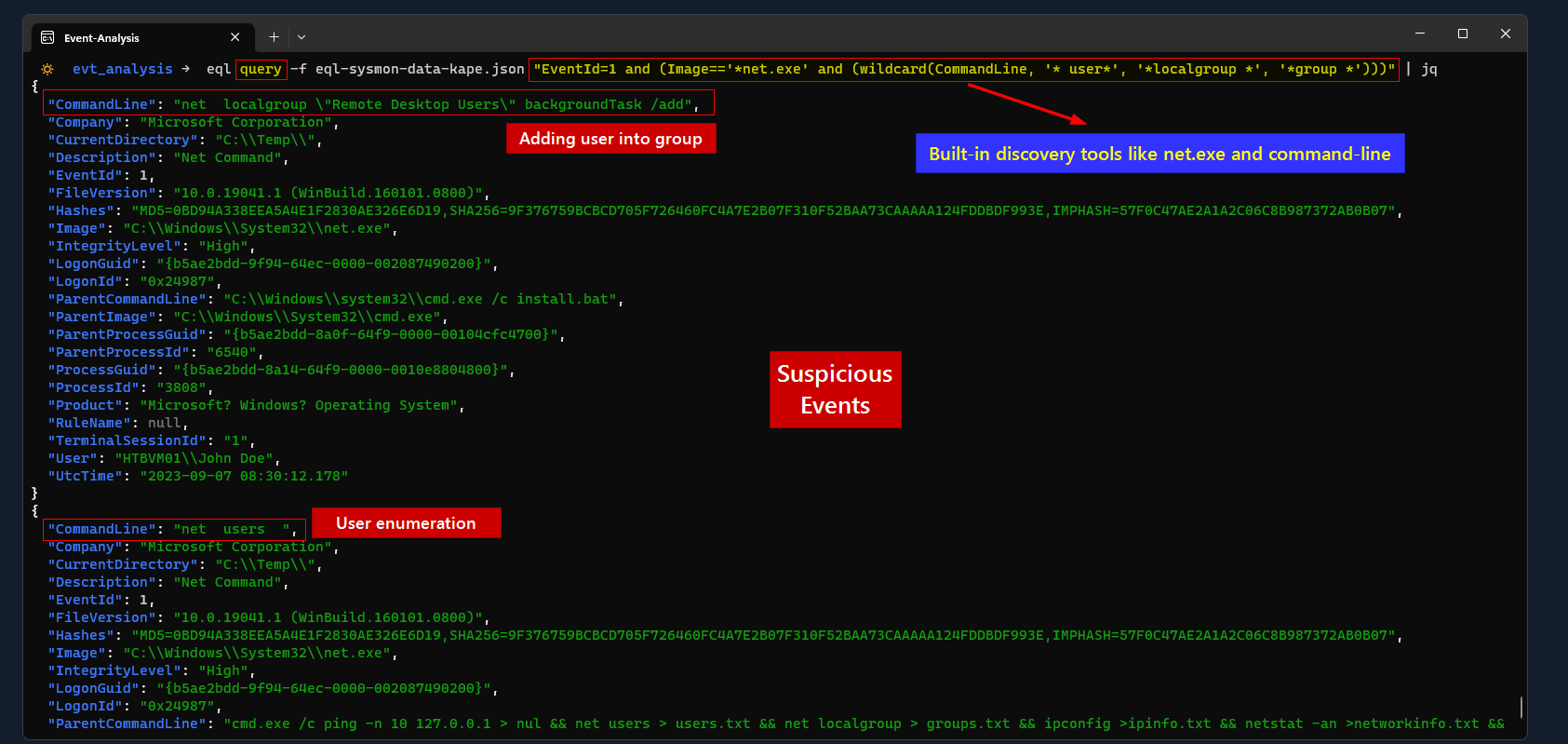
Windows Registry Analysis
The Registry provides a broad set of host and user evidence. invaluable insights, such as the computer’s name, Windows version, owner’s name, and network configuration.
Registry-related files harvested from KAPE are typically housed in <KAPE_output_folder>\Windows\System32\config
Additionally, there are user-specific registry hives located within individual user directories, as exemplified in the following screenshot.
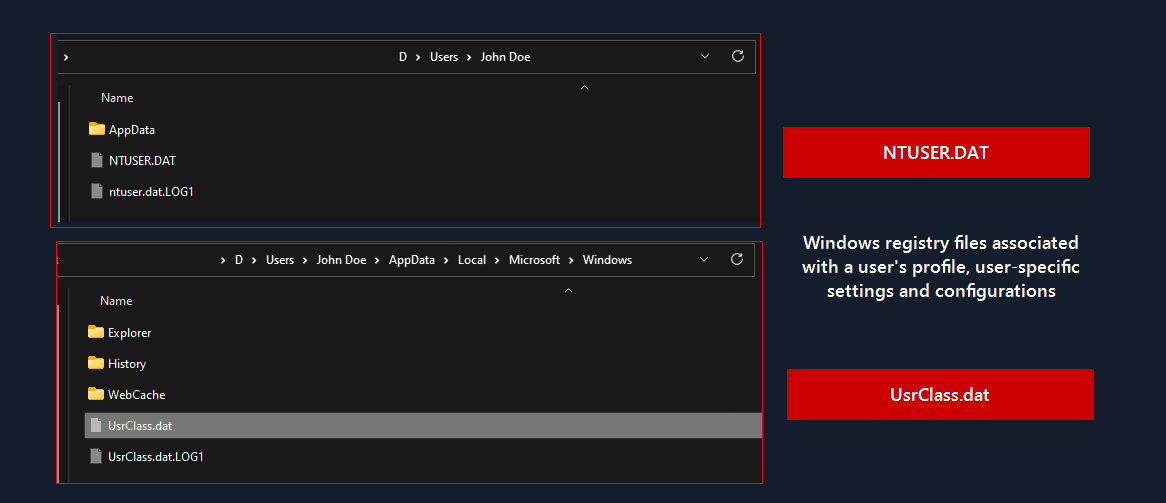
I opened the collected hives in Registry Explorer from C:\Users\johndoe\Desktop\Get-ZimmermanTools\net6\RegistryExplorer.
The first pivot was the SYSTEM hive from the KAPE output.
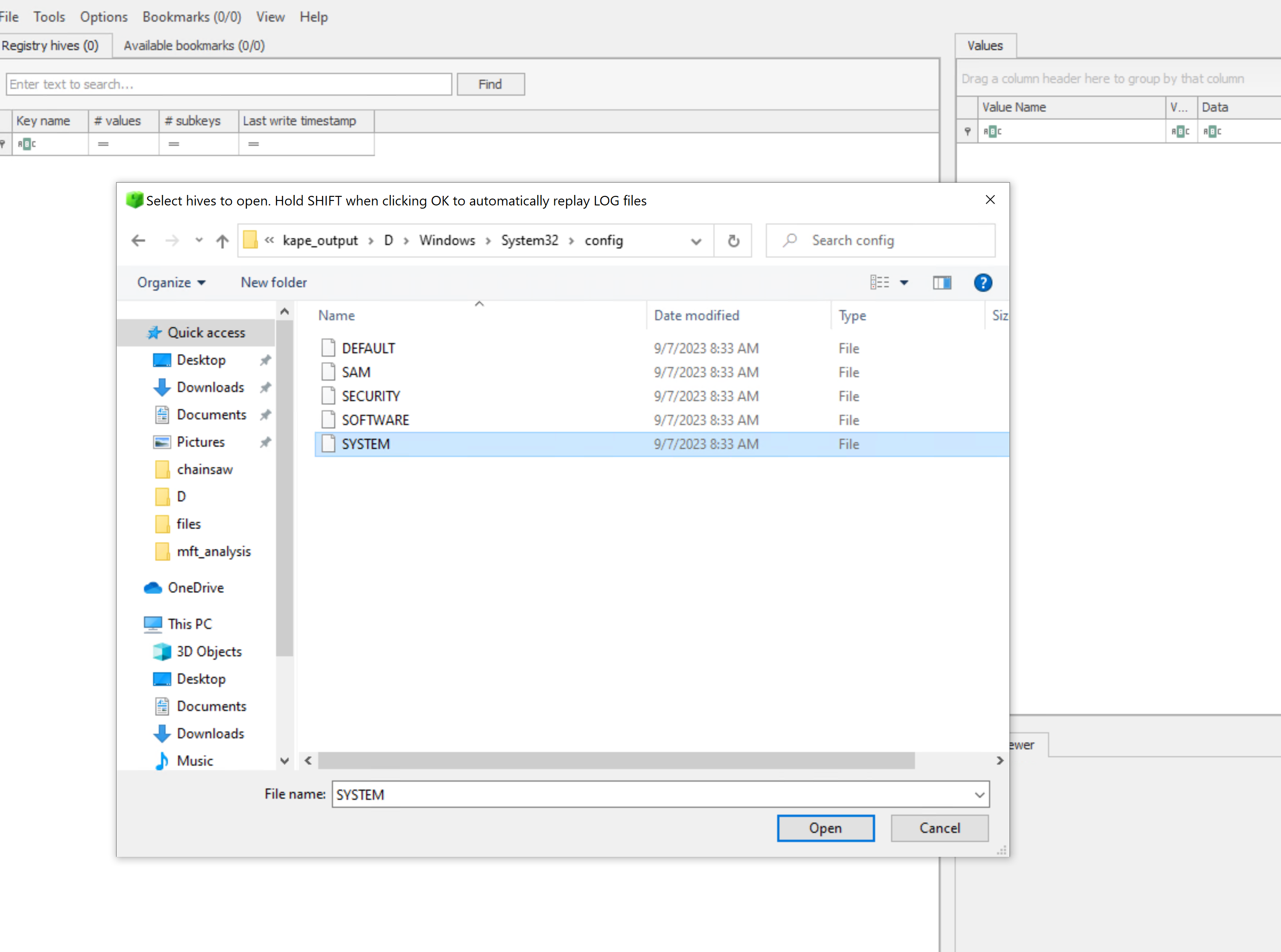
Registry Explorer bookmarks make high-value keys easier to revisit during an investigation.
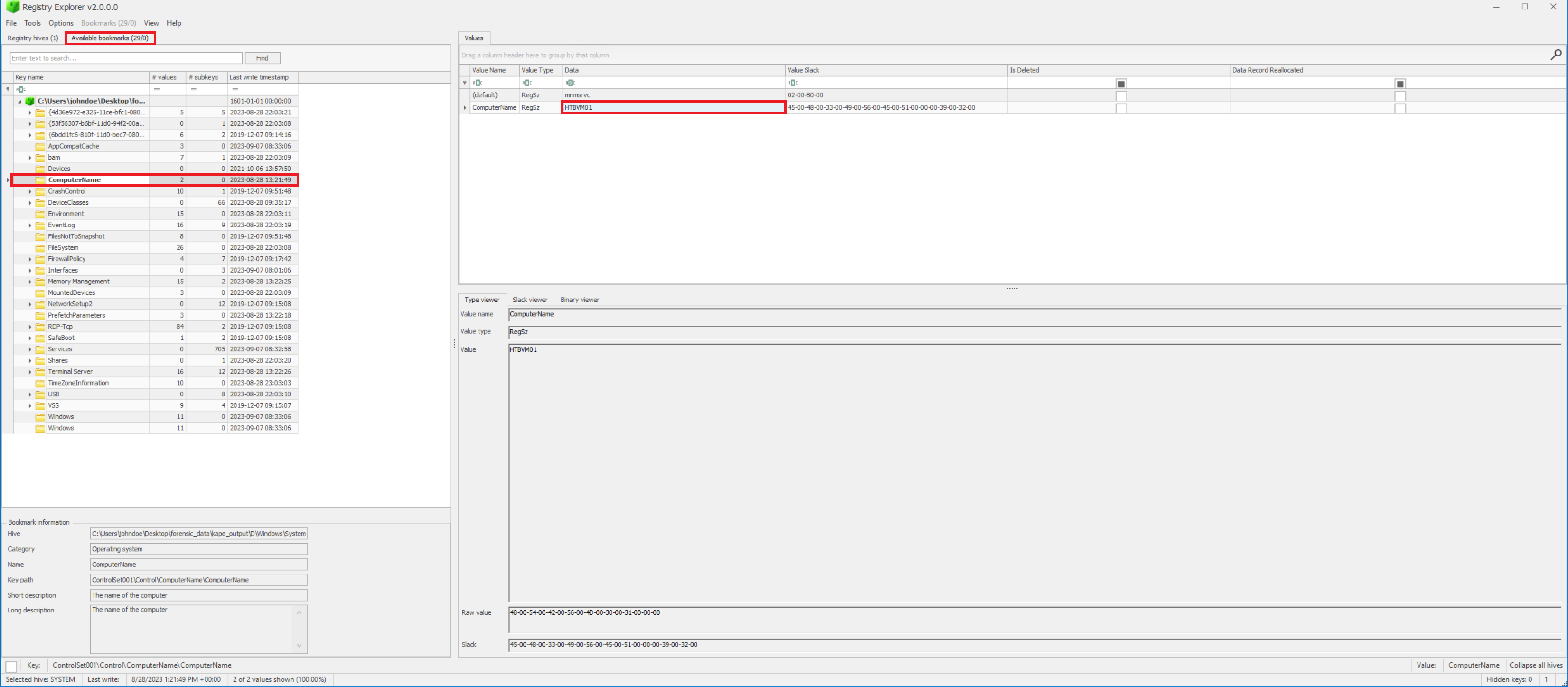
RegRipper
RegRipper uses artifact-specific plugins, so I started by enumerating the available names.
So we can list the plugins name with and use whats needed
.\rip.exe -l -c > rip_plugins.csv
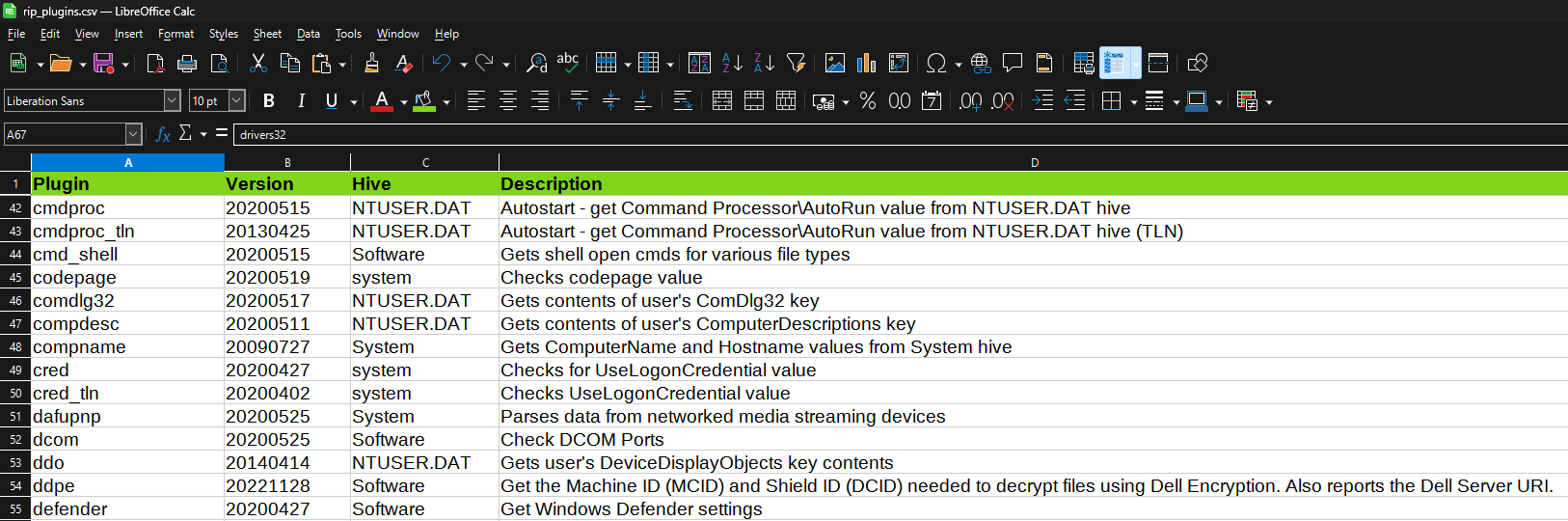
PS C:\Users\johndoe\Desktop\RegRipper3.0-master> .\rip.exe -r "C:\Users\johndoe\Desktop\forensic_data\kape_output\D\Windows\System32\config\SYSTEM" -p compname
Launching compname v.20090727
compname v.20090727
(System) Gets ComputerName and Hostname values from System hive

ComputerName    = HTBVM01
TCP/IP Hostname = HTBVM01
PS C:\Users\johndoe\Desktop\RegRipper3.0-master>
Timezone
PS C:\Users\johndoe\Desktop\RegRipper3.0-master> .\rip.exe -r "C:\Users\johndoe\Desktop\forensic_data\kape_output\D\Windows\System32\config\SYSTEM" -p timezone
Launching timezone v.20200518
timezone v.20200518
(System) Get TimeZoneInformation key contents

TimeZoneInformation key
ControlSet001\Control\TimeZoneInformation
LastWrite Time 2023-08-28 23:03:03Z
  DaylightName   -> @tzres.dll,-211
  StandardName   -> @tzres.dll,-212
  Bias           -> 480 (8 hours)
  ActiveTimeBias -> 420 (7 hours)
  TimeZoneKeyName-> Pacific Standard Time
PS C:\Users\johndoe\Desktop\RegRipper3.0-master>
Network Information
PS C:\Users\johndoe\Desktop\RegRipper3.0-master> .\rip.exe -r "C:\Users\johndoe\Desktop\forensic_data\kape_output\D\Windows\System32\config\SYSTEM" -p nic2
Launching nic2 v.20200525
nic2 v.20200525
(System) Gets NIC info from System hive

Adapter: {50c7b4ab-b059-43f4-8b0f-919502abc934}
LastWrite Time: 2023-09-07 08:01:06Z
  EnableDHCP                   0
  Domain
  NameServer                   10.10.10.100
  DhcpServer                   255.255.255.255
  Lease                        1800
  LeaseObtainedTime            2023-09-07 07:58:03Z
  T1                           2023-09-07 08:13:03Z
  T2                           2023-09-07 08:24:18Z
  LeaseTerminatesTime          2023-09-07 08:28:03Z
  AddressType                  0
  IsServerNapAware             0
  DhcpConnForceBroadcastFlag   0
  DhcpInterfaceOptions         ├╝               ├Ä☻  w               ├Ä☻  /               ├Ä☻  .               ├Ä☻  ,               ├Ä☻  +               ├Ä☻  !               ├Ä☻  ▼               ├Ä☻  ♥               ├Ä☻  ☼               ├Ä☻  ♠               ├Ä☻  ☺               ├Ä☻  3               ├Ä☻  6               ├Ä☻  5               ├Ä☻
  DhcpGatewayHardware          ├Ç┬¿┬╢☻♠    PV├Ñ┬ó┬¥
  DhcpGatewayHardwareCount     1
  RegistrationEnabled          1
  RegisterAdapterName          0
  IPAddress                    10.10.10.11
  SubnetMask                   255.0.0.0
  DefaultGateway               10.10.10.100
  DefaultGatewayMetric         0

ControlSet001\Services\Tcpip\Parameters\Interfaces has no subkeys.
Installer Execution
ControlSet001\Services\Tcpip\Parameters\Interfaces has no subkeys.
PS C:\Users\johndoe\Desktop\RegRipper3.0-master> .\rip.exe -r "C:\Users\johndoe\Desktop\forensic_data\kape_output\D\Windows\System32\config\SOFTWARE" -p installer
Launching installer v.20200517
Launching installer v.20200517
(Software) Determines product install information

Installer
Microsoft\Windows\CurrentVersion\Installer\UserData

User SID: S-1-5-18
Key      : 01DCD275E2FC1D341815B89DCA09680D
LastWrite: 2023-08-28 09:39:56Z
20230828 - Microsoft Visual C++ 2019 X86 Additional Runtime - 14.28.29913 14.28.29913 (Microsoft Corporation)

Key      : 3367A02690A78A24580870A644384C0B
LastWrite: 2023-08-28 09:39:59Z
20230828 - Microsoft Visual C++ 2019 X64 Additional Runtime - 14.28.29913 14.28.29913 (Microsoft Corporation)

Key      : 426D5FF15155343438A75EC40151376E
LastWrite: 2023-08-28 09:40:29Z
20230828 - VMware Tools 11.3.5.18557794 (VMware, Inc.)

Key      : 731DDCEEAD31DE64DA0ADB7F8FEB568B
LastWrite: 2023-08-28 09:39:58Z
20230828 - Microsoft Visual C++ 2019 X64 Minimum Runtime - 14.28.29913 14.28.29913 (Microsoft Corporation)

Key      : DBBE6326F05F3B048B91D80B6C8003C8
LastWrite: 2023-08-28 09:39:55Z
20230828 - Microsoft Visual C++ 2019 X86 Minimum Runtime - 14.28.29913 14.28.29913 (Microsoft Corporation)
Recently Accessed Folders/Docs
PS C:\Users\johndoe\Desktop\RegRipper3.0-master> .\rip.exe -r "C:\Users\johndoe\Desktop\forensic_data\kape_output\D\Users\John Doe\NTUSER.DAT" -p recentdocs
Launching recentdocs v.20200427
recentdocs v.20200427
(NTUSER.DAT) Gets contents of user's RecentDocs key

RecentDocs
**All values printed in MRUList\MRUListEx order.
Software\Microsoft\Windows\CurrentVersion\Explorer\RecentDocs
LastWrite Time: 2023-09-07 08:28:20Z
  2 = The Internet
  7 = threat/
  0 = system32
  6 = This PC
  5 = C:\
  4 = Local Disk (C:)
  3 = Temp
  1 = redirect

Software\Microsoft\Windows\CurrentVersion\Explorer\RecentDocs\Folder
LastWrite Time 2023-09-07 08:28:20Z
MRUListEx = 1,0,3,2
  1 = The Internet
  0 = system32
  3 = This PC
  2 = Local Disk (C:)
Run key entries
PS C:\Users\johndoe\Desktop\RegRipper3.0-master> .\rip.exe -r "C:\Users\johndoe\Desktop\forensic_data\kape_output\D\Users\John Doe\NTUSER.DAT" -p run
Launching run v.20200511
run v.20200511
(Software, NTUSER.DAT) [Autostart] Get autostart key contents from Software hive

Software\Microsoft\Windows\CurrentVersion\Run
LastWrite Time 2023-09-07 08:30:07Z
  MicrosoftEdgeAutoLaunch_0562217A6A32A7E92C68940F512715D9 - "C:\Program Files (x86)\Microsoft\Edge\Application\msedge.exe" --no-startup-window --win-session-start /prefetch:5
  DiscordUpdate - C:\Windows\Tasks\update.exe

Software\Microsoft\Windows\CurrentVersion\Run has no subkeys.

Software\Wow6432Node\Microsoft\Windows\CurrentVersion\Run not found.

Software\Microsoft\Windows\CurrentVersion\RunOnce not found.

Software\Microsoft\Windows\CurrentVersion\RunServices not found.

Software\Microsoft\Windows\CurrentVersion\RunServicesOnce not found.

Software\Microsoft\Windows NT\CurrentVersion\Terminal Server\Install\Software\Microsoft\Windows\CurrentVersion\Run not found.

Software\Microsoft\Windows NT\CurrentVersion\Terminal Server\Install\Software\Microsoft\Windows\CurrentVersion\RunOnce not found.

Software\Microsoft\Windows\CurrentVersion\Policies\Explorer\Run not found.

Software\Wow6432Node\Microsoft\Windows\CurrentVersion\Policies\Explorer\Run not found.

Software\Microsoft\Windows\CurrentVersion\StartupApproved\Run not found.

Software\Microsoft\Windows\CurrentVersion\StartupApproved\Run32 not found.

Software\Microsoft\Windows\CurrentVersion\StartupApproved\StartupFolder not found.
Execution Artifacts
Execution artifacts are traces left when a program runs. Their evidentiary strength varies, so I kept Prefetch and BAM in their proper context.
PrefetchBAM (Background Activity Moderator)
Prefetch
- Windows feature that speeds up application startup.
- Creates
.pffiles for many executed programs. - Filename format:
EXECUTABLE-NAME-HASH.pf. - Useful for identifying:
- Which programs executed
- Last execution times
- Approximate execution count
- Default location:
C:\Windows\Prefetch\
- KAPE location:
<KAPE_output_folder>\Windows\Prefetch
PECmd will analyze the prefetch file (.pf) and display various information about the application execution. This generally includes details such as:
- First and last execution timestamps.
- Number of times the application has been executed.
- Volume and directory information.
- Application name and path.
- File information, such as file size and hash values.
Usage
PS C:\Users\johndoe\Desktop\Get-ZimmermanTools\net6>  .\PECmd.exe -f C:\Users\johndoe\Desktop\forensic_data\kape_output\D\Windows\prefetch\DISCORD.EXE-7191FAD6.pf
PECmd version 1.5.0.0

Author: Eric Zimmerman ([email protected])
https://github.com/EricZimmerman/PECmd

Command line: -f C:\Users\johndoe\Desktop\forensic_data\kape_output\D\Windows\prefetch\DISCORD.EXE-7191FAD6.pf

Warning: Administrator privileges not found!

Keywords: temp, tmp

Processing C:\Users\johndoe\Desktop\forensic_data\kape_output\D\Windows\prefetch\DISCORD.EXE-7191FAD6.pf

Created on: 2023-09-07 08:30:16
Modified on: 2023-09-07 08:30:16
Last accessed on: 2026-07-22 15:24:31

Executable name: DISCORD.EXE
Hash: 7191FAD6
File size (bytes): 51,104
Version: Windows 10 or Windows 11

Run count: 1
Last run: 2023-09-07 08:30:06

Volume information:

#0: Name: \VOLUME{01d9da035d4d8f00-285d5e74} Serial: 285D5E74 Created: 2023-08-28 22:59:56 Directories: 23 File references: 106

Directories referenced: 23

00: \VOLUME{01d9da035d4d8f00-285d5e74}\$EXTEND
01: \VOLUME{01d9da035d4d8f00-285d5e74}\TEMP (Keyword True)
02: \VOLUME{01d9da035d4d8f00-285d5e74}\USERS
03: \VOLUME{01d9da035d4d8f00-285d5e74}\USERS\JOHN DOE
04: \VOLUME{01d9da035d4d8f00-285d5e74}\USERS\JOHN DOE\APPDATA
05: \VOLUME{01d9da035d4d8f00-285d5e74}\USERS\JOHN DOE\APPDATA\LOCAL
06: \VOLUME{01d9da035d4d8f00-285d5e74}\USERS\JOHN DOE\APPDATA\LOCAL\MICROSOFT
07: \VOLUME{01d9da035d4d8f00-285d5e74}\USERS\JOHN DOE\APPDATA\LOCAL\MICROSOFT\WINDOWS
08: \VOLUME{01d9da035d4d8f00-285d5e74}\USERS\JOHN DOE\APPDATA\LOCAL\MICROSOFT\WINDOWS\CACHES
09: \VOLUME{01d9da035d4d8f00-285d5e74}\USERS\JOHN DOE\APPDATA\LOCAL\MICROSOFT\WINDOWS\INETCACHE
10: \VOLUME{01d9da035d4d8f00-285d5e74}\USERS\JOHN DOE\APPDATA\LOCAL\MICROSOFT\WINDOWS\INETCACHE\IE
11: \VOLUME{01d9da035d4d8f00-285d5e74}\USERS\JOHN DOE\APPDATA\LOCAL\MICROSOFT\WINDOWS\INETCACHE\IE\8O7R2XTQ
12: \VOLUME{01d9da035d4d8f00-285d5e74}\USERS\JOHN DOE\APPDATA\LOCAL\TEMP (Keyword True)
13: \VOLUME{01d9da035d4d8f00-285d5e74}\USERS\JOHN DOE\DOWNLOADS
14: \VOLUME{01d9da035d4d8f00-285d5e74}\WINDOWS
15: \VOLUME{01d9da035d4d8f00-285d5e74}\WINDOWS\APPPATCH
16: \VOLUME{01d9da035d4d8f00-285d5e74}\WINDOWS\GLOBALIZATION
17: \VOLUME{01d9da035d4d8f00-285d5e74}\WINDOWS\GLOBALIZATION\SORTING
18: \VOLUME{01d9da035d4d8f00-285d5e74}\WINDOWS\REGISTRATION
19: \VOLUME{01d9da035d4d8f00-285d5e74}\WINDOWS\SYSTEM32
20: \VOLUME{01d9da035d4d8f00-285d5e74}\WINDOWS\SYSTEM32\DRIVERS
21: \VOLUME{01d9da035d4d8f00-285d5e74}\WINDOWS\SYSTEM32\EN-US
22: \VOLUME{01d9da035d4d8f00-285d5e74}\WINDOWS\TASKS

Files referenced: 76

00: \VOLUME{01d9da035d4d8f00-285d5e74}\WINDOWS\SYSTEM32\NTDLL.DLL
01: \VOLUME{01d9da035d4d8f00-285d5e74}\TEMP\DISCORD.EXE (Executable: True)
02: \VOLUME{01d9da035d4d8f00-285d5e74}\WINDOWS\SYSTEM32\KERNEL32.DLL
03: \VOLUME{01d9da035d4d8f00-285d5e74}\WINDOWS\SYSTEM32\KERNELBASE.DLL
04: \VOLUME{01d9da035d4d8f00-285d5e74}\WINDOWS\SYSTEM32\LOCALE.NLS
05: \VOLUME{01d9da035d4d8f00-285d5e74}\WINDOWS\SYSTEM32\APPHELP.DLL
06: \VOLUME{01d9da035d4d8f00-285d5e74}\WINDOWS\APPPATCH\SYSMAIN.SDB
07: \VOLUME{01d9da035d4d8f00-285d5e74}\WINDOWS\SYSTEM32\ADVAPI32.DLL
08: \VOLUME{01d9da035d4d8f00-285d5e74}\WINDOWS\SYSTEM32\MSVCRT.DLL
09: \VOLUME{01d9da035d4d8f00-285d5e74}\WINDOWS\SYSTEM32\SECHOST.DLL
10: \VOLUME{01d9da035d4d8f00-285d5e74}\WINDOWS\SYSTEM32\RPCRT4.DLL
11: \VOLUME{01d9da035d4d8f00-285d5e74}\WINDOWS\SYSTEM32\SHELL32.DLL
12: \VOLUME{01d9da035d4d8f00-285d5e74}\WINDOWS\SYSTEM32\MSVCP_WIN.DLL
13: \VOLUME{01d9da035d4d8f00-285d5e74}\WINDOWS\SYSTEM32\UCRTBASE.DLL
14: \VOLUME{01d9da035d4d8f00-285d5e74}\WINDOWS\SYSTEM32\USER32.DLL
15: \VOLUME{01d9da035d4d8f00-285d5e74}\WINDOWS\SYSTEM32\NETAPI32.DLL
16: \VOLUME{01d9da035d4d8f00-285d5e74}\WINDOWS\SYSTEM32\WIN32U.DLL
17: \VOLUME{01d9da035d4d8f00-285d5e74}\WINDOWS\SYSTEM32\GDI32.DLL
18: \VOLUME{01d9da035d4d8f00-285d5e74}\WINDOWS\SYSTEM32\GDI32FULL.DLL
19: \VOLUME{01d9da035d4d8f00-285d5e74}\WINDOWS\SYSTEM32\WS2_32.DLL
20: \VOLUME{01d9da035d4d8f00-285d5e74}\WINDOWS\SYSTEM32\WININET.DLL
21: \VOLUME{01d9da035d4d8f00-285d5e74}\WINDOWS\SYSTEM32\NETUTILS.DLL
22: \VOLUME{01d9da035d4d8f00-285d5e74}\$MFT
23: \VOLUME{01d9da035d4d8f00-285d5e74}\WINDOWS\SYSTEM32\SAMCLI.DLL
24: \VOLUME{01d9da035d4d8f00-285d5e74}\WINDOWS\SYSTEM32\IMM32.DLL
25: \VOLUME{01d9da035d4d8f00-285d5e74}\WINDOWS\SYSTEM32\DRIVERS\CONDRV.SYS
26: \VOLUME{01d9da035d4d8f00-285d5e74}\WINDOWS\SYSTEM32\NTMARTA.DLL
27: \VOLUME{01d9da035d4d8f00-285d5e74}\TEMP\UNINSTALL.EXE (Keyword: True)
28: \VOLUME{01d9da035d4d8f00-285d5e74}\WINDOWS\TASKS\MICROSOFT.WINDOWSKITS.FEEDBACK.EXE
29: \VOLUME{01d9da035d4d8f00-285d5e74}\USERS\JOHN DOE\DOWNLOADS\UNINSTALL.EXE:ZONE.IDENTIFIER
30: \VOLUME{01d9da035d4d8f00-285d5e74}\WINDOWS\TASKS\MICROSOFT.WINDOWSKITS.FEEDBACK.EXE:ZONE.IDENTIFIER
31: \VOLUME{01d9da035d4d8f00-285d5e74}\WINDOWS\SYSTEM32\IERTUTIL.DLL
32: \VOLUME{01d9da035d4d8f00-285d5e74}\WINDOWS\SYSTEM32\COMBASE.DLL
33: \VOLUME{01d9da035d4d8f00-285d5e74}\WINDOWS\SYSTEM32\SHCORE.DLL
34: \VOLUME{01d9da035d4d8f00-285d5e74}\WINDOWS\GLOBALIZATION\SORTING\SORTDEFAULT.NLS
35: \VOLUME{01d9da035d4d8f00-285d5e74}\WINDOWS\SYSTEM32\SSPICLI.DLL
36: \VOLUME{01d9da035d4d8f00-285d5e74}\WINDOWS\SYSTEM32\WINDOWS.STORAGE.DLL
37: \VOLUME{01d9da035d4d8f00-285d5e74}\WINDOWS\SYSTEM32\WLDP.DLL
38: \VOLUME{01d9da035d4d8f00-285d5e74}\WINDOWS\SYSTEM32\SHLWAPI.DLL
39: \VOLUME{01d9da035d4d8f00-285d5e74}\WINDOWS\SYSTEM32\PROFAPI.DLL
40: \VOLUME{01d9da035d4d8f00-285d5e74}\WINDOWS\SYSTEM32\ONDEMANDCONNROUTEHELPER.DLL
41: \VOLUME{01d9da035d4d8f00-285d5e74}\WINDOWS\SYSTEM32\WINHTTP.DLL
42: \VOLUME{01d9da035d4d8f00-285d5e74}\WINDOWS\SYSTEM32\KERNEL.APPCORE.DLL
43: \VOLUME{01d9da035d4d8f00-285d5e74}\WINDOWS\SYSTEM32\MSWSOCK.DLL
44: \VOLUME{01d9da035d4d8f00-285d5e74}\WINDOWS\SYSTEM32\IPHLPAPI.DLL
45: \VOLUME{01d9da035d4d8f00-285d5e74}\WINDOWS\SYSTEM32\WINNSI.DLL
46: \VOLUME{01d9da035d4d8f00-285d5e74}\WINDOWS\SYSTEM32\NSI.DLL
47: \VOLUME{01d9da035d4d8f00-285d5e74}\WINDOWS\SYSTEM32\URLMON.DLL
48: \VOLUME{01d9da035d4d8f00-285d5e74}\WINDOWS\SYSTEM32\SRVCLI.DLL
49: \VOLUME{01d9da035d4d8f00-285d5e74}\WINDOWS\SYSTEM32\OLEAUT32.DLL
50: \VOLUME{01d9da035d4d8f00-285d5e74}\WINDOWS\SYSTEM32\OLE32.DLL
51: \VOLUME{01d9da035d4d8f00-285d5e74}\WINDOWS\SYSTEM32\DNSAPI.DLL
52: \VOLUME{01d9da035d4d8f00-285d5e74}\WINDOWS\SYSTEM32\RASADHLP.DLL
53: \VOLUME{01d9da035d4d8f00-285d5e74}\WINDOWS\SYSTEM32\FWPUCLNT.DLL
54: \VOLUME{01d9da035d4d8f00-285d5e74}\WINDOWS\SYSTEM32\BCRYPT.DLL
55: \VOLUME{01d9da035d4d8f00-285d5e74}\WINDOWS\SYSTEM32\EN-US\MSWSOCK.DLL.MUI
56: \VOLUME{01d9da035d4d8f00-285d5e74}\WINDOWS\SYSTEM32\WSHQOS.DLL
57: \VOLUME{01d9da035d4d8f00-285d5e74}\WINDOWS\SYSTEM32\EN-US\WSHQOS.DLL.MUI
58: \VOLUME{01d9da035d4d8f00-285d5e74}\WINDOWS\SYSTEM32\C_20127.NLS
59: \VOLUME{01d9da035d4d8f00-285d5e74}\USERS\JOHN DOE\APPDATA\LOCAL\MICROSOFT\WINDOWS\INETCACHE\IE\8O7R2XTQ\DISCORDSETUP[1].EXE
60: \VOLUME{01d9da035d4d8f00-285d5e74}\USERS\JOHN DOE\APPDATA\LOCAL\TEMP\DISCORDSETUP.EXE (Keyword: True)
61: \VOLUME{01d9da035d4d8f00-285d5e74}\WINDOWS\TASKS\UPDATE.EXE
62: \VOLUME{01d9da035d4d8f00-285d5e74}\WINDOWS\SYSTEM32\BCRYPTPRIMITIVES.DLL
63: \VOLUME{01d9da035d4d8f00-285d5e74}\WINDOWS\SYSTEM32\RPCSS.DLL
64: \VOLUME{01d9da035d4d8f00-285d5e74}\WINDOWS\SYSTEM32\UXTHEME.DLL
65: \VOLUME{01d9da035d4d8f00-285d5e74}\WINDOWS\SYSTEM32\PROPSYS.DLL
66: \VOLUME{01d9da035d4d8f00-285d5e74}\WINDOWS\SYSTEM32\CFGMGR32.DLL
67: \VOLUME{01d9da035d4d8f00-285d5e74}\WINDOWS\SYSTEM32\CLBCATQ.DLL
68: \VOLUME{01d9da035d4d8f00-285d5e74}\WINDOWS\REGISTRATION\R000000000006.CLB
69: \VOLUME{01d9da035d4d8f00-285d5e74}\USERS\JOHN DOE\APPDATA\LOCAL\MICROSOFT\WINDOWS\CACHES\CVERSIONS.1.DB
70: \VOLUME{01d9da035d4d8f00-285d5e74}\USERS\JOHN DOE\APPDATA\LOCAL\MICROSOFT\WINDOWS\CACHES\{AFBF9F1A-8EE8-4C77-AF34-C647E37CA0D9}.1.VER0X0000000000000003.DB
71: \VOLUME{01d9da035d4d8f00-285d5e74}\USERS\DESKTOP.INI
72: \VOLUME{01d9da035d4d8f00-285d5e74}\WINDOWS\SYSTEM32\SAMLIB.DLL
73: \VOLUME{01d9da035d4d8f00-285d5e74}\WINDOWS\SYSTEM32\CRYPTBASE.DLL
74: \VOLUME{01d9da035d4d8f00-285d5e74}\TEMP\INSTALL.BAT (Keyword: True)
75: \VOLUME{01d9da035d4d8f00-285d5e74}\WINDOWS\SYSTEM32\CMD.EXE


---------- Processed C:\Users\johndoe\Desktop\forensic_data\kape_output\D\Windows\prefetch\DISCORD.EXE-7191FAD6.pf in 0.21376950 seconds ----------

PS C:\Users\johndoe\Desktop\Get-ZimmermanTools\net6>
The referenced-file list provides additional execution context.
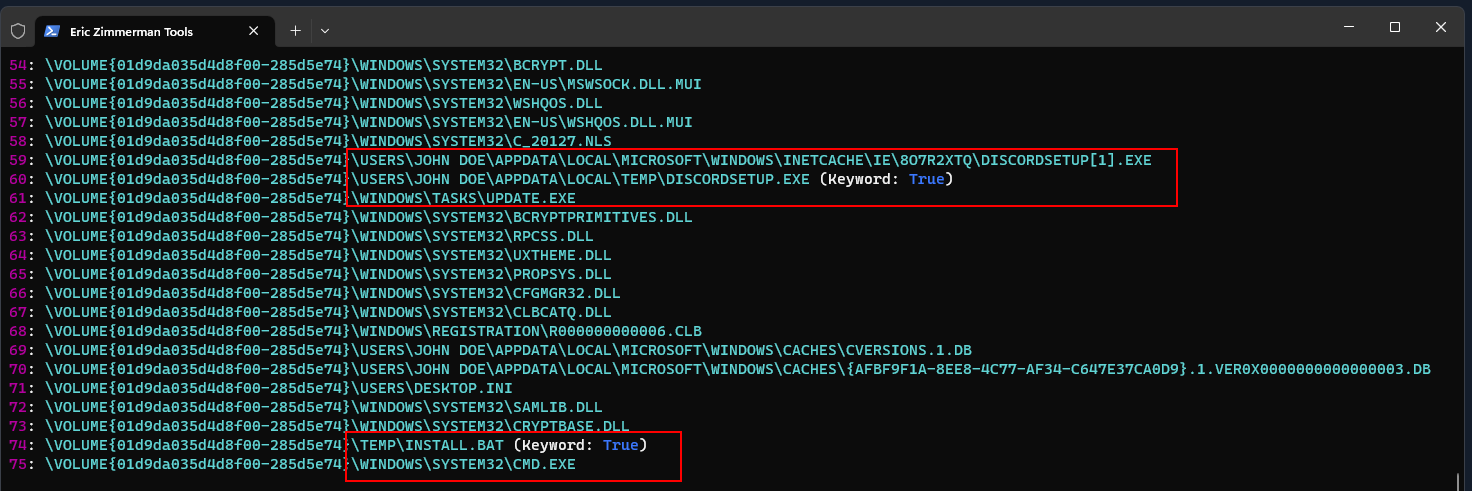
I also converted the Prefetch collection to CSV for timeline filtering.
.\PECmd.exe -d C:\Users\johndoe\Desktop\forensic_data\kape_output\D\Windows\prefetch --csv C:\Users\johndoe\Desktop\forensic_data\prefetch_analysis
The resulting CSV is shown below.
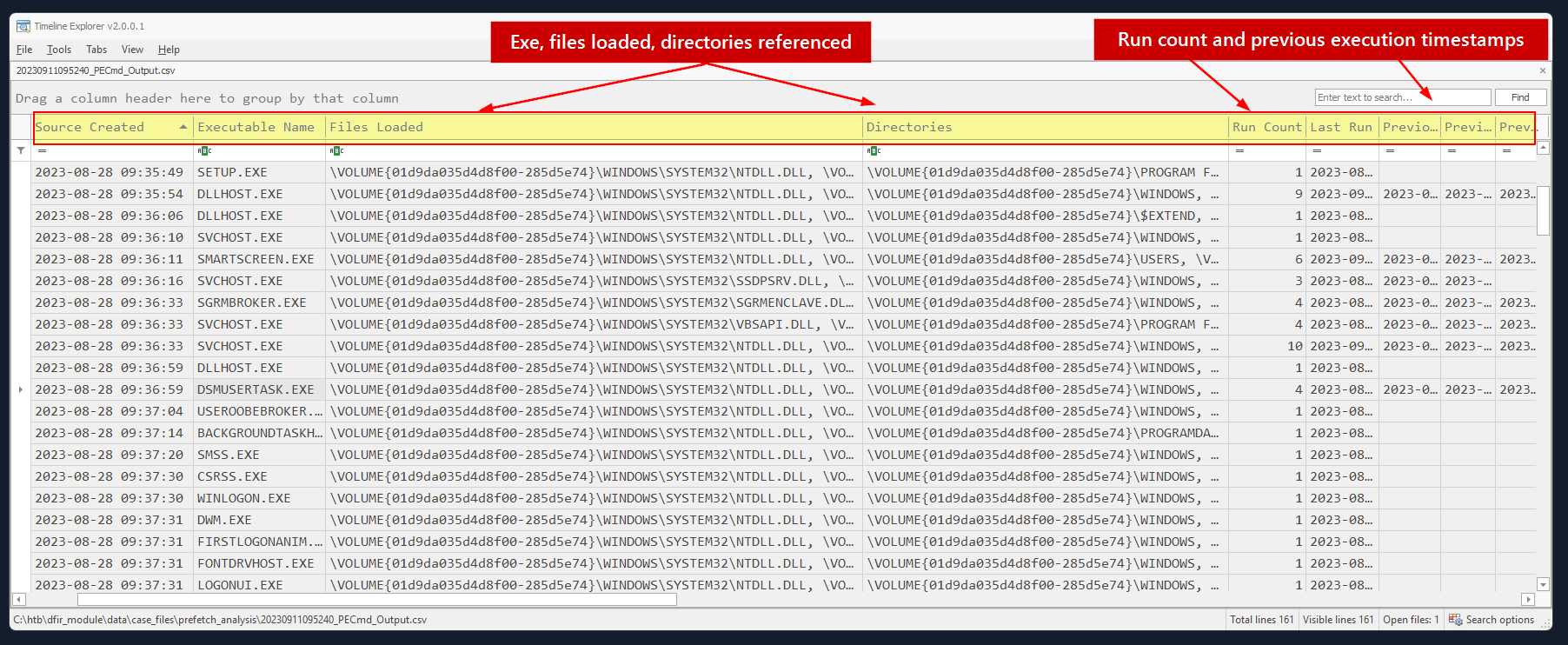
Background Activity Moderator (BAM)
The Background Activity Moderator (BAM) is a component in the Windows operating system that tracks and logs the execution of certain types of background or scheduled tasks.
PS C:\Windows\System32> .\sc.exe qc bam
[SC] QueryServiceConfig SUCCESS

SERVICE_NAME: bam
        TYPE               : 1  KERNEL_DRIVER
        START_TYPE         : 1   SYSTEM_START
        ERROR_CONTROL      : 1   NORMAL
        BINARY_PATH_NAME   : system32\drivers\bam.sys
        LOAD_ORDER_GROUP   :
        TAG                : 0
        DISPLAY_NAME       : Background Activity Moderator Driver
        DEPENDENCIES       :
        SERVICE_START_NAME :
PS C:\Windows\System32>
The BAM Registry data can provide user and recency context for recorded applications.
hive location is HKEY_LOCAL_MACHINE\SYSTEM\ControlSet001\Services\bam\State\UserSettings{USER-SID}
PS C:\Users\johndoe\Desktop\RegRipper3.0-master> .\rip.exe -r "C:\Users\johndoe\Desktop\forensic_data\kape_output\D\Windows\System32\config\SYSTEM" -p bam
Launching bam v.20200427
bam v.20200427
(System) Parse files from System hive BAM Services

S-1-5-18
  2023-08-28 09:38:33Z - \Device\HarddiskVolume3\Windows\System32\oobe\FirstLogonAnim.exe

S-1-5-21-3907945667-1160922781-1032853511-1000
  2023-08-28 09:37:20Z - \Device\HarddiskVolume3\Windows\explorer.exe
  2023-08-28 09:37:20Z - Microsoft.Windows.CloudExperienceHost_cw5n1h2txyewy

S-1-5-21-3907945667-1160922781-1032853511-1001
  2023-09-07 08:32:58Z - Microsoft.Windows.StartMenuExperienceHost_cw5n1h2txyewy
  2023-09-07 08:32:58Z - Microsoft.Windows.Search_cw5n1h2txyewy
  2023-09-07 08:32:58Z - \Device\HarddiskVolume3\Windows\explorer.exe
  2023-09-07 08:32:58Z - Microsoft.Windows.ShellExperienceHost_cw5n1h2txyewy
  2023-08-28 13:22:01Z - \Device\HarddiskVolume3\Windows\System32\SystemPropertiesComputerName.exe
  2023-09-07 08:32:58Z - \Device\HarddiskVolume3\Windows\System32\ApplicationFrameHost.exe
  2023-08-28 09:39:24Z - windows.immersivecontrolpanel_cw5n1h2txyewy
  2023-09-07 08:32:56Z - \Device\HarddiskVolume3\Program Files\VMware\VMware Tools\vmtoolsd.exe
  2023-09-07 08:32:56Z - \Device\HarddiskVolume3\Windows\System32\cmd.exe
  2023-08-28 12:59:14Z - \Device\HarddiskVolume3\Windows\System32\wscript.exe
  2023-09-07 08:30:26Z - \Device\HarddiskVolume3\Windows\System32\PING.EXE
  2023-09-07 08:32:56Z - \Device\HarddiskVolume3\Program Files (x86)\Microsoft\Edge\Application\msedge.exe
  2023-09-07 08:32:56Z - \Device\HarddiskVolume3\Windows\System32\dllhost.exe
  2023-09-07 08:01:20Z - \Device\HarddiskVolume3\Windows\System32\OpenWith.exe
  2023-09-07 08:23:10Z - \Device\HarddiskVolume3\Windows\System32\mmc.exe
  2023-09-07 08:23:19Z - \Device\HarddiskVolume3\Windows\System32\Sysmon64.exe
  2023-09-07 08:28:47Z - Microsoft.Windows.SecHealthUI_cw5n1h2txyewy

S-1-5-90-0-1
  2023-08-28 13:22:34Z - \Device\HarddiskVolume3\Windows\System32\dwm.exe

S-1-5-90-0-2
  2023-08-28 09:37:30Z - \Device\HarddiskVolume3\Windows\System32\dwm.exe
API Monitor Files
.apmx64files contain API calls captured by API Monitor.- Useful for analyzing how an application interacts with Windows APIs.
- Can reveal file, registry, network, process, and memory activity.
- Open the capture directly inside API Monitor.
Example file:
C:\Users\johndoe\Desktop\forensic_data\APMX64\discord.apmx64
The capture opens directly in API Monitor.
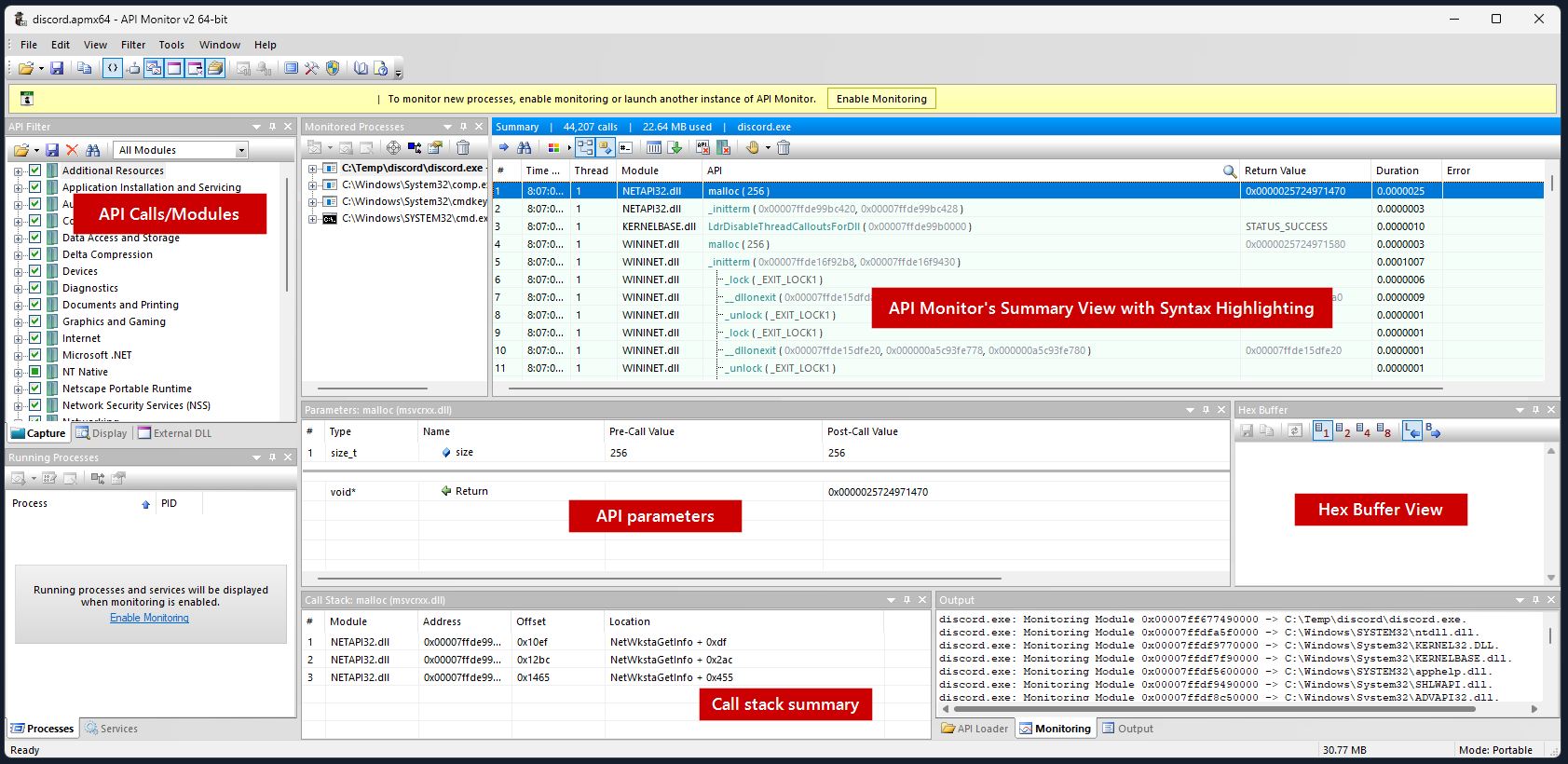 A notable observation from the screenshot is the call to the getenv function. Here’s the syntax of this function.
char *getenv( const char *varname );
- Environment variable function: Retrieves the value of a specified environment variable using its name.
- API Monitor filters: Search API calls by function or time.
- Useful for finding file creation, process execution, registry changes, and other suspicious activity
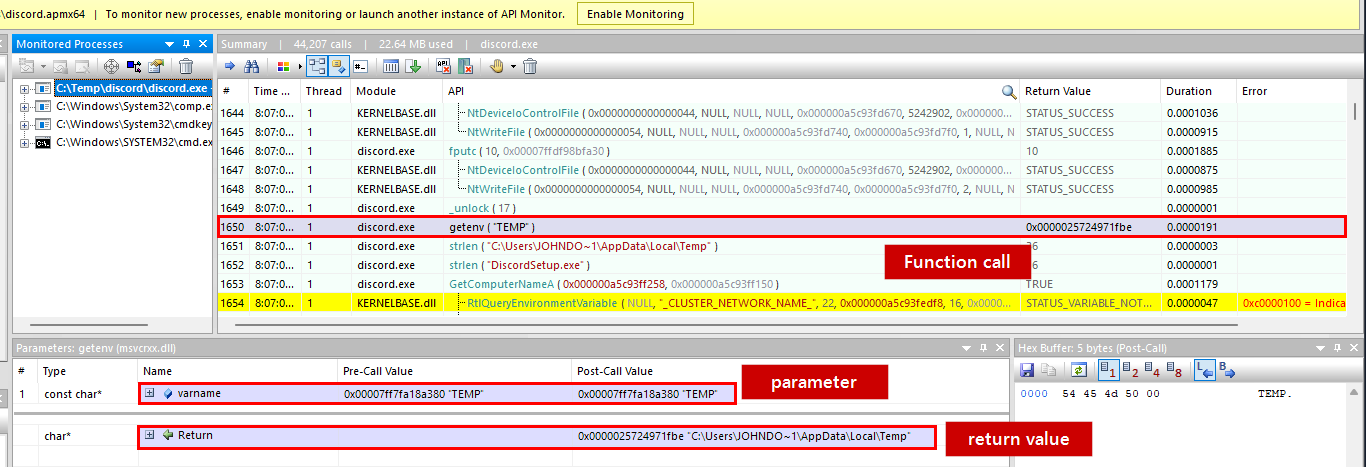
- Run Registry Key:
SOFTWARE\Microsoft\Windows\CurrentVersion\Run - Executes configured programs whenever the user logs in.
- Commonly abused by malware for persistence.
RegSetValueExAcan create or modify entries in this key.
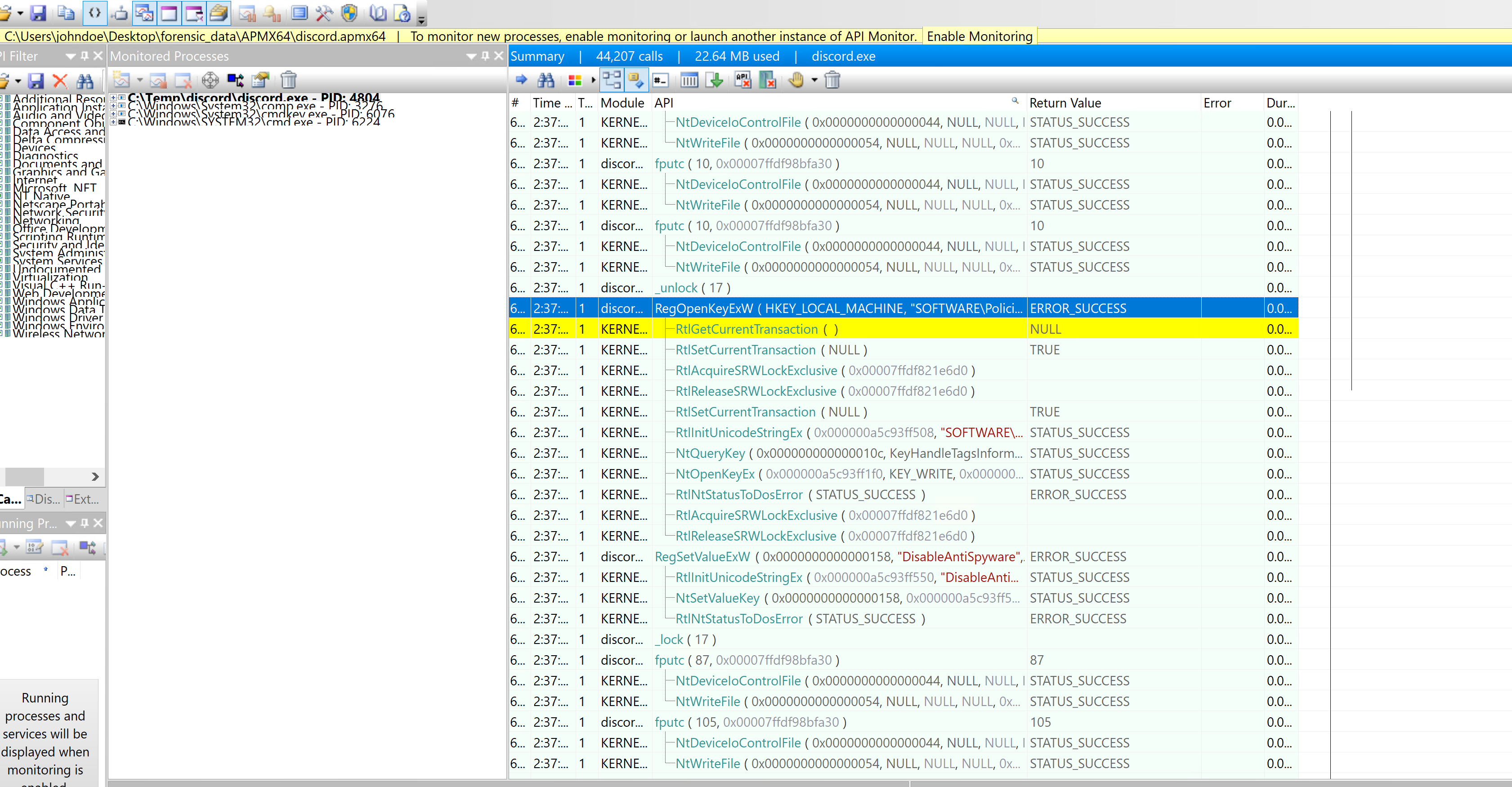
Next I inspected the RegSetValueExA call.
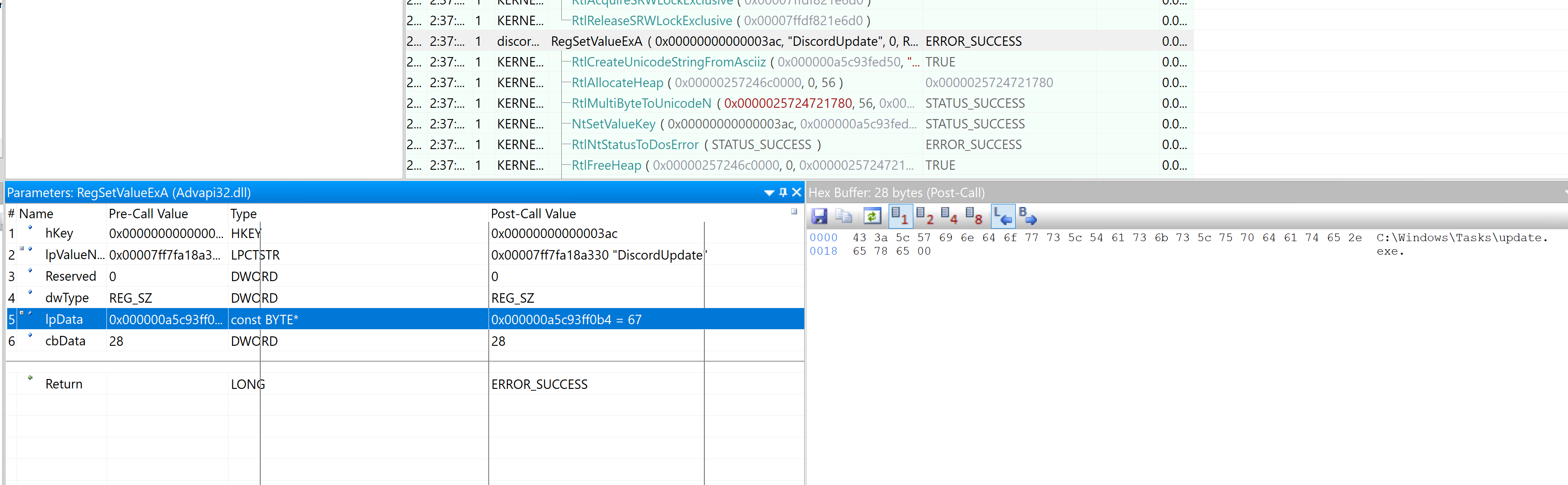
The RegSetValueExA invocation exposes the persistence write.
From microsoft function doc and parameters section supported from api call
LSTATUS RegSetValueExA( [in] HKEY hKey, [in, optional] LPCSTR lpValueName, DWORD Reserved, [in] DWORD dwType, [in] const BYTE *lpData, [in] DWORD cbData );
The parameters break down as follows:
- hKey: Handle to the target registry key.
- lpValueName: Registry value name, here
DiscordUpdate. - Reserved: Must be
0. - dwType: Registry data type, such as
REG_SZ. - lpData: Data being written, here
C:\Windows\Tasks\update.exe. - cbData: Size of the data in bytes.
I then followed the process-creation and injection-related calls.
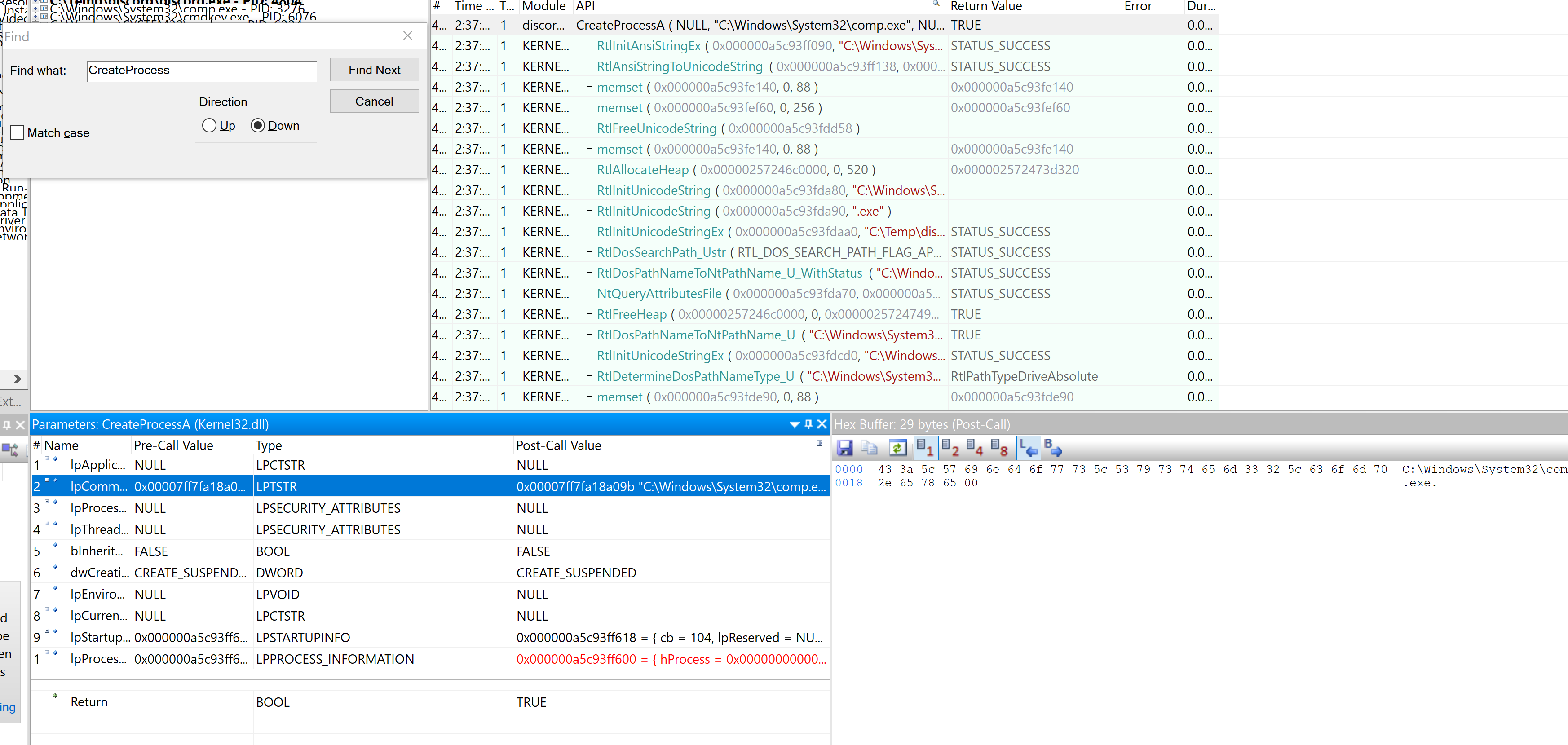
- lpCommandLine: Shows the child process executed:
C:\Windows\System32\comp.exe. - dwCreationFlags:
CREATE_SUSPENDEDstarts the process paused. - The process remains suspended until
ResumeThreadis called. discord.exealso uses APIs associated with process injection.
Further down, discord.exe calls APIs associated with process injection.
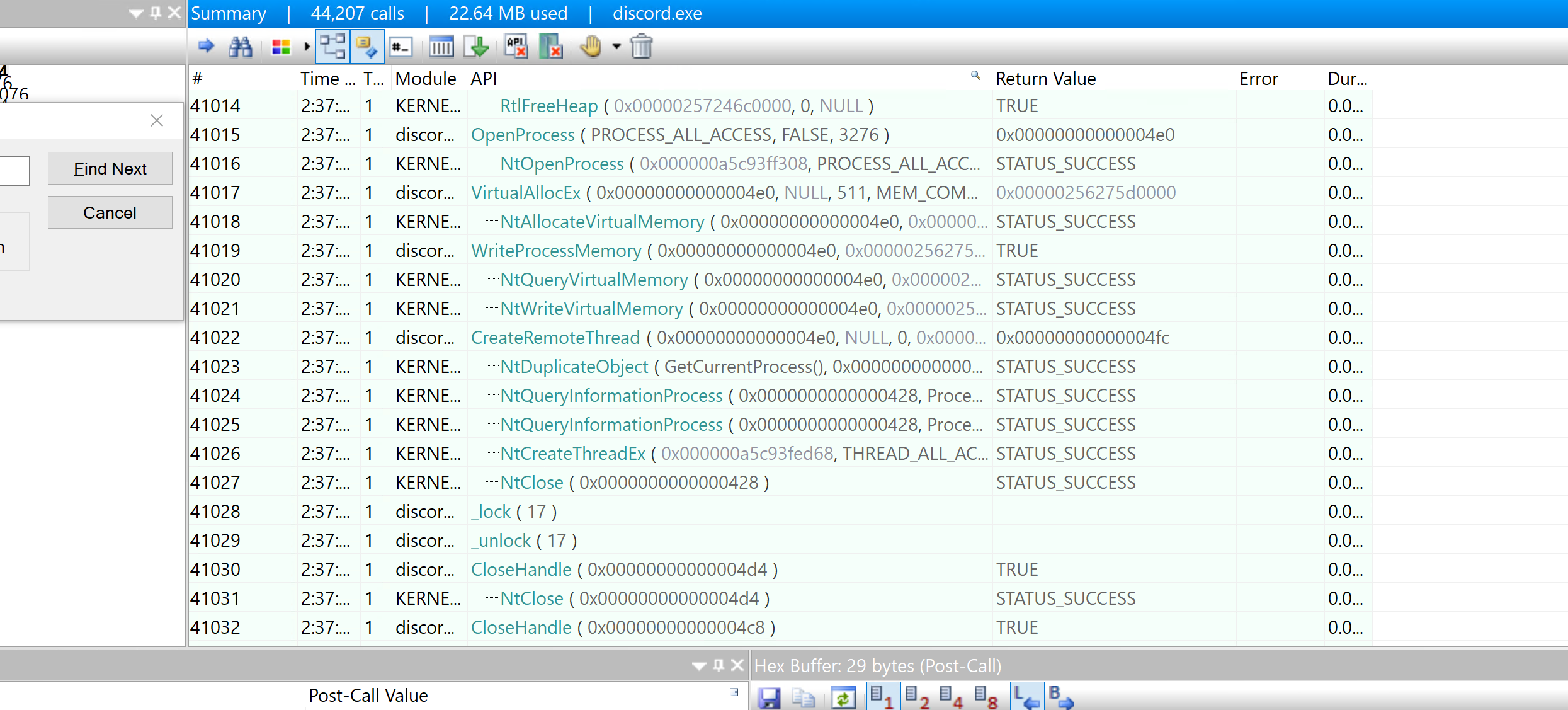
PowerShell Activity
PowerShell transcripts preserve commands and their output, providing direct evidence of activity within the recorded session.
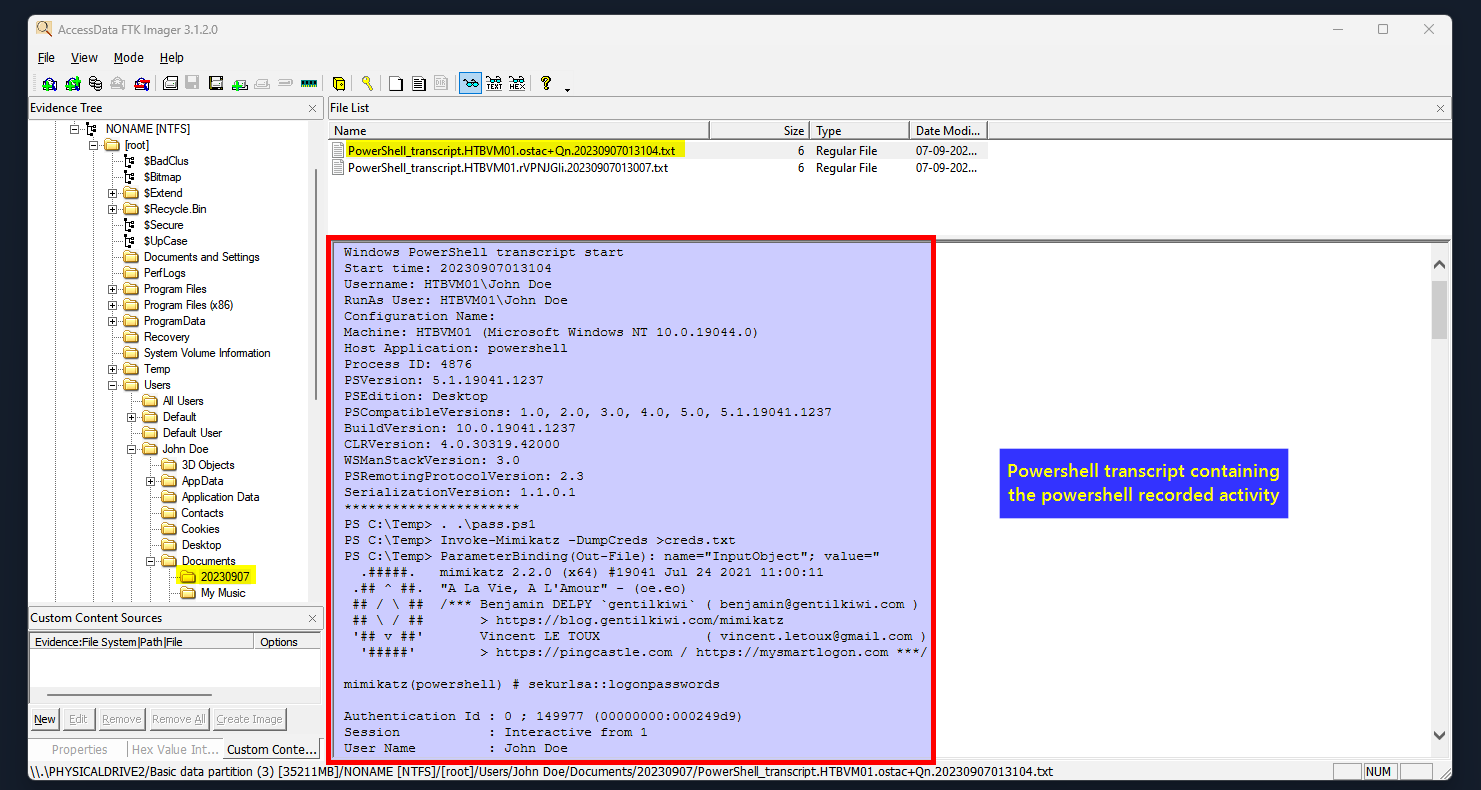
When investigating PowerShell activity, look for unusual downloads, encoded commands, unsigned scripts, privilege escalation, suspicious file or network activity, registry changes, scheduled tasks, uncommon modules, user-account changes, and repeated command patterns that may indicate malicious automation.
Module 14 Lab Questions
Question 1: Track the Renamed uninstall.exe
Prompt: Use the USN Journal and Zone.Identifier evidence to determine the new name of uninstall.exe.
→ Search MFT Zone Id Contents for uninstall.exe → Find another file with the same HostUrl → That file’s current name is the answer
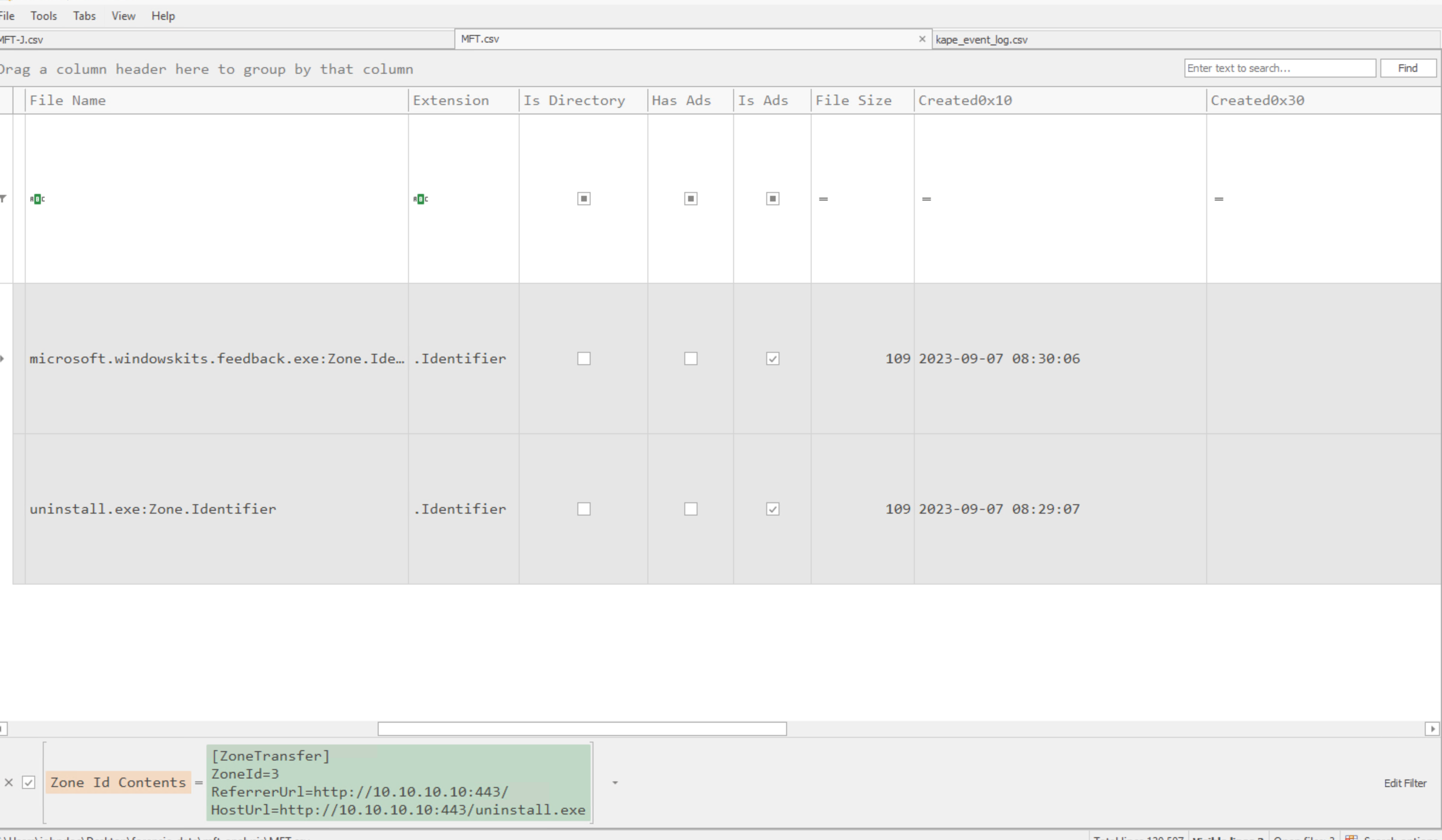
We know it was copied because:
- Original file: MFT entry
93866 - New file: MFT entry
90469 - Same
Zone.IdentifierandHostUrl - New file has a new Created time but inherited the original Modified time
- MFT parser marks the new file as
Copied: Checked
Question 2: Identify the Scheduled Task
Prompt: Review Microsoft-Windows-Sysmon%4Operational.evtx in Timeline Explorer and identify the scheduled task whose name begins with M and ends with r.
Microsoft-Windows-DiagnosticDataCollector
I found it by filtering for schtasks in Timeline Explorer.
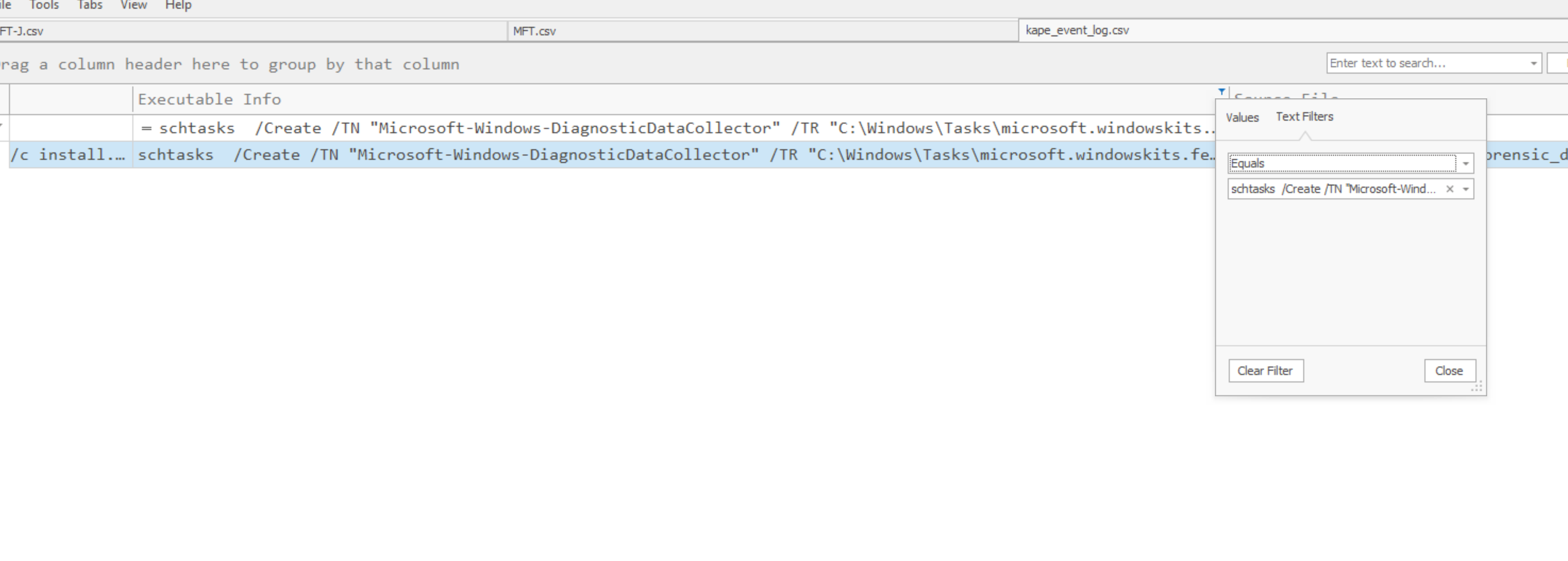
Question 3: Identify the Second Injection Target
Prompt: Examine discord.apmx64 in API Monitor and identify the other process targeted by discord.exe.
The lpCommandLine parameter identifies cmdkey.exe.
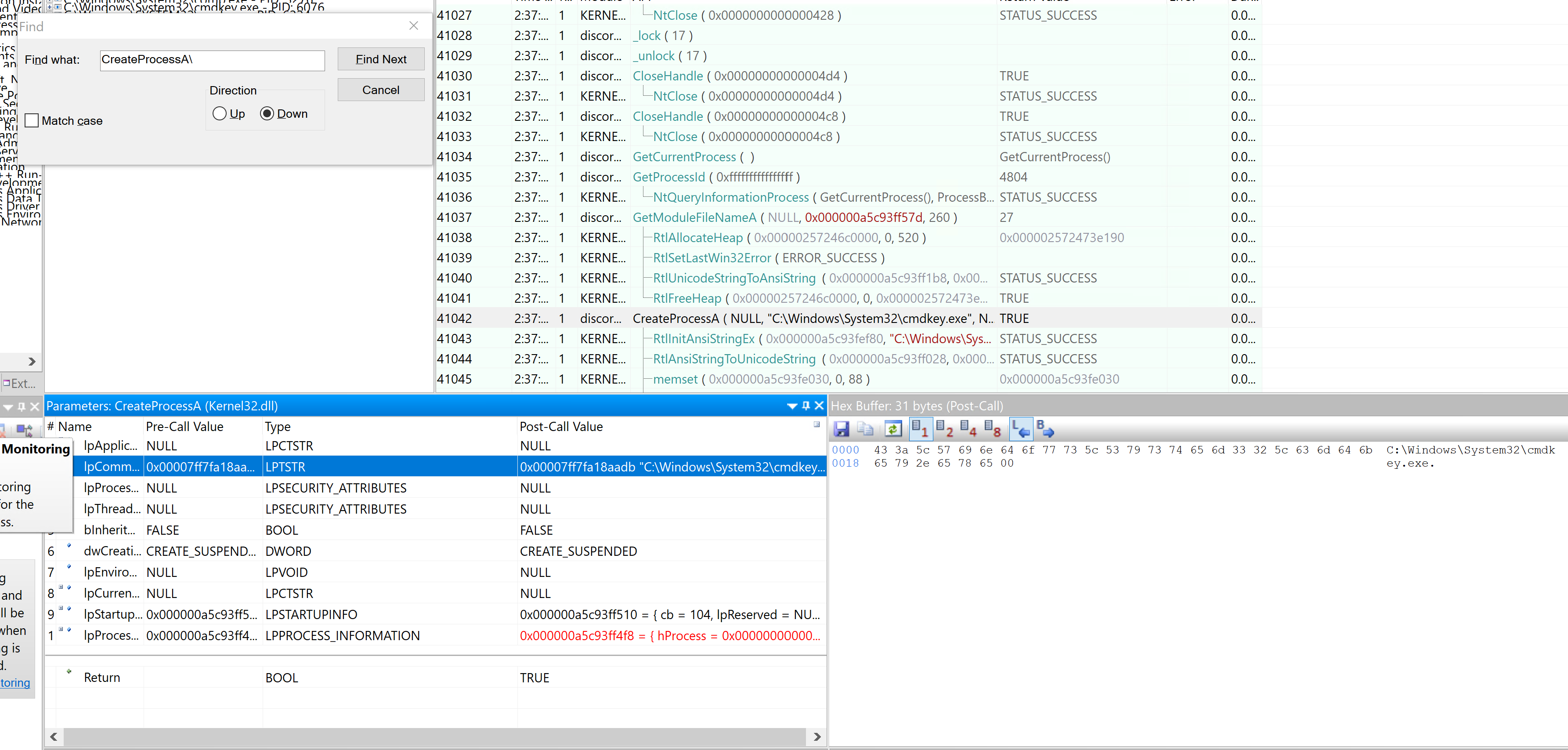
Where I Went Next
The artifact reference and tool walkthroughs above establish what each source can prove. I used those ideas together in a full intrusion reconstruction:
- Module 14: Practical Digital Forensics Case Study
- Module 14 Skill Assessment: Velociraptor Triage
- Module 15: Security Incident Reporting
Key Takeaway
The central lesson was correlation. A single artifact rarely tells the whole story. File-system records establish presence and change, execution artifacts support program runs, memory exposes live behavior, and event logs connect processes to users and commands. Confidence comes from making those sources agree while stating clearly what each one does and does not prove.